Last update date: April 10, 2023
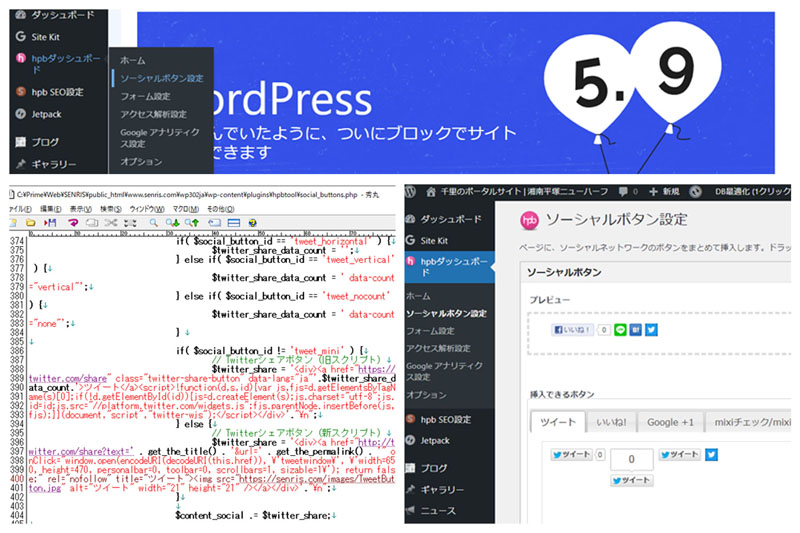
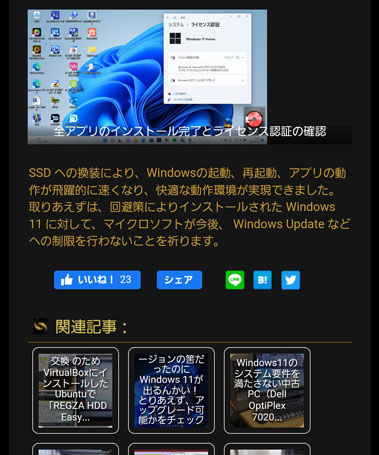
At the bottom of the article on this website, social buttons such as the Facebook Like button, the Line "Send via LINE," the Hatena Bookmark "Subscribe to Hatena Bookmark," and the Twitter tweet button are displayed.
However, as shown in the screen below (on the left), the tweet button was displayed in the second row, and the design was not very beautiful.
So, by modifying the program that manages and displays social buttons, we have now installed a mini-button (the screen on the right below) for tweets, and it can now be displayed on a single line. Now the social buttons are finally visible.

This site is built with WordPress, one of the CMSs, and the WordPress theme program is built based on JustSystem's Home Page Builder.
Unfortunately, there have been no updates to thematic programs or plugins provided by JustSystem in recent years, so the latest version of WordPress has caused system incompatibility.
The reasons why the updates are not being updated include JustSystem's poor management, lack of development costs, absence of development staff, and a policy to discontinue WordPress functionality in the near future, but if you continue to use JustSystem's themed programs, you will need to perform the maintenance yourself.
Normally, it would be best to change the theme program, but the theme program has already been made quite a bit more difficult, and changing the theme takes a considerable amount of effort, so I have refrained from changing the theme.
This site has taken various approaches to modifying the themes and plugins provided by JustSystem, so if you would like to use it as a reference, please refer to the article linked below.

As shown below, the page for the WordPress plugin "hpbtool" was closed as of April 29, 2022, and is not officially supported by WordPress, and is currently not available for download from WordPress.org.

よって、ソーシャルボタンの修正と追加に関しては、今後もジャストシステムから提供された関連するプログラムを自身で修正することが必要となります。
2023.04.04 更新
The dashboard plugin "hpb Dashboard" will only be updated to the latest version when WordPress content is transferred from JustSystem's hpb22 to the server.
The latest version releases features such as Google Analytics 4 support, breadcrumb schema.org support, and removal of deprecated social buttons (Google+). hpbseo has not been updated.
From now on, we will explain how to add Twitter tweets and mini buttons.
Creating and preparing tweet mini buttons
First, create an image of the tweet mini button. Once you've finished creating, upload one file using FTP to the following path:
I made it this time in a hurry, so I made it with an opaque image, but I plan to recreate it with a transparent PNG image when I look at the machine.
<yourdomain>/<wordpressのディレクトリ>wp-content/plugins/hpbtool/image/social_button/tweet_mini.png
Next, open the following file in an editor:
<yourdomain>/<wordpressのディレクトリ>wp-content/plugins/hpbtool/social_buttons.phpHPB's SocialModifying the Button Management Program
There are a total of four modifications in the Social Button Management Program (social_buttons.php).
The marked parts have been added and revised.
(1) Adding buttons
Add the following line:
<div id="tweet_tab">
	<div class="socialType" id="tweet">
		<ul class="buttonTypes">
		<li id="tweet_horizontal"><img id="tweet_horizontal" src="<?php echo HPB_PLUGIN_URL; ?>/image/social_button/tweet_horizontal.png"></li>
		<li id="tweet_vertical"><img id="tweet_vertical" src="<?php echo HPB_PLUGIN_URL; ?>/image/social_button/tweet_vertical.png"></li>
		<li id="tweet_nocount"><img id="tweet_nocount" src="<?php echo HPB_PLUGIN_URL; ?>/image/social_button/tweet_nocount.png"></li>
		<li id="tweet_mini"><img id="tweet_mini" src="<?php echo HPB_PLUGIN_URL; ?>/image/social_button/tweet_mini.png"></li>
		</ul>
</div>
(2) Modification of the display section
There are three modifications to the display section, each of which is the following script:
① Add the following line
<li id="tweet_mini"><img id="tweet_mini" src="<?php echo HPB_PLUGIN_URL; ?>/image/social_button/tweet_mini.png"></li>② Correct the following line
} else if ( $social_button_id == 'tweet_horizontal' || $social_button_id == 'tweet_vertical' || $social_button_id == 'tweet_nocount' || $social_button_id == 'tweet_mini') {③ Changes and additions to the following description
				if( $social_button_id != 'tweet_mini' ) {
					// Twitterシェアボタン(旧スクリプト)
					$twitter_share = '<div><a href="https://twitter.com/share" class="twitter-share-button" data-lang="ja"'.$twitter_share_data_count.'>ツイート</a><script>!function(d,s,id){var js,fjs=d.getElementsByTagName(s)[0];if(!d.getElementById(id)){js=d.createElement(s);js.charset="utf-8";js.id=id;js.src="//platform.twitter.com/widgets.js";fjs.parentNode.insertBefore(js,fjs);}}(document,"script","twitter-wjs");</script></div>'."\n";
				} else {
					// Twitterシェアボタン(新スクリプト)
					$tweet_btn = HPB_PLUGIN_URL . "/image/social_button/tweet_mini.png";
					$twitter_share = '<div><a href="http://twitter.com/share?text=' . get_the_title() . '&url=' . get_the_permalink() . '" onClick="window.open(encodeURI(decodeURI(this.href)), \'tweetwindow\', \'width=650, height=470, personalbar=0, toolbar=0, scrollbars=1, sizable=1\'); return false;" rel="nofollow" title="ツイート"><img src="' . $tweet_btn . '" alt="ツイート" width="20" height="20" /></a></div>'."\n";
				}
Updated 2023.04.06
Currently, due to a bug in the Twitter app, when you click the Share button, you will receive an error saying, "There are no search results for the words you entered. Please try again later" and are unable to share.
To address this, we will introduce the above description in line 7 to "Twitter link address"https://twitter.com/share?"of"https://twitter.com/intent/tweetChange to "?"
The insertion points that reflect all of the above contents are as follows.(Updated versions of 2023.04.06 also reflected)
As it includes script modifications for other social buttons, such as the support for SSL on Facebook "Like" buttons, for reference, all of the code for the social button display section (social_buttons.php) is listed below.
<?php

function hpb_social_page()
{
	wp_enqueue_style('hpb_dashboard_admin', HPB_PLUGIN_URL.'/hpb_dashboard_admin.css');
	wp_enqueue_style('hpb_socialbutton_style', HPB_PLUGIN_URL.'/hpb_social_admin.css');
	wp_enqueue_script('jquery');
	wp_enqueue_script('jquery-ui-core');
	wp_enqueue_script('jquery-ui-tabs');
	wp_enqueue_script('jquery-ui-sortable');
	wp_enqueue_script('jquery-ui-draggable');
	wp_enqueue_script('jquery-ui-droppable');
	wp_enqueue_script('jquery-ui-dialog');
	wp_enqueue_style('wp-jquery-ui-dialog');
	if ( wp_is_mobile() )
		wp_enqueue_script( 'jquery-touch-punch' );
	wp_enqueue_script('hpb_social_admin', HPB_PLUGIN_URL.'/hpb_social_admin.js');
?>
<div id="hpb_dashboard_body">
<form method="post" action="options.php">
<div id="hpb_dashboard_title" class="wrap"><h2><img src="<?php echo HPB_PLUGIN_URL.'/image/admin/icon_hpb.png';?>">ソーシャルボタン設定</h2></div>
<p>ページに、ソーシャルネットワークのボタンをまとめて挿入します。ドラッグ&ドロップでボタンを追加、移動、削除できます。</p>
<div class="postbox">
<h3 class="hpb_content_title">ソーシャルボタン</h3>
<div class="hpb_content">
<div id="preview_box">
<div class="hpb_caption">プレビュー</div>
<ul id="socialbuttonlist">
<?php
 $hpb_social_buttons_order = hpb_get_social_buttons_order();
 $array_data = explode( ',', $hpb_social_buttons_order );
 foreach( $array_data as $social_button_id ) {
 	if( 0 === strpos($social_button_id ,'google_plusone_')) {
			continue;
	}
	if( $social_button_id != '' ) {

		if( $social_button_id == 'linebutton_vertical' ) {
			$button_size = ' width="36" height="60"';
		} else if ( $social_button_id == 'linebutton_horizontal' ) {
			$button_size = ' width="82" height="20"';
		} else if ( $social_button_id == 'linebutton_large' ) {
			$button_size = ' width="40" height="40"';
		} else if ( $social_button_id == 'linebutton_medium' ) {
			$button_size = ' width="30" height="30"';
		} else if ( $social_button_id == 'linebutton_small' ) {
			$button_size = ' width="20" height="20"';
		} else {
			$button_size = '';
		}

		if ( $social_button_id == 'tweet_horizontal' || $social_button_id == 'tweet_vertical' || $social_button_id == 'tweet_nocount' ) {
			$social_button_id = 'tweet_horizontal_small';
		}
		else if ( $social_button_id == 'facebook_like_standart') {
			$social_button_id = 'facebook_like_standard';
		}

?>
 <li id="<?php echo $social_button_id; ?>"><img id="<?php echo $social_button_id; ?>" src="<?php echo HPB_PLUGIN_URL; ?>/image/social_button/<?php echo $social_button_id; ?>.png"<?php echo $button_size; ?>></li>
<?php
	}
 }
?>
</ul>
</div>
<div id="trashbox">
<span class="over">削除</span>
</div>
<div class="clearfloat"></div>
<div class="hpb_caption">挿入できるボタン</div>
<div id="hpb_social_tabs">
	<ul class="category-tabs">
	<li><a href="#tweet_tab">ツイート</a></li>
	<li><a href="#facebooklike_tab">いいね!</a></li>
	<li><a href="#mixicheck_tab">mixiチェック/mixiイイネ!</a></li>
	<li><a href="#hatenabookmark_tab">はてなブックマーク</a></li>
	<li><a href="#sendbyline_tab">LINEで送る</a></li>
	</ul>
<div id="tweet_tab">
	<div class="socialType" id="tweet">
		<ul class="buttonTypes">
		<li id="tweet_horizontal_small"><img id="tweet_horizontal_small" src="<?php echo HPB_PLUGIN_URL; ?>/image/social_button/tweet_horizontal_small.png"></li>
		<li id="tweet_horizontal_large"><img id="tweet_horizontal_large" src="<?php echo HPB_PLUGIN_URL; ?>/image/social_button/tweet_horizontal_large.png"></li>
		<li id="tweet_mini"><img id="tweet_mini" src="<?php echo HPB_PLUGIN_URL; ?>/image/social_button/tweet_mini.png"></li>
		</ul>
	</div>
</div>
<div id="facebooklike_tab">
	<div class="socialType" id="facebooklike">
		<ul class="buttonTypes">
		<li id="facebook_like_horizontal"><img id="facebook_like_horizontal" src="<?php echo HPB_PLUGIN_URL; ?>/image/social_button/facebook_like_horizontal.png"></li>
		<li id="facebook_like_vertical"><img id="facebook_like_vertical" src="<?php echo HPB_PLUGIN_URL; ?>/image/social_button/facebook_like_vertical.png"></li>
		<li id="facebook_like_standard"><img id="facebook_like_standard" src="<?php echo HPB_PLUGIN_URL; ?>/image/social_button/facebook_like_standard.png"></li>
		</ul>
		<div class="clearfloat"></div>
		<div class="buttonoption">
		<p>
			<label for="hpb_social_facebook_admins">ユーザーID</label>
			<input size="40" type="text" name="hpb_social_facebook_admins" id="hpb_social_facebook_admins" value="<?php echo get_option('hpb_social_facebook_admins'); ?>"/>
		</p>
		<p>
			<label for="hpb_social_facebook_app_id">アプリケーションID</label>
			<input size="40" type="text" name="hpb_social_facebook_app_id" id="hpb_social_facebook_app_id" value="<?php echo get_option('hpb_social_facebook_app_id'); ?>"/>
		</p>
		</dl>
		<div>取得方法については、FacebookのWebページ をご覧ください。</div>
		</div>
	</div>
</div>
<div id="mixicheck_tab">
	<div class="socialType" id="mixicheck">
		<ul class="buttonTypes">
		<li id="mixi_check"><img id="mixi_check" src="<?php echo HPB_PLUGIN_URL; ?>/image/social_button/mixi_check.png"></li>
		<li id="mixi_like"><img id="mixi_like" src="<?php echo HPB_PLUGIN_URL; ?>/image/social_button/mixi_like.png"></li>
		</ul>
		<div class="clearfloat"></div>
		<div class="buttonoption">
		<p>
			<label for="hpb_social_mixi_check_key">mixiチェックキー</label>
			<input size="40" type="text" name="hpb_social_mixi_check_key" id="hpb_social_mixi_check_key" value="<?php echo get_option('hpb_social_mixi_check_key'); ?>"/>
		</p>
		<div>取得方法については、mixiのWebページ をご覧ください。</div>
		</div>
	</div>
</div>
<div id="hatenabookmark_tab">
	<div class="socialType" id="hatenabookmark">
	<ul class="buttonTypes">
	<li id="hatena_bookmark_horizontal"><img id="hatena_bookmark_horizontal" id="aaaa" src="<?php echo HPB_PLUGIN_URL; ?>/image/social_button/hatena_bookmark_horizontal.png"></li>
	<li id="hatena_bookmark_vertical"><img id="hatena_bookmark_vertical" src="<?php echo HPB_PLUGIN_URL; ?>/image/social_button/hatena_bookmark_vertical.png"></li>
	<li id="hatena_bookmark_nocount"><img id="hatena_bookmark_nocount" src="<?php echo HPB_PLUGIN_URL; ?>/image/social_button/hatena_bookmark_nocount.png"></li>
	</ul>
	</div>
</div>
<div id="sendbyline_tab">
	<div class="socialType" id="sendbyline">
	<ul class="buttonTypes">
	<li id="linebutton_horizontal"><img id="linebutton_horizontal" src="<?php echo HPB_PLUGIN_URL; ?>/image/social_button/linebutton_horizontal.png" width="82" height="20"></li>
	<li id="linebutton_vertical"><img id="linebutton_vertical" src="<?php echo HPB_PLUGIN_URL; ?>/image/social_button/linebutton_vertical.png" width="36" height="60"></li>
	<li id="linebutton_large"><img id="linebutton_large" src="<?php echo HPB_PLUGIN_URL; ?>/image/social_button/linebutton_large.png" width="40" height="40"></li>
	<li id="linebutton_medium"><img id="linebutton_medium" src="<?php echo HPB_PLUGIN_URL; ?>/image/social_button/linebutton_medium.png" width="30" height="30"></li>
	<li id="linebutton_small"><img id="linebutton_small" src="<?php echo HPB_PLUGIN_URL; ?>/image/social_button/linebutton_small.png" width="20" height="20"></li>
	</ul>
	</div>
</div>
</div></div>
<div class="hpb_content">
<?php wp_nonce_field('update-options'); ?>
<div id="hpb_insert_pos_settings"><div class="hpb_caption">挿入位置</div>
<p class="indent1"><input type="checkbox" name="hpb_social_post" id="hpb_social_post" value="1" <?php checked( get_option('hpb_social_post', 1 ), 1 ); ?> /><label for="hpb_social_post"> 投稿単体ページ</label></p>
<p class="indent2"><input type="radio" name="hpb_social_post_insert_position" id="insert_post_before" value="0" <?php checked( get_option('hpb_social_post_insert_position', 0 ), 0 ); ?> /><label for="insert_post_before"><img src="<?php echo HPB_PLUGIN_URL; ?>/image/social_button/socialbutton_insert_top.png"/>記事の前</label>
<input type="radio" name="hpb_social_post_insert_position" id="insert_post_after" value="1" <?php checked( get_option('hpb_social_post_insert_position', 0 ), 1 ); ?> /><label for="insert_post_after"><img src="<?php echo HPB_PLUGIN_URL; ?>/image/social_button/socialbutton_insert_bottom.png"/>記事の後ろ</label></p>
<p class="indent1"><input type="checkbox" name="hpb_social_page" id="hpb_social_page" value="1" <?php checked( get_option('hpb_social_page', 1 ), 1 ); ?> /><label for="hpb_social_page"> 固定ページ</label></p>
<p class="indent2"><input type="checkbox" name="hpb_social_front_page" id="hpb_social_front_page" value="1" <?php checked( get_option('hpb_social_front_page', 0 ), 1 ); ?> /><label for="hpb_social_front_page"> トップページのみ</label></p>
<p class="indent2"><input type="radio" name="hpb_social_page_insert_position" id="insert_page_before" value="0" <?php checked( get_option('hpb_social_page_insert_position', 0 ), 0 ); ?> /><label for="insert_page_before"><img src="<?php echo HPB_PLUGIN_URL; ?>/image/social_button/socialbutton_insert_top.png"/>記事の前</label>
<input type="radio" name="hpb_social_page_insert_position" id="insert_page_after" value="1" <?php checked( get_option('hpb_social_page_insert_position', 0 ), 1 ); ?> ><label for="insert_page_after"/><img src="<?php echo HPB_PLUGIN_URL; ?>/image/social_button/socialbutton_insert_bottom.png"/>記事の後ろ</label></p><br/>
<p class="indent1"><input type="checkbox" name="hpb_social_ogp_set" id="hpb_social_ogp_set" value="1" <?php checked( get_option('hpb_social_ogp_set', 1 ), 1 ); ?> /><label for="hpb_social_ogp_set"> OGPを自動設定する</label></p>
</div></div>
<div class="hpb_content">
<p><input type="hidden" name="hpb_social_buttons_order" id="order" value="<?php echo hpb_get_social_buttons_order() ?>"/><input type="submit" class="button-primary" value="<?php _e('設定を保存する') ?>" /></p></div>
<input type="hidden" name="action" value="update" />
<input type="hidden" name="page_options" value="hpb_social_post, hpb_social_post_insert_position, hpb_social_page, hpb_social_page_insert_position, hpb_social_front_page, hpb_social_archive_page, hpb_social_archive_page_insert_position, hpb_social_buttons_order, hpb_social_ogp_set, hpb_social_mixi_check_key, hpb_social_facebook_admins, hpb_social_facebook_app_id" /></div>
</form></div>
<?php
}

function hpb_social_enqueue_style () {
	if( hpb_is_social() ) {
		wp_enqueue_style( 'hpb_social_style', HPB_PLUGIN_URL.'/'.'hpb_social.css' );
	}
}

function hpb_is_social() {
	$option_post = get_option( 'hpb_social_post', 1  );
	$option_page = get_option( 'hpb_social_page', 1  );
	$option_archive = get_option( 'hpb_archive_page', 0  );
	if( hpb_get_social_buttons_order() != '' && ( $option_post == 1 || $option_page == 1 ||  $option_archive == 1 ) ) {
		return true;
	} else {
		return false;
	}
}

function hpb_social_the_content( $content ) {
	if( is_feed() || is_404() || is_robots() ) {
		return $content;
	}

	$option_post = get_option( 'hpb_social_post', 1  );
	$option_page = get_option( 'hpb_social_page', 1  );
	$option_front_page = get_option( 'hpb_social_front_page', 0  );
	$option_archive = get_option( 'hpb_archive_page', 0  );

	$content_social = '';
	if( ( is_singular() && $option_post == 1 && !is_page() ) || ( is_page() && $option_page == 1 &&
		 !( !is_front_page() && $option_front_page == 1 ) ) || ( is_archive() && $option_archive == 1 ) ) {
		$hpb_social_buttons_order = hpb_get_social_buttons_order();
		$array_data = explode( ',', $hpb_social_buttons_order );
		foreach( $array_data as $social_button_id ) {
			if( $social_button_id == 'facebook_like_horizontal' || $social_button_id == 'facebook_like_vertical' || $social_button_id == 'facebook_like_standard' || $social_button_id == 'facebook_like_standart' ) {
				if( $social_button_id == 'facebook_like_horizontal' ) {
					$facebook_like_width = '120';
					$facebook_like_layout = 'button_count';
				} else if ( $social_button_id == 'facebook_like_vertical' ) {
					$facebook_like_width = '75';
					$facebook_like_layout = 'box_count';
				} else if ( $social_button_id == 'facebook_like_standard' || $social_button_id == 'facebook_like_standart'){
					$facebook_like_width = '250';
					$facebook_like_layout = 'standard';
				}

				$fb_appid = get_option('hpb_social_facebook_app_id');

				$STR_DATA_HREF = get_permalink();
				if ( 20200206 >= intval(get_the_date('Ymd')) ) {
					if ( $STR_DATA_HREF !== 'https://www.senris.com/' and $STR_DATA_HREF !== 'https://senris.com/' ) {
						// TOPページ以外でなおかつSSL化前の記事だけ data-href のURLを古いURLに変更する
						$STR_DATA_HREF = str_replace( 'https://', 'http://',$STR_DATA_HREF);
					}
				}

				// Facebookいいね!ボタン表示
				$facebook_like = '<div id="fb-root"></div>
				<script async defer crossorigin="anonymous" src="https://connect.facebook.net/ja_JP/sdk.js#xfbml=1&version=v15.0&appId='.$fb_appid.'&autoLogAppEvents=1 nonce="xQheSmRM"></script>
				<div class="fb-like" data-href="'.$STR_DATA_HREF.'" data-send="false" data-layout="'.$facebook_like_layout.'" data-width="'.$facebook_like_width.'" data-size="small" data-share="true"></div>'."\n";

				$content_social .= $facebook_like;
			} else if ( $social_button_id == 'mixi_check' ) {
				$mixi_check = '<div><a href="https://mixi.jp/share.pl" class="mixi-check-button" data-key="'.get_option( 'hpb_social_mixi_check_key' ).'" data-url="'.get_permalink().'">mixiチェック</a><script type="text/javascript" src="http://static.mixi.jp/js/share.js"></script></div>'."\n";
				$content_social .= $mixi_check;
			} else if ( $social_button_id == 'mixi_like' ) {
				$mixi_like = '<div><iframe src="http://plugins.mixi.jp/favorite.pl?href='.urlencode(get_permalink()).'&service_key='.get_option( 'hpb_social_mixi_check_key' ).'&show_faces=true" scrolling="no" frameborder="0" allowtransparency="true" style="border:0; overflow:hidden; width:120px; height:20px;"></iframe></div>'."\n";
				$content_social .= $mixi_like;
			} else if ( $social_button_id == 'tweet_horizontal' || $social_button_id == 'tweet_vertical' || $social_button_id == 'tweet_nocount' || $social_button_id == 'tweet_horizontal_small' || $social_button_id == 'tweet_horizontal_large' || $social_button_id == 'tweet_mini') {
				if( $social_button_id == 'tweet_horizontal' || $social_button_id == 'tweet_vertical' || $social_button_id == 'tweet_nocount' ){
					$social_button_id = 'tweet_horizontal_small';
				}
				if( $social_button_id == 'tweet_horizontal_small' ) {
					$twitter_share_data_size = '';
				} else if( $social_button_id == 'tweet_horizontal_large' ) {
					$twitter_share_data_size = ' data-size="large"';
				}

				if( $social_button_id != 'tweet_mini' ) {
					// Twitterシェアボタン(旧スクリプト)
					$twitter_share = '<div><a href="https://twitter.com/share" class="twitter-share-button" data-lang="ja"'.$twitter_share_data_size.'>ツイート</a><script>!function(d,s,id){var js,fjs=d.getElementsByTagName(s)[0];if(!d.getElementById(id)){js=d.createElement(s);js.id=id;js.src="//platform.twitter.com/widgets.js";fjs.parentNode.insertBefore(js,fjs);}}(document,"script","twitter-wjs");</script></div>'."\n";
				} else {
					// Twitterシェアボタン(新スクリプト)
					$tweet_btn = HPB_PLUGIN_URL . "/image/social_button/tweet_mini.png";
					$twitter_share = '<div><a href="http://twitter.com/intent/tweet?text=' . get_the_title() . '&url=' . get_the_permalink() . '" onClick="window.open(encodeURI(decodeURI(this.href)), \'tweetwindow\', \'width=650, height=470, personalbar=0, toolbar=0, scrollbars=1, sizable=1\'); return false;" rel="nofollow" title="ツイート"><img src="' . $tweet_btn . '" alt="ツイート" width="20" height="20" /></a></div>'."\n";
				}

				$content_social .= $twitter_share;

			} else if ( $social_button_id == 'hatena_bookmark_horizontal' || $social_button_id == 'hatena_bookmark_vertical' || $social_button_id == 'hatena_bookmark_nocount' ) {
				if( $social_button_id == 'hatena_bookmark_horizontal' ) {
					$hatena_bookmark_layout = 'basic-counter';
				} else if( $social_button_id == 'hatena_bookmark_vertical' ) {
					$hatena_bookmark_layout = 'vertical-normal';
				} else if( $social_button_id == 'hatena_bookmark_nocount' ) {
					$hatena_bookmark_layout = 'basic';
				}
				$hatena_bookmark = '<div><a href="https://b.hatena.ne.jp/entry/'.get_permalink().'" class="hatena-bookmark-button" data-hatena-bookmark-title="'.get_the_title() .'" data-hatena-bookmark-layout="'.$hatena_bookmark_layout.'" title="このエントリーをはてなブックマークに追加"><img src="https://b.st-hatena.com/images/v4/public/entry-button/button-only@2x.png" alt="このエントリーをはてなブックマークに追加" width="20" height="20" style="border: none;" /></a><script type="text/javascript" src="https://b.st-hatena.com/js/bookmark_button.js" charset="utf-8" async="async"></script></div>'."\n";
				$content_social .= $hatena_bookmark;
			} else if ( $social_button_id == 'linebutton_vertical' || $social_button_id == 'linebutton_horizontal' || $social_button_id == 'linebutton_large' || $social_button_id == 'linebutton_medium' || $social_button_id == 'linebutton_small' ) {
				if( $social_button_id == 'linebutton_vertical' ) {
					$line_button_width = '36';
					$line_button_height = '60';
				} else if ( $social_button_id == 'linebutton_horizontal' ) {
					$line_button_width = '82';
					$line_button_height = '20';
				} else if ( $social_button_id == 'linebutton_large' ) {
					$line_button_width = '40';
					$line_button_height = '40';
				} else if ( $social_button_id == 'linebutton_medium' ) {
					$line_button_width = '30';
					$line_button_height = '30';
				} else if ( $social_button_id == 'linebutton_small' ) {
					$line_button_width = '20';
					$line_button_height = '20';
				}
				$send_by_line = '<div><a href="https://line.me/R/msg/text/?'.urlencode(get_the_title()) .'%0D%0A'.urlencode(get_permalink()) .'" class="send-by-line-button" target="blank" title="LINEで送る"><img src="'.HPB_PLUGIN_URL.'/image/social_button/'.$social_button_id.'.png" width="'.$line_button_width.'" height="'.$line_button_height.'" alt="LINEで送る" style="border:none; width:'.$line_button_width.'px !important; height:'.$line_button_height.'px !important;"></a></div>'."\n";
				$content_social .= $send_by_line;
			}
		}
	}

	if( $content_social !== '' ) {
		$content_social = '<div class="hpb_social">'.$content_social.'</div>'."\n";
	}

	$option_post_insert_position = get_option( 'hpb_social_post_insert_position', 0  );
	$option_page_insert_position = get_option( 'hpb_social_page_insert_position', 0  );
	$option_archive_page_insert_position = get_option( 'hpb_social_archive_page_insert_position', 0  );

	if(  ( is_singular() && !is_page() && $option_post_insert_position == 0 ) || ( is_page() && $option_page_insert_position == 0 &&
		 !( !is_front_page() && $option_front_page == 1 )) || ( is_archive() && $option_archive_page_insert_position == 0 )  ) {
		return $content_social.$content;
	} else {
		return $content.$content_social;
	}

	return $content;
}

function hpb_get_social_buttons_order() {
	return get_option( 'hpb_social_buttons_order', 'facebook_like_vertical,hatena_bookmark_vertical,tweet_horizontal_small,linebutton_large' );
}

function hpb_head_social() {

	if( is_feed() || is_404() || is_robots() ) {
		return;
	}
	$option_post = get_option( 'hpb_social_post', 1  );
	$option_page = get_option( 'hpb_social_page', 1  );
	$option_archive = get_option( 'hpb_archive_page', 0  );
	$content_social = '';
	if( !( $option_post == 1  || $option_page == 1 || $option_archive == 1 ) ) {
		return;
	}
	if( get_option( 'hpb_social_ogp_set', 1 ) == 1 && ( is_single() || is_page() ) ) {
		while( have_posts() ) : the_post(); global $id;

	$STR_OGP_URL = get_permalink();	// og:url
	if ( 20200206 >= intval(get_the_date('Ymd')) ) {
		if ( $STR_OGP_URL !== 'https://www.senris.com/' and $STR_OGP_URL !== 'https://senris.com/' ) {
			// TOPページ以外でなおかつSSL化前の記事だけ og:url のURLを古いURLに変更する
			$STR_OGP_URL = str_replace( 'https://', 'http://',$STR_OGP_URL);
		}
	}
?>

<meta property="og:title" content="<?php the_title(); ?> | <?php bloginfo('name'); ?>"/>
<meta property="og:url" content="<?php echo esc_url($STR_OGP_URL); ?>"/>
<meta property="og:image" content="<?php echo esc_url(hpb_get_thumbnail_url($id,'large')); ?>"/>
<meta property="og:image" content="<?php echo esc_url(hpb_get_thumbnail_url($id,'medium')); ?>"/>

<meta property="og:description" content="<?php echo strip_tags(get_the_excerpt()); ?>"/>
<meta property="og:site_name" content="<?php bloginfo('name'); ?>"/>
<meta property="og:type" content="<?php hpb_get_og_type() ?>"/>
<?php $fb_admins = get_option('hpb_social_facebook_admins'); if( $fb_admins != '' ) {?>
<meta property="fb:admins" content="<?php echo $fb_admins; ?>"/>
<?php } $fb_appid = get_option('hpb_social_facebook_app_id'); if( $fb_appid != '' ) {?>
<meta property="fb:app_id" content="<?php echo $fb_appid; ?>"/>

<?php
}		endwhile;
	}
}

function hpb_get_og_type() {
	if( is_front_page() ) {
		echo 'website';
	}  else  {
		echo 'article';
	}
}

function hpb_og_image_url($id) {
	$attachment_image = wp_get_attachment_image_src( get_post_thumbnail_id($id) );
	if ( $attachment_image ){
		echo $attachment_image[0];
	} else {
		$query = 'post_parent=' . $id . '&post_type=attachment&post_mime_type=image';
		$postImg = get_children($query);
		if ( !empty($postImg) ){
			$keys = array_keys($postImg);
			$num = $keys[sizeOf($keys)-1];
			$thumb = wp_get_attachment_image_src($num, 'thumbnail');
			echo clean_url($thumb[0]);
		}  else {
			echo get_bloginfo('template_directory').'/screenshot.jpg';
		}
	}
}

function hpb_get_thumbnail_url( $id, $size ) {
	// OGP用サムネイル画像のURL取得
	$thumbnail_url = get_the_post_thumbnail_url($id, $size);

	if ( !$thumbnail_url ) {
		$query = 'post_parent=' . $id . '&post_type=attachment&post_mime_type=image';
		$postImg = get_children($query);
		if ( !empty($postImg) ){
			$keys = array_keys($postImg);
			$num = $keys[sizeOf($keys)-1];
			$thumb = wp_get_attachment_image_src($num, $size);
			$thumbnail_url = clean_url($thumb[0]);
		} else {
			$thumbnail_url = get_bloginfo('template_directory').'/screenshot.jpg';
		}

	}

	return $thumbnail_url;
}
?>
Social button settings in HPB admin screen
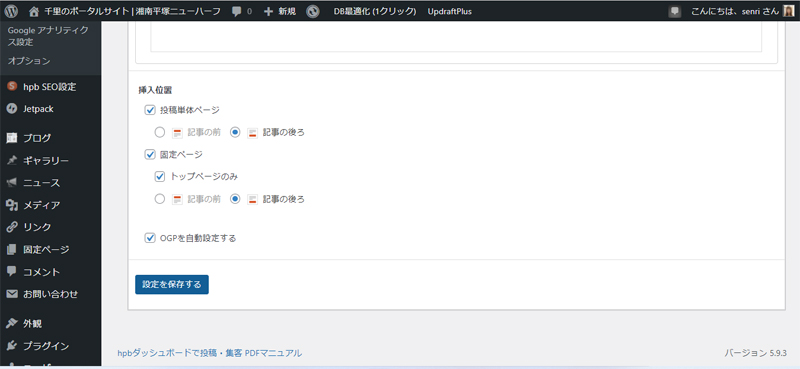
As follows, place the Tweet Mini buttons in the social button settings on the HPB dashboard to check the operation of the admin screen.
Once you've finished placing it, save the social button settings and make sure the social buttons are displayed correctly in the article.

2022.05.21 Added
Transparent png image creation
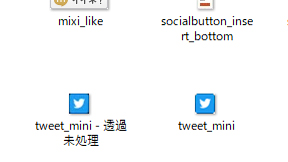
As shown below, I created a mini button for tweets in Photoshop with transparent png images. (The following gallery is an example of a case where transparency is applied to a non-png image)
In addition, the description of the social button management program (social_buttons.php) has also been revised.
It is easier to create a mini-button for tweets by downloading the mini-button for Hatena Bookmark and then creating a mini-button for tweets based on the PNG image.

P.S. Regarding social buttons, we have confirmed that the Facebook Like button is not displayed when using the standard Galaxy browser.
There may be issues such as conflicts with Javascript built into Galaxy's standard browser, but for now, the exact cause is unknown. Even if I disabled the Lazy-Loading feature, which was supported since WordPress 5.5, the results were the same.
なお、Android 版の Google Chrome , iPhoneの Safari , Windowsの Microsoft Edge (Chromiumベース) , Windows 版の Google Chrome では問題なく表示されています。