Last update date: April 10, 2023
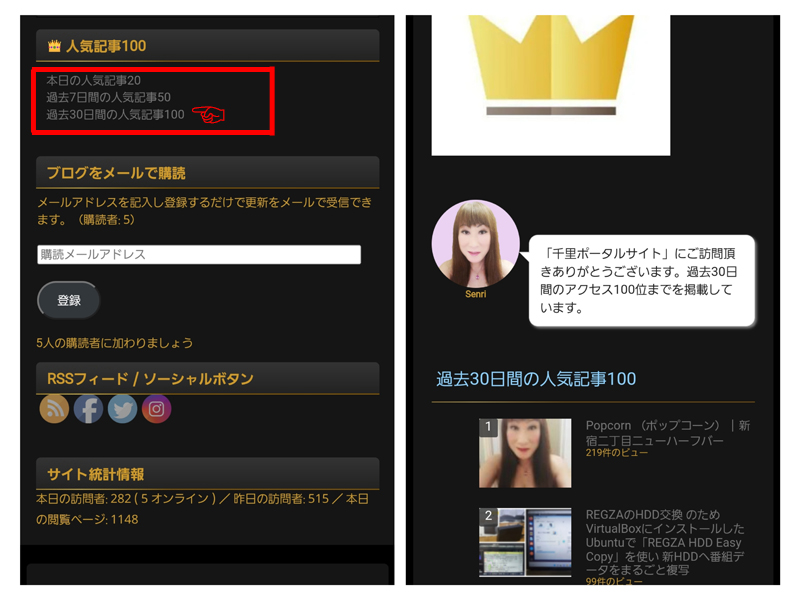

The "200 Popular Articles" tab has been added to the menu on Senri's portal site and the posting calendar has been renewed.
Added 200 popular articles tabs
The 200 Popular Articles tab contains links to today's popular articles, 50 Popular Articles from the past 7 days, 100 Popular Articles from the past 30 days, 200 Popular Articles from the past 180 days, and 200 Popular Articles from the past 360 days (currently deleted from the tab), so please feel free to use it.
Each menu can also be viewed using the link below.

About customizing WordPress Popular Posts
For more information on this feature, please see the WordPress pluginWordPress Popular Posts' was easy to achieve with customization.
The customization method is as follows: Please use this as a reference.
Setting the shortcode
Below is the shortcode for viewing popular articles from the past 30 days. Note that the parameter 'pid' specifies the articles to be excluded from the aggregation.
[wpp range='last30days' pid='18341,18358,18381' limit=200 thumbnail_width=100 thumbnail_height=75 stats_category=1 post_html='<li><div class="wpp_thumb_wrapper">{thumb}</div> {title} <span class="wpp-meta post-stats">{stats}</span></li>']Configuring additional CSS
Open the WordPress settings menu, go to "Appearance" -> "Additional CSS" and add the following CSS:
In this CSS, the ranking number is displayed in the thumbnail and the mouse over the thumbnail (Hover) Implements display settings when
The widget ID (#wpp-2) used in CSS below is displayed and checked using a browser Edge or similar.
/* 人気記事のアイキャッチ内に順位番号を表示 */
body{
  counter-reset: rank_number;
}
ul.wpp-list li img:hover {
  box-shadow: 0 -2px 5px #999;
}
.wpp_thumb_wrapper{
  position: relative;
}
.wpp_thumb_wrapper:after{
  counter-increment: rank_number;
  content: counter(rank_number);
  display: block;
  position: absolute;
  left: 0;
  width: 20px;
  height: 20px;
  background: rgba(50, 50, 50, 0.8);
  color: white;
  font-size: 14px;
  text-align: center;
  border-radius: 2px;
}

/* WordPress Popular Posts のウィジェット表示調整 */
#wpp-2 li{
  margin-top: 2px;
  margin-bottom: 2px;
}
Replacing post calendars (archives)
Until now, blog archives have been displayed using the post calendar widget provided with the standard WordPress feature, but it seems that it is not very convenient to use, so please see the following WordPress plugin:Archives Calendar WidgetI decided to replace it with ".

However, this plugin has not been tested on the latest three major releases of WordPress. Maintenance and support may end in the future, and compatibility issues may occur when used with newer versions of WordPress, so it will be a trial run for the time being.
Display custom posts in monthly archives
There was a problem with this post calendar being swapped.
The "Archives Calendar Widget" setting supports custom posts. So, in addition to 'post', I also set it to include custom posts to be displayed, and when I clicked on the post month link, I got an error saying, "The page you're looking for cannot be found."
This is because only custom posts exist in the archive. In the WordPress system, regular posts are reflected in the calendar archive, but custom posts (on this site, 'news', 'gallery') are not reflected in the archive.
Therefore, you should avoid this error by allowing custom posts to be displayed in your monthly archive.
This can be solved by writing the following code in the theme's functions.php:
/* 月別・日別アーカイブにカスタム投稿を含めて表示する
---------------------------------------------------------------- */
function my_pre_get_posts( $query ) {
    if ( ($query->is_month() || $query->is_day()) && $query->is_main_query() ) {
        $query->set( 'post_type', array('post','news', 'gallery') );
    }
}
add_action( 'pre_get_posts', 'my_pre_get_posts' );

function my_getarchives_where( $where ){
    $where = "WHERE";
    $where .= " (post_type = 'post' OR post_type = 'news' OR post_type = 'gallery')";
    $where .= " AND post_status = 'publish'";
    return $where;
}
add_filter( 'getarchives_where', 'my_getarchives_where' );
* Updated on 2023.02.19
↑ The code has been modified to support displaying daily archives (in the article below).