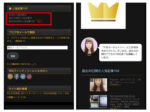
Fixed a bug in the English text-to-speech function in the article "Listen to English on Spotify during commuting time"

⌛Time it takes to read this article: < 1 pointLast updated: April 11, 2023 The article below, ``Listening to English on Spotify while commuting'', was not able to play the English audio on iOS, so we made it possible to play it on iOS as well. Now available to play on all smartphones, tablets, and desktop devices. During your commute, listen to English on Spotify [excerpts of carefully selected English conversation phrases for beginners and native speakers with audio] The WordPress plugin that supports this function is "ResponsiveVoice Text To Speech", which is also introduced in the article below.

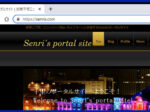
The text size of the WordPress blog post text is too small to read, so I changed it to the same size as the newspaper (14px/10.5pt) and improved the display performance.

⌛Time it takes to read this article: 2 pointThe text size of the WordPress blog article is small and difficult to read, so we changed it to the same size as the newspaper, and improved display performance with Jetpack Boost.

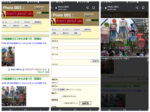
Image message board compatible with smartphones

⌛Time it takes to read this article: < 1 point最終更新日:2023年4月10日 千里のポータルサイトにおいて、以下のメニューにある画像掲示板は、これまでPC専用でしたので、スマホの表示にも対応させるため、画像掲示板を表示するプログラム「Joyful Note X」をレスポンシブで動作させるようプログラム修正を行いました。 Joyful Note X の詳細は、以下の記事に記載しておりますが、Perl言語で書かれた JOYFUL NOTE v6.02 をベースに Lightbox2(v2.7.1)を組み込み、更にはバイリンガル(日本語、英語)機能も追加し、カスタマイズしたものです。 JOYFUL NOTE の最新バージョンは、v7.3 となりますが、このバージョンから新たに改造し直すのは工数が掛かり大変な作業となりますので、Joyful Note X の改修で対処することにしました。なお、この画像掲示板に第70回湘南ひらつか七夕まつりにおける夕方の写真をアップしました。 2022.07.23 追記以下の記事の通り、Joyful Note X v2.0 を新たに開発し、本サイトの画像掲示板のプログラムを入れ替えました。Joyful Note X v2.0 は、JOYFUL NOTE v7.3 を元に Lightbox2 の最新バージョン v2.7.1 を組み込み、更にはバイリンガル機能にも対応させ改造したものとなります。

Migrating core server V1 to a new server and fixing Perl 5.26 incompatible, PHP 7.4 deprecated issues

⌛Time it takes to read this article: < 1 point最終更新日:2023年4月10日 本サイトは、レンタルサーバー GMO Digirock 社のコアサーバー(V1)にて、 Senri が管理運営しております。この度、このサーバーが以下の通り、新サーバーへのマイグレーションが決定し、より高性能なサーバーへのシステム移行が完了しました。コアサーバーは、全プランに最新システム、最大64コアの高速CPU、最大1TBの大容量メモリー、高速SSD RAIDを採用することで優れた安定性と速度を実現し、無料SSL・HTTP/3・TLS1.3にも対応しています。 マイグレーションにおける主な変更点は以下の通りです。 CPU 最大28コア ⇒ 最大64コア メモリー  最大384GB ⇒ 最大1TB PHP(デフォルト) 7.1 + FastCGI + OPcache + APCu(5.3/5.4/5.5/5.6/7.0FastCGI選択可) ⇒ 7.4+ FastCGI + OPcache + APCu(5.6/7.0/7.1/7.2/7.3/8.0/8.1FastCGI選択可) Perl(デフォルト) 5.16系 ⇒ 5.26系 MySQL(デフォルト) 5.7 ⇒ MariaDB 10.6 上記の通り、Webサーバーがハイスペックとなった事で、Webサイトの表示が飛躍的に速くなりました。これは大変喜ばしい事なのですが、新サーバーへのマイグレーションに伴い一部のCGIプログラムが動作しなくなりました。PHPに関しては、既に PHP 7.4 に対応済みであるため、問題はありませんでしたが、 Perl に関しては油断していました。Perl は、アクセスカウンタやアクセス集計、掲示板、ランチャーなどの CGIプログラムが動作しています。調査したところ、当サイトでの Perl 5.26 に関する非互換箇所は、以下の通りでした。いずれも、 500 ERROR が発生します。 セキュリティ問題により、カレントディレクトリを示す以下の表記がエラー扱いになる$thisfile = ‘./cgi.cgi’; 日本語変換ライブラリ jcode.pl が Perl 5.26 で動作しないrequire ‘./jcode.pl’; この問題に関しては、それぞれ以下のように対応することで解決しました。 カレントディレクトリの指定 以下の1行を追加します。 use lib "."; $thisfile = './cgi.cgi'; jcode.pl の非互換問題 jcode.pl に代わる日本語変換ライブラリ jacode.pl を導入し、以下のように呼び出し部分を変更する。jacode.pl の最新版は、jacode-2.13.4.18 よりダウンロードできます。 require './jacode.pl'; # JISコード変換 jacode::convert(\$mbody,'jis','sjis'); 以上、取りあえず、表面上の表示は正常になりましたが、未だ、全プログラムの検証は終えていないため、引き続きテストを行っていく予定です。 新サーバーへのマイグレーションで絵文字など、4Bコード(utf8mb4)を含む記事を更新するとエラーになる件 2022.06.10 追記 新サーバーへのマイグレーション後、絵文字などの4Bコード(utf8mb4)を含む記事を更新すると、以下のエラーが出て記事が更新できなくなりました。 更新に失敗しました。データベースの投稿を更新できませんでした。 こちらで何度か、DBの修復を試みましたが、上手くいきませんでした。 止むを得ず、コアサーバーのサポートへ連絡し、マイグレーション前のDBで修復を依頼しました。しかし、結果は NG でした。そこで、色々と試行錯誤したところ、以下の方法で無事、DBの修復ができました!絵文字を入力し、更新もできるようになりました。 1.「phpMyAdmin」にログイン ⇒ 変更したいデータベース名を選択2.ヘッダーの「操作」タブを選択 ⇒ 「照合順序」と書かれている箇所を見る。3.照合順序で “utf8mb4_general_ci” を指定し「実行」をクリック * 本件につきましては、以下の WordPress サポートフォーラムにもトピックをアップしておりますが、検証後、問題がないようでしたら、このスレッドはクローズする予定です。 * 対応する記事は、以下の通りです。 2022.06.30 追記 PHP 7.4 非推奨 / PHP 8.0 非互換問題 以下の記事へ加筆した内容を再掲します。WordPress プラグインの中で、PHP 7.4 で非推奨、PHP 8.0 で廃止される関数が見つかりました。 PHP 7.4 の環境において、デバッグモードで実行した際、以下のワーニングを確認しています。 [28-Nov-2021 05:19:48 UTC] PHP Deprecated: join(): Passing… read more "

お問合せフォームの不具合修正とPHP7.4/8.0へのバージョンアップ

⌛Time it takes to read this article: < 1 point最終更新日:2023年4月10日 本Webサイトのお問合せフォーム(以下のメニュー)からの送信ができない不具合が発生していましたので、本日、システムを改修しました。これまでのご不便をお詫び申し上げます。 また、以下リンク先記事の通り、CMS(WordPress)を動作させるために必要なサーバーサイドのスクリプト言語であるPHPのバージョンを7.1から7.4へバージョンアップさせました。これにより、システムのパフォーマンスがかなり向上しました。今後は、PHP8.0へのバージョンアップへ向け、暫時準備を進めております。2021.06.19 追記記事表示の邪魔になると思われるページにおいて、下記プラグインの機能により、Google reCAPTCHAのバッジ(ロゴ)を非表示にしました。

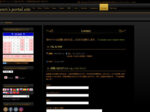
Replacement and program modifications to WordPress plugin "Business Day Calendar" (CMSxWP)

⌛Time it takes to read this article: < 1 point最終更新日:2023年4月10日 営業日カレンダープラグインのウィジェット これまで出勤のシフトを表示させるために無料のWordPressプラグイン「Biz Calandar」を使っていたのですが、今回、有料のプラグイン「営業日カレンダー」(CMSxWP)に入れ替えました。Biz Calandarは、軽量で良く出来たプラグインなのですが、残念ながら記事中にショートコードを記述しWidgetを埋め込めない事に加え、複数のイベントが登録できない事、管理画面での休日設定が面倒という不便を感じていましたので、思い切ってプラグインを変更する事にしました。営業日カレンダー は、複数のイベントが登録でき、イベントが設定された日をクリックすると、該当するブログのページが開けます。また、管理画面において、ワンクリックするだけで休日設定ができます。しかしながら、ウィジェットの画面で前月、次月を表示した後に当月を表示する機能が無いなど、有料プラグインにしては、多少不便なところもありましたので、やむを得ず以下のPHPプログラム(Ajaxで表示月を切り替えるスクリプトを追加等)ならびにCSSを修正する事で対応させました。 $output = ' <table class="business-calendar bc'.$u." ".$type.'"> <caption>'; if ( !empty($past) || (!empty($future) && $past_unixtime >= $current_unixtime) ) : $output .= '<span class="business-calendar-past"><a href="javascript:void(0);" onclick="jQuery(this).parent().parent().parent().parent().load(\''.plugins_url().'/business-calendar/business-calendar.php?loadbcm=1&bc_id='.$bc_id.'&year_in='.$past_year.'&month_in='.$past_month.'&day_in='.($today-7).'¬ooltip='.$notooltip.'&event='.$event.'&future='.$future.'&past='.$past.'&starting='.$starting.'¢er='.$center.'&badate='.$badate.'&type='.$type.'&term='.$term.'&event_ul_before='.urlencode($event_ul_before).'&event_ul_after='.urlencode($event_ul_after).'&event_li_before='.urlencode($event_li_before).'&event_li_after='.urlencode($event_li_after).'\');"><img src="https://www.senris.com/images/icon-backward.png" border="0" width="12" height="12" title="前の月へ"></a> </span>'; endif; $output .= $year_month; if ( !empty($future) || (!empty($past) && $future_unixtime <= $current_unixtime) ) { $output .= '<span class="business-calendar-future"> <a href="javascript:void(0);" onclick="jQuery(this).parent().parent().parent().parent().load(\''.plugins_url().'/business-calendar/business-calendar.php?loadbcm=1&bc_id='.$bc_id.'&year_in='.$future_year.'&month_in='.$future_month.'&day_in='.($today+7).'¬ooltip='.$notooltip.'&event='.$event.'&future='.$future.'&past='.$past.'&starting='.$starting.'¢er='.$center.'&badate='.$badate.'&type='.$type.'&term='.$term.'&event_ul_before='.urlencode($event_ul_before).'&event_ul_after='.urlencode($event_ul_after).'&event_li_before='.urlencode($event_li_before).'&event_li_after='.urlencode($event_li_after).'\');"><img src="https://www.senris.com/images/icon-forward.png" border="0" width="12" height="12" title="次の月へ"></a></span> '; } # Added by Senri Miura on 15 March 2021 $year_now = date_i18n("Y"); $month_now = date_i18n("n"); if ( !(!(is_numeric($month_in)) || $month_in < 1 || $month_in > 12) && $month_in != $month_now ) { $output .= '<span class="business-calendar-future">  今月 <a href="javascript:void(0);" onclick="jQuery(this).parent().parent().parent().parent().load(\''.plugins_url().'/business-calendar/business-calendar.php?loadbcm=1&bc_id='.$bc_id.'&year_in='.$year_now.'&month_in='.$month_now.'&day_in='.($today+7).'¬ooltip='.$notooltip.'&event='.$event.'&future='.$future.'&past='.$past.'&starting='.$starting.'¢er='.$center.'&badate='.$badate.'&type='.$type.'&term='.$term.'&event_ul_before='.urlencode($event_ul_before).'&event_ul_after='.urlencode($event_ul_after).'&event_li_before='.urlencode($event_li_before).'&event_li_after='.urlencode($event_li_after).'\');"><img src="https://www.senris.com/images/icon-stop.png" border="0" width="12" height="12" title="今月へ"></a></span> '; } $output .= '</caption>'; if ( $type == 'calendar' ) : $output .= ' <thead> <tr> <th>' . $daynames[($starting+7)%7] . '</th>… read more "