最終更新日:2026年7月4日
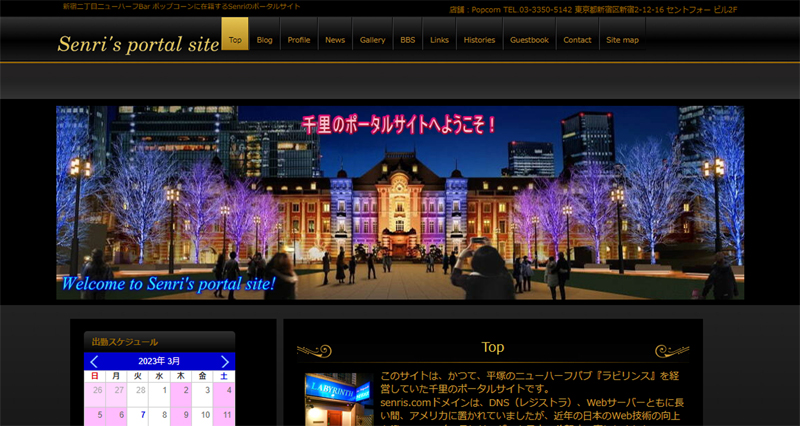

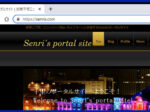
We have renewed the design of senris.com for the first time in eight years!
We have updated the header image for Senris.com, a portal site for Senris.com, for the first time in eight years, and have reviewed the theme program, CSS, and other issues to fix design issues.
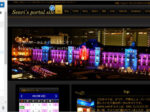
The eye-catching image listed is the design of the header image on the home page. The image source was borrowed from an image of Tokyo Michi Terrace 2022 (Tokyo Station Marunouchi Central Square, Gyoko-dori). 🙇♀️
Including the maintenance that has been in place since February 2023, the changes to this website are as follows.
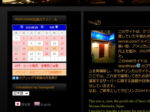
- Renewal of submission calendar
Details in the article below
We've revealed how to display custom posts (add eye-catching images) in WordPress monthly/daily archives - Added menus for 200 popular articles
Details in the news article below
Added 200 popular articles menus (customize the plugin WordPress Popular Posts) & Renewed Post Calendar - Added thumbnail image to Recent Posts widget (Custom Posts Available)
WordPress Popular Posts The theme program has been modified to match the design of the site. - XO Event Calendar Change the color of widget captions and navigation buttons
- Hover display on eye-catching images and Transposh flag icons
- Renewed front page header image
- Adjusting the sidebar widget display (font size, margin, padding, etc.)
- Change page navigation for blogs, news, and gallery (from 5 to 10 posts displayed per page)
- Add banners to static pages (Links to Site map)
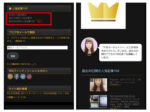
- Image message boardCSS implements sparkling effects when mouse over the icon image
- Fixed a bug where the display was distorted when accessing the image message board from a smartphone (article below)
Image message board CGI "Joyful Note X v2.0" developed - JOYFUL NOTE v7.3 (mini counter compatible) + Lightbox2 (v2.11.3) & Bilingual function source released #Fixed an issue where display was distorted - Adjust the width of the input field in the Contact Form 7 (article below)
Complete explanation of recommended plugins for WordPress multilingual sites! #Installing contact form - Repairing Broken Navigation Menu and Changing Page Navigation (Article below)
Complete explanation of recommended plugins for WordPress multilingual sites! #WP-PageNavi - If you convert an article containing UTF-8 emojis in an article to English using Transposh, the emoji may become garbled, so the relevant article has been corrected (the article below)
Complete explanation of recommended plugins for WordPress multilingual sites! #Transposh development platform moved to github - Security program modifications to prevent unauthorized use of language switching launchers
Complete explanation of recommended plugins for WordPress multilingual sites! #Added Language Switching Launcher - Program modifications to display news articles on the tag archive page (articles below)
Explain how to add tagging function to WordPress custom post and display custom post on tag archive page - NewsとGalleryのメニューがオレンジ色に反転表示されない不具合を修正 – 2026.07.04 追記
カスタム投稿のメニューがオレンジに反転表示されない不具合を修正
Updated WordPress display style (CSS definition)
In line with the above design changes, we have updated the "Additional CSS" that determines the display style of WordPress.
For your reference, the full text is listed below.
The following '.google-auto-placed' was automatically added by the WordPress plugin Google Adsense.
.google-auto-placed {
    margin-top: 2em!important;
    margin-bottom: 2em!important;
}

/*
	記事本文の文字サイズ変更
*/
.entry-content p {
	font-size:14px;
}
.site-branding #hpb-site-desc {
	font-size:10px;
}
#hpb-header-extra1 p.address{
	font-size:9.5px;
}

/*
	キャプションの文字サイズ変更
*/
.wp-block-image figcaption{
	font-size: 12px !important;
}

/*
	Stickyメニュー設定
*/
#hpb-header-extra1 .sticky-menu{
	opacity: 0.5; /* 透過指定 */
	z-index:calc(infinity) !important; /* 最前面表示 */
	position: fixed; /* 画面上の位置を固定 */
	top: 40px; /* 上からの位置 */
	right: 30px; /* 右からの位置 */
	width: 24px; /* 画像の幅 */
	height: 24px; /* 画像の高さ */
}

@media (max-width: 600px) {
	/* スマホ対応 */
	#hpb-header-extra1 .sticky-menu{
		top: 70px;
		right: 10px;
		width: 18px;
		height: 18px;
	}
}

/* マウスオーバー時に拡大 */

#hpb-header-extra1 img.sticky-menu{
	overflow: visible; /* 拡大時、はみ出た部分も表示 */
	display: block; /* コンテンツのひとかたまりとなる要素 */
	transition-duration: 0.5s; /* 変化にかかる時間 */
}
#hpb-header-extra1 img.sticky-menu:hover {
	transform: scale(1.3,1.3); /* 画像の拡大率 */
	transition-duration: 0.5s;
}

/*
	ポップアップメニュー設定
*/
.popup-menu{
	margin:10px;
	a{
		color:white;
		background-color: skyblue;
		padding:5px 8px;
		border-radius: 5px;
		text-decoration: none;
	}
	a:hover{
		color:skyblue;
		background-color: white;
		border:3px solid skyblue;
	}
}

/*
	記事一覧のアイキャッチ画像回り込み
*/
.entry-thumbnail {
	float: left;
	margin-right: 1em;
}

/*
	記事一覧イメージへのHover時に拡大
*/
.entry-thumbnail img{
	overflow: visible;
	display: block;
	transition-duration: 0.5s;
}
.entry-thumbnail img:hover {
	transform: scale(1.13,1.13);
	transition-duration: 0.5s;
}

/*
	YARPPの文字サイズ変更
*/
.yarpp-thumbnail-title {
	font-size:9px !important;
	font-weight:normal !important;
}

/*
	イメージへのhover時影付け
*/
/* Transposh */
#custom_html-2 img:hover {
	box-shadow: 0 -4px 5px #999;
}
/* YARPP */
.yarpp-related img:hover {
	box-shadow: 0 -2px 5px #999;
}
/* 最近の投稿ウィジェット */
.rpost-eyecatch img:hover {
	box-shadow: 0 -2px 5px #999;
}
/* 更新情報 (Display Posts) */
.listing-item img:hover {
	box-shadow: 0 -2px 5px #999;
}

/*
	reCAPTCHA v3のバッジを非表示にする
*/
.grecaptcha-badge { visibility: hidden; }

/*
	TOPページのデザイン変更
*/
.senris-top td {
	border: solid 0px!important;
	padding-top: 7px !important;
	padding-left: 7px !important;
	padding-right: 7px !important;
	padding-bottom: 5px!important;
}

/*
	人気記事のアイキャッチ内に順位番号を表示
*/
body{
	counter-reset: rank_number;
}
ul.wpp-list li img:hover {
	box-shadow: 0 -2px 5px #999;
	-webkit-filter: brightness(1.3);
	-moz-filter: brightness(1.3);
	-o-filter: brightness(1.3);
	-ms-filter: brightness(1.3);
	filter: brightness(1.3);
}
.wpp_thumb_wrapper{
	position: relative;
}
.wpp_thumb_wrapper:after{
	counter-increment: rank_number;
	content: counter(rank_number);
	display: block;
	position: absolute;
	left: 0;
	width: 20px;
	height: 20px;
	background: rgba(50, 50, 50, 0.8);
	color: white;
	font-size: 14px;
	text-align: center;
	border-radius: 2px;
}

/*
	各ウィジェットのデザインを調整
*/

/* ウィジェットのタイトル */
.widget-title {
	font-size:12px !important;
}
/* 最近の投稿の余白 */
.rpost-list li {
	padding-right:2px;
}
/* 最近のコメントの余白 */
#recent-comments-2 li {
	padding-right:2px;
}
/* 本日の人気記事の余白 */
#block-2 li {
	padding-right:2px;
}
/* ニュースの余白 */
.hpb-viewtype-date dl,dd {
	padding-right:10px !important;
}

/*
	各ウィジェットの間隔を調整
*/

/* Transposh */
#transposh-6 {
	margin-top:3px;
	margin-bottom:0;
	padding-bottom:0;
}
/* Prisna GWT */
#prisna-google-website-translator-2 {
	margin-top:0
	padding-top:0;
}
/* 投稿カレンダー(アーカイブ) */
#archives_calendar-2 {
	padding-top:10px;
}
/* 日本語&English */
#custom_html-2 {
	margin-top:0;
	margin-bottom:0;
	padding-bottom:0;
}
/* RSSフィード&ソーシャルボタン */
#sfsi-widget-2 {
	margin-bottom:0;
	padding-bottom:0;
}
/* WordPress Popular Posts */
#block-2 li{
	margin-top: 2px;
	margin-bottom: 2px;
}
/* 本日の人気記事 */
#block-2 {
	margin-top:-15px;
}
/* 人気記事200 */
#text-4 {
	margin-top:0px;
	margin-bottom:0;
	padding-bottom:0;
	font-size:10x;
}
/* ブログをメールで購読 */
#blog_subscription-2 {
	margin-top:-15px;
}
.wp-block-jetpack-subscriptions__container {
	margin-top:0;
	margin-bottom:0;
	padding-bottom:0;
	font-size:10px;
}
/* 購読メールアドレス */
#subscribe-field-blog_subscription-2 {
		font-size:10px;
}
/* 登録ボタン (Jetpack) */
.wp-block-button__link {
	font-size:9px;
}
/* サイト統計情報 (SlimStat) */
#text-6 {
	margin-top:-10px;
	padding-top:0;
	padding-bottom:0;
	font-size:11px;
}

/*
	XO Event Calendar ウィジェットのキャプションとナビゲーションボタンの色変更
	[短縮カラー] #fff:白 #333:薄黒 #f30:薄赤 03f:薄青 #666:濃灰 #ccc:灰
	[16進カラー] #0000cc:blue #000080:navy #97cbff:aqua #b5b5b5:gray
*/

/*
	タイトルの背景色(ブルー)・キャプションの色(白)変更
	background-color: #0000cc; text-align: center; / color: #fff; 追加
*/
.xo-event-calendar table.xo-month > caption {
	background-color: #0000cc;
	color: #fff;
}
/*
	ナビゲーションボタンの色(水色)変更
*/
.xo-event-calendar table.xo-month button span.nav-prev,
.xo-event-calendar table.xo-month button span.nav-next {
	border-color:#97cbff !important;
}
/*
	曜日ヘッダの背景色(灰色)変更
*/
.xo-event-calendar table.xo-month thead th {
	background-color: #b5b5b5;
}

/*
	Photo-BBS イメージへのhover時影付けとアライメント調整
*/
.photo_bbs img:hover {
	box-shadow: 0 -2px 14px #999;
}
.photo_bbs dl,dt,dd {
	vertical-align:middle !important;
}

/*
	Photo-BBS きらっと光る
	アニメーション
*/
.btnshine{
	/*キラッと光る基点とするためrelativeを指定*/
	position: relative;
	/*ボタンの形状*/
	display:inline-block;
	color: #fff;
	padding: 10px 20px;
	text-decoration: none;
	outline: none;
	overflow: hidden;
}

/*キラッと光る*/
.btnshine::before {
	content: '';
	/*絶対配置でキラッと光るの位置を決める*/
	position: absolute;
	top: 0;
	left: -75%;
	/*キラッと光る形状*/
	width: 50%;
	height: 100%;
	background: linear-gradient(to right, rgba(255,255,255,0) 0%, rgba(255,255,255,.3) 100%);
	transform: skewX(-25deg);
}

/*hoverした際の移動のアニメーション*/
.btnshine:hover::before {
	animation: shine 0.7s;
}
@keyframes shine {
	100% {
		left: 125%;
	}
}

/*
	Contact Form 7 入力欄の幅を調整
*/
.wpcf7 input[name="your-name"] { /* 名前入力欄 */
	width: 75%;
}
.wpcf7 input[name="your-email"] { /* メール入力欄 */
	width: 75%;
}
.wpcf7 input[name="your-subject"] { /* タイトル入力欄 */
	width: 100%;
}
.wpcf7 textarea[name="your-message"] { /* 本文入力欄 */
	width: 100%;
}

/*
	WP-PageNavi のスタイル
*/
.wp-pagenavi {
	padding: 10px 20px 10px !important;
	display:block !important;
	clear:both !important;
}
.wp-pagenavi a ,.wp-pagenavi span.pages, .wp-pagenavi span.extend {
	display: inline-block;
	color:#333333 !important;
	text-shadow:0px 1px #F6F6F6 !important;
	padding:6px 9px 6px 9px !important;
	border:solid 1px #B6B6B6 !important;
	box-shadow:0px 1px #EFEFEF !important;
	-moz-box-shadow:0px 1px #EFEFEF !important;
	-webkit-box-shadow:0px 1px #EFEFEF !important;
	background:#E6E6E6 !important;
	background:-moz-linear-gradient(top,#FFFFFF 1px,#F3F3F3 1px,#E6E6E6) !important;
	background:-webkit-gradient(linear,0 0,0 100%,color-stop(0.02,#FFFFFF),color-stop(0.02,#F3F3F3),color-stop(1,#E6E6E6)) !important;
	font-size:12px !important;
	margin-right:3px !important;
	text-decoration:none !important;
}
.wp-pagenavi a:hover {
	display: inline-block;
	color:#fff !important;
	text-shadow:0px 1px #3C3C3C !important;
	border-color:#202020 !important;
	background:#525252 !important;
	background:-moz-linear-gradient(top,#9F9F9F 1px,#6C6C6C 1px,#525252) !important;
	background:-webkit-gradient(linear,0 0,0 100%,color-stop(0.02,#9F9F9F),color-stop(0.02,#6C6C6C),color-stop(1,#525252)) !important;
	color:#FFFFFF !important;
	box-shadow:0px 1px #E7E7E7 !important;
	-moz-box-shadow:0px 1px #E7E7E7 !important;
	-webkit-box-shadow:0px 1px #E7E7E7 !important;
}
.wp-pagenavi span.current{
	display: inline-block;
	padding:6px 9px 6px 9px !important;
	border:solid 1px #DCDCDC !important;
	color:#fff !important;
	box-shadow:0px 1px #E7E7E7 !important;
	-moz-box-shadow:0px 1px #E7E7E7 !important;
	-webkit-box-shadow:0px 1px #E7E7E7 !important;
	margin-right:3px !important;
	text-shadow:0px 1px #3C3C3C !important;
	border-color:#202020 !important;
	background:#525252 !important;
	background:-moz-linear-gradient(top,#9F9F9F 1px,#6C6C6C 1px,#525252) !important;
	background:-webkit-gradient(linear,0 0,0 100%,color-stop(0.02,#9F9F9F),color-stop(0.02,#6C6C6C),color-stop(1,#525252)) !important;
}

/* Facebook「いいね!」位置補正 */
.fb-like {
	vertical-align:baseline
  margin: 0 0 0 0!important;
}

/*--------------------------------
  関連記事(YARPP)のカスタマイズ
  http://tsumaboku.com/yarpp-customize
--------------------------------*/
/*yarppの領域*/
.related-post{
	width:100%;/*①記事幅に100%フィット*/
	overflow:hidden;
	margin-top:5px;
	font-size:0;
}
/*1記事の領域*/
.related-entry {
	vertical-align: top;
	display:inline-block;
	width:22%;/*②1記事の領域(幅)*/
	font-size: 12px;/*文字サイズ*/
*/
	line-height: 1.4;/*文字行高*/
	margin-bottom: 12px;/*下余白*/
	padding: 0 1.3%;/*記事の間隔(左右)*/
}
/*画像の設定*/
.related-entry img{
 	border: #ccc 1px solid;/*画像の枠線*/
	padding:2%;/*画像と枠線の間隔*/
	width:100%;/*1記事の領域幅にフィット*/
	height: auto;
}
/*画像の装飾*/
.related-thumb a,
.related-thumb a img{
	-webkit-box-shadow: none;
	box-shadow: none;
	text-decoration: none;
	border-radius: 10%; /*角丸*/
}
/*マウスオーバーで光る*/
.related-thumb a img:hover{
	-webkit-filter: brightness(1.3);
	-moz-filter: brightness(1.3);
	-o-filter: brightness(1.3);
	-ms-filter: brightness(1.3);
	filter: brightness(1.3);
}

/*
	SNSボタンのhover時影付け
*/
.hpb_social img:hover {
	box-shadow: 0 -2px 5px #999;
}

/*--------------------------------
  メディアクエリ(スマホ対応)
---------------------------------*/
@media (max-width:480px) {
	/* YARPP の文字サイズ変更 */
	.related-entry {
		font-size: 9px;
	}
	/* キャプションの文字サイズ変更 */
	.wp-block-image figcaption{
		font-size: 11px !important;
	}
}
Added thumbnail image to Recent Posts widget (Custom Posts Available)
Recent post widgets (custom posting compatible) are provided in JustSystem's Homepage Builder (hpb) theme program "functions.php", but if you set up the post's eye-catching images in the sidebar, the design will be distorted in the theme of this website.WordPress Popular Posts The program has been modified to display thumbnail images at the beginning of the article title in the same format.
The thumbnail image used here must be created a new one, and more details can be found. Complete explanation of recommended plugins for WordPress multilingual sites! #Display-Posts It is listed in.
This is for your reference, but the module in question is listed below. The marked part is the corrected part.
// 最近の投稿ウィジェット(カスタム投稿対応)
// * サムネイルのサイズを「WordPress Popular Post」に合わせる

add_action( 'widgets_init', '_hpb_register_widgets' );
function _hpb_register_widgets() {
	register_widget( 'HpbRecentPost' );
}

class HpbRecentPost extends WP_Widget {
	function __construct() {
		$widget_ops = array('classname' => 'widget_hpb_recent_post', 'description' => 'カスタム投稿に対応した最新の投稿' );
		parent::__construct('hpb-recent-post', '最近の投稿(カスタム投稿)', $widget_ops);
		$this->alt_option_name = 'widget_hpb_recent_post';

		add_action( 'save_post', array($this, 'flush_widget_cache') );
		add_action( 'deleted_post', array($this, 'flush_widget_cache') );
		add_action( 'switch_theme', array($this, 'flush_widget_cache') );
	}

	function widget( $args, $instance ) {
		$cache = wp_cache_get('HpbRecentPost', 'widget');

		if ( !is_array($cache) )
			$cache = array();

		if ( ! isset( $args['widget_id'] ) )
			$args['widget_id'] = $this->id;

		if ( isset( $cache[ $args['widget_id'] ] ) ) {
			echo $cache[ $args['widget_id'] ];
			return;
		}

		ob_start();
		extract($args);

		$title = apply_filters('widget_title', empty($instance['title']) ? __('最近の投稿') : $instance['title'], $instance, $this->id_base);
		if ( empty( $instance['number'] ) || ! $number = absint( $instance['number'] ) )
 			$number = 5;
		$show_date = isset( $instance['show_date'] ) ? $instance['show_date'] : false;
		$show_eyecatch = isset( $instance['show_eyecatch'] ) ? $instance['show_eyecatch'] : false;

		$arrayCP = array('');
		if($instance['post']){
			array_push($arrayCP, 'post');
		}
		$wp_post_type_names = get_post_types(array('_builtin' => false, 'public' => true), 'objects');
		foreach( $wp_post_type_names as $post_type ) {
			if($instance[$post_type->name]){
				array_push($arrayCP, $post_type->name);
			}
		}
		$r = new WP_Query( array('post_type' => $arrayCP,'posts_per_page' => $number ) );
		if ( $r->have_posts()) :
		echo $before_widget;
		if ( $title )
			echo $before_title . $title . $after_title;
		?>
		<span class="rpost-list">
		<ul>
			<?php while($r->have_posts()) : $r->the_post(); ?>
				<li>
					<?php if ( $show_eyecatch && has_post_thumbnail() ) : ?>
						<span class="rpost-eyecatch"><a href="<?php the_permalink() ?>"><?php echo the_post_thumbnail( array(16,16) ),' '; the_title(); ?></a></span>
					<?php endif; ?>
					<?php if ( $show_date ) : ?>
						<span class="post-date"><?php echo get_the_date(); ?></span>
				<?php endif; ?>
				</li>
			<?php endwhile; ?>
		</ul>
		</span>
		<?php
		echo $after_widget;
		wp_reset_query();
		endif;
		$cache[$args['widget_id']] = ob_get_flush();
		wp_cache_set('HpbRecentPost', $cache, 'widget');
	}

	function update( $new_instance, $old_instance ) {
		$instance = $old_instance;
		$instance = $old_instance;
		$instance['title'] = strip_tags($new_instance['title']);
		$instance['number'] = (int) $new_instance['number'];
		$instance['show_date'] = (bool) $new_instance['show_date'];
		$instance['show_eyecatch'] = (bool) $new_instance['show_eyecatch'];
		$instance['post'] = $new_instance['post'] ? 1 : 0;
		$wp_post_type_names = get_post_types(array('_builtin' => false, 'public' => true), 'objects');
		foreach( $wp_post_type_names as $post_type ) {
			$instance[$post_type->name] = $new_instance[$post_type->name] ? 1 : 0;
		}

		$this->flush_widget_cache();

		$alloptions = wp_cache_get( 'alloptions', 'options' );
		if ( isset($alloptions['widget_hpb_recent_post']) )
			delete_option('widget_hpb_recent_post');

		return $instance;
	}

	function flush_widget_cache() {
		wp_cache_delete('HpbRecentPost', 'widget');
	}

	function form($instance) {
		$title = strip_tags($instance['title']);
		$number    = isset( $instance['number'] ) ? absint( $instance['number'] ) : 5;
		$show_date = isset( $instance['show_date'] ) ? (bool) $instance['show_date'] : false;
		$show_eyecatch = isset( $instance['show_eyecatch'] ) ? (bool) $instance['show_eyecatch'] : false;
		$wp_post_type_names = get_post_types(array('_builtin' => false, 'public' => true), 'objects');
		$index = 0;
?>
<p><label for="<?php echo $this->get_field_id('title'); ?>"><?php _e( 'Title:', '_hpb' ); ?></label> <input class="widefat" id="				<?php echo $this->get_field_id('title'); ?>" name="<?php echo $this->get_field_name('title'); ?>" type="text" value="<?php echo esc_attr($title); ?>" /></p><p>表示するカスタム投稿</p>
<?php $checked = $instance['post'] ? 'checked="checked"' : ''; ?>
<p><input class="checkbox" type="checkbox" <?php echo $checked; ?> id="<?php echo $this->get_field_id('post'); ?>"  name="<?php echo $this->get_field_name('post'); ?>" /> <label for="<?php echo $this->get_field_id('post'); ?>">ブログ</label></p>
<?php
		foreach( $wp_post_type_names as $post_type ) {
		$checked = $instance[$post_type->name] ? 'checked="checked"' : '';
?>
<p><input class="checkbox" type="checkbox" <?php echo $checked; ?> id="<?php echo $this->get_field_id($post_type->name); ?>"  name="<?php echo $this->get_field_name($post_type->name); ?>" /> <label for="<?php echo $this->get_field_id($post_type->name); ?>"><?php echo $post_type->label; ?></label></p>
<?php
		}
?>
		<p><label for="<?php echo $this->get_field_id( 'number' ); ?>">表示する投稿数</label>
		<input id="<?php echo $this->get_field_id( 'number' ); ?>" name="<?php echo $this->get_field_name( 'number' ); ?>" type="text" value="<?php echo $number; ?>" size="3" /></p>
		<p><input class="checkbox" type="checkbox" <?php checked( $show_date ); ?> id="<?php echo $this->get_field_id( 'show_date' ); ?>" name="<?php echo $this->get_field_name( 'show_date' ); ?>" />
		<label for="<?php echo $this->get_field_id( 'show_date' ); ?>">投稿日を表示</label></p>
		<p><input class="checkbox" type="checkbox" <?php checked( $show_eyecatch); ?> id="<?php echo $this->get_field_id( 'show_eyecatch' ); ?>" name="<?php echo $this->get_field_name( 'show_eyecatch' ); ?>" />
		<label for="<?php echo $this->get_field_id( 'show_eyecatch' ); ?>">アイキャッチ画像を表示</label></p>
<?php
	}
}

// end 最近の投稿ウィジェット(カスタム投稿対応)
Changing the color of the XO Event Calendar widget captions and navigation buttons
The WordPress plugin you use to view your work schedule XO Event Calendar Changed the background color of the caption and navigation buttons, as well as the day of week header for widgets.
This was possible by adding the following definition to the plugin's CSS file "xo-event-calendar.css" as follows:
Note that the following definitions will be reset when updating the plugin, so we recommend adding them to additional WordPress CSS.
/*
	XO Event Calendar ウィジェットのキャプションとナビゲーションボタンの色変更
	[短縮カラー] #fff:白 #333:薄黒 #f30:薄赤 03f:薄青 #666:濃灰 #ccc:灰
	[16進カラー] #0000cc:blue #000080:navy #97cbff:aqua #b5b5b5:gray
*/

/*
	タイトルの背景色(ブルー)・キャプションの色(白)変更
	background-color: #0000cc; text-align: center; / color: #fff; 追加
*/
.xo-event-calendar table.xo-month > caption {
	background-color: #0000cc;
	color: #fff;
}
/*
	ナビゲーションボタンの色(水色)変更
*/
.xo-event-calendar table.xo-month button span.nav-prev,
.xo-event-calendar table.xo-month button span.nav-next {
	border-color:#97cbff !important;
}
/*
	曜日ヘッダの背景色(灰色)変更
*/
.xo-event-calendar table.xo-month thead th {
	background-color: #b5b5b5;
}
Change page navigation for blogs and news (from 5 to 10 articles displayed per page)
In blogs and custom post types (news, gallery), in order to change the number of articles displayed per page from the previous 5 to 10, the theme program needed to be modified.
Below is an example of a revision in the program "blog.php" for the theme that displays blogs. The marked line is the corrected area.
	$paged = isset( $wp_query->query['paged'] ) ? $wp_query->query['paged'] : 0;
	$args = array(
		'post_type' => 'post',
		'posts_per_page' => 10,
		'cat' => implode( ',', $array_catid ),
		'order' => '',
		'orderby' => '',
		'paged' => $paged
	);
$wp_query = new WP_Query( $args );Previously, I used the plugin WP-PageNavi + Styles For WP Pagenavi Addon (formerly Wp Pagenavi Style) for page navigation in WordPress, but it stopped working properly due to the WordPress and PHP version upgrades.
Therefore, in order to uninstall the WP Pagenavi Addon, which is no longer working properly, and to enable WP-PageNavi to work alone, we have optimized the plugin configuration and CSS definition as follows: CSS definitions are also responsive.

WP-PageNavi is configured as follows: When viewing from a smartphone, you have entered the appropriate UTF-8 code (including emojis) so that the icon size is uniform.

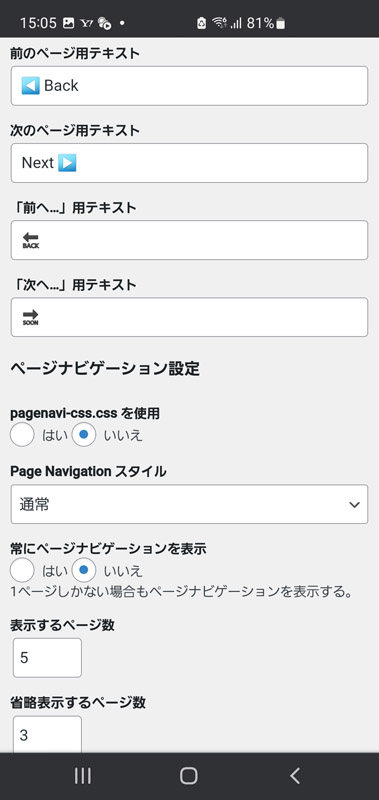
Updated 2023.04.06
In the WP-PageNavi settings, the text "Previous..." and "Next..." are defined as follows to prevent the UTF-8 emoji from being translated to prevent translations of Transposh as follows: (Example of "Previous...")
<span class="no_translate">🔙</span>The following CSS is defined for WP-PageNav: This CSS is also compatible with smartphone browsing and works responsively.
/*
	WP-PageNavi のスタイル
*/
.wp-pagenavi {
	padding: 10px 20px 10px !important;
	display:block !important;
	clear:both !important;
}
.wp-pagenavi a ,.wp-pagenavi span.pages, .wp-pagenavi span.extend {
	display: inline-block;
	color:#333333 !important;
	text-shadow:0px 1px #F6F6F6 !important;
	padding:6px 9px 6px 9px !important;
	border:solid 1px #B6B6B6 !important;
	box-shadow:0px 1px #EFEFEF !important;
	-moz-box-shadow:0px 1px #EFEFEF !important;
	-webkit-box-shadow:0px 1px #EFEFEF !important;
	background:#E6E6E6 !important;
	background:-moz-linear-gradient(top,#FFFFFF 1px,#F3F3F3 1px,#E6E6E6) !important;
	background:-webkit-gradient(linear,0 0,0 100%,color-stop(0.02,#FFFFFF),color-stop(0.02,#F3F3F3),color-stop(1,#E6E6E6)) !important;
	font-size:12px !important;
	margin-right:3px !important;
	text-decoration:none !important;
}
.wp-pagenavi a:hover {
	display: inline-block;
	color:#fff !important;
	text-shadow:0px 1px #3C3C3C !important;
	border-color:#202020 !important;
	background:#525252 !important;
	background:-moz-linear-gradient(top,#9F9F9F 1px,#6C6C6C 1px,#525252) !important;
	background:-webkit-gradient(linear,0 0,0 100%,color-stop(0.02,#9F9F9F),color-stop(0.02,#6C6C6C),color-stop(1,#525252)) !important;
	color:#FFFFFF !important;
	box-shadow:0px 1px #E7E7E7 !important;
	-moz-box-shadow:0px 1px #E7E7E7 !important;
	-webkit-box-shadow:0px 1px #E7E7E7 !important;
}
.wp-pagenavi span.current{
	display: inline-block;
	padding:6px 9px 6px 9px !important;
	border:solid 1px #DCDCDC !important;
	color:#fff !important;
	box-shadow:0px 1px #E7E7E7 !important;
	-moz-box-shadow:0px 1px #E7E7E7 !important;
	-webkit-box-shadow:0px 1px #E7E7E7 !important;
	margin-right:3px !important;
	text-shadow:0px 1px #3C3C3C !important;
	border-color:#202020 !important;
	background:#525252 !important;
	background:-moz-linear-gradient(top,#9F9F9F 1px,#6C6C6C 1px,#525252) !important;
	background:-webkit-gradient(linear,0 0,0 100%,color-stop(0.02,#9F9F9F),color-stop(0.02,#6C6C6C),color-stop(1,#525252)) !important;
}
2026.07.04 追記
カスタム投稿のメニューがオレンジに反転表示されない不具合を修正
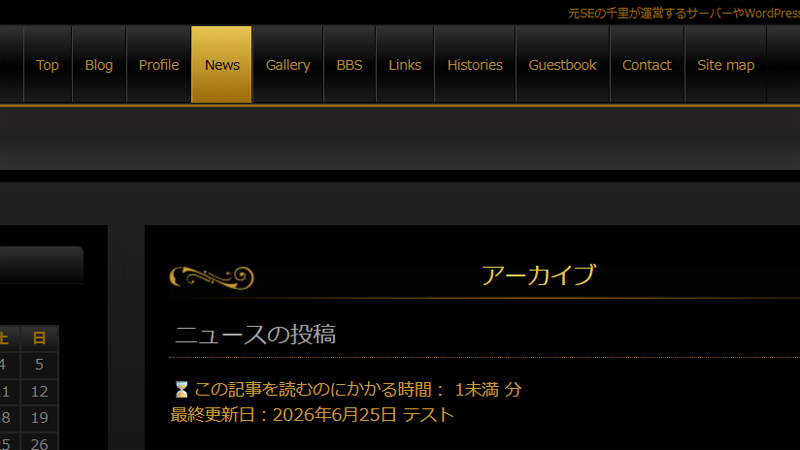
WordPress の仕様の影響で、「ニュース」、「ギャラリー」などカスタム投稿の記事一覧画面を開くと、メニューがオレンジに反転表示にならない問題を修正しました。「ブログ」のアーカイブページにも対応させます。
以下のコードをテーマの functions.php の最後に追加します。このコードは Gemini による監修ですw
/**
 * 【メニュー反転】画面の奥底(wp_footer)にJavaScriptを強制挿入し、開いているURL
 *  に応じてメニュー(Post/News/Gallery)を強制的にアクティブ(反転)にするコード
 */
function hpb_force_menu_highlight_script() {
    ?>
    <script>
    (function() {
        // 画面が読み込まれたら実行
        window.addEventListener('DOMContentLoaded', function() {
            var currentUrl = window.location.href;

            // 1. URLに「/post/」が含まれる場合、Blogメニューを光らせる
            if (currentUrl.indexOf('/post/') !== -1) {
                var newsLinks = document.querySelectorAll('#site-navigation a[href*="/blog/"]');
                newsLinks.forEach(function(link) {
                    var li = link.closest('li');
                    if (li) {
                        li.classList.add('current-menu-item', 'active');
                    }
                });
            }

            // 2. URLに「/news/」が含まれる場合、Newsメニューを光らせる
            if (currentUrl.indexOf('/news/') !== -1) {
                var newsLinks = document.querySelectorAll('#site-navigation a[href*="/news/"]');
                newsLinks.forEach(function(link) {
                    var li = link.closest('li');
                    if (li) {
                        li.classList.add('current-menu-item', 'active');
                    }
                });
            }

            // 3. URLに「/gallery/」が含まれる場合、Galleryメニューを光らせる
            if (currentUrl.indexOf('/gallery/') !== -1) {
                var galleryLinks = document.querySelectorAll('#site-navigation a[href*="/gallery/"]');
                galleryLinks.forEach(function(link) {
                    var li = link.closest('li');
                    if (li) {
                        li.classList.add('current-menu-item', 'active');
                    }
                });
            }
        });
    })();
    </script>
    <?php
}
add_action('wp_footer', 'hpb_force_menu_highlight_script', 999);