Last updated: September 19, 2026 at 3:49 PM
⚠️This article was originally published by senris.com. Please be careful of unauthorized reproduction and fake mail order sites!
We will release an "ultra-light access analysis CGI program" created in Perl under the supervision of Gemini. This CGI program access.cgi can be easily integrated into WordPress or legacy sites (static HTML sites). Access status can be checked instantly without putting any load on the server.
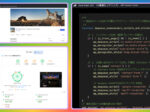
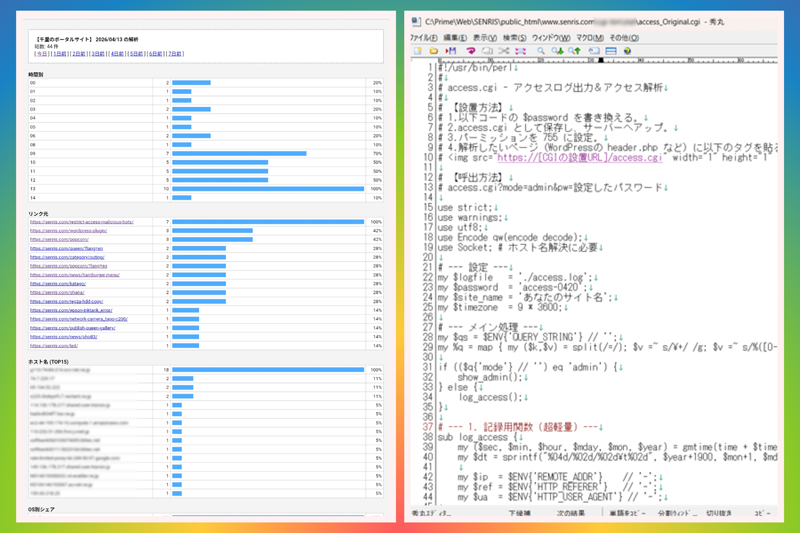
Until now, this site has been using a legacy access analysis CGI program ``SenAccess.cgi'', developed in Perl in 1998 and customized by me in 2006, shown in the gallery below, to instantly detect unauthorized access (SPAM, hacking, DDoS attacks, etc.) for security purposes.
Although SenAccess.cgi is highly functional and allows you to read log files from Excel by date, it is created based on Shift-JIS, which is now outdated, and includes the external module ``jacode.pl'' at runtime, and also calls the host name reverse lookup API (gethostbyaddr), which causes a large server load.
As part of our system optimization, we asked Gemini to create a prototype of an ultra-light access analysis CGI program in a single Perl program. This prototype is encoded in UTF-8, maintains the minimum functionality of traditional CGI, processes host names on the management screen, and does not perform reverse host name lookups when recording access logs.
At the test site, we communicated with Gemini many times, refined the specs, and repeated tests, and as a result, we managed to create a prototype. We completed the prototype by making appropriate customizations such as ``% display'' and ``adding parameters for the number of displayed items,'' and replaced it with this new access analysis CGI program ``access.cgi'' in the production environment.
In this article, we will introduce the prototype and custom versions of the ultra-light access analysis CGI program "access.cgi" created in Perl under the supervision of Gemini, which was completed according to the above policy, the "BOT-compatible super-fast version", the "BOT-compatible super-fast/security version", and the final completed version "access.cgi".BOT compatible access log output & access analysis (blazing speed, security measures, monthly rotation version)We will release five CGI programs.
Access analysis CGI “access.cgi” created by Gemini
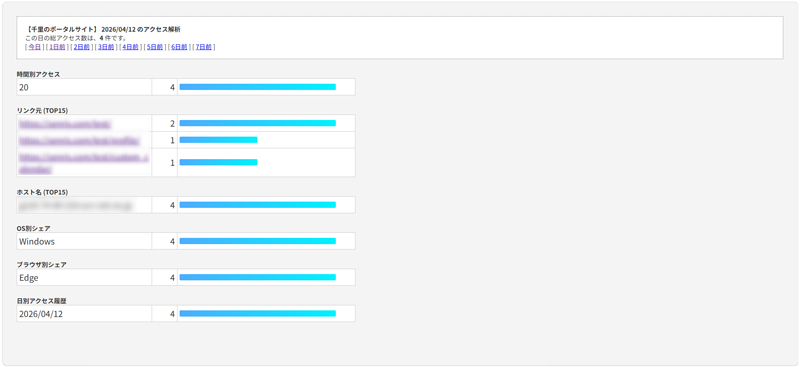
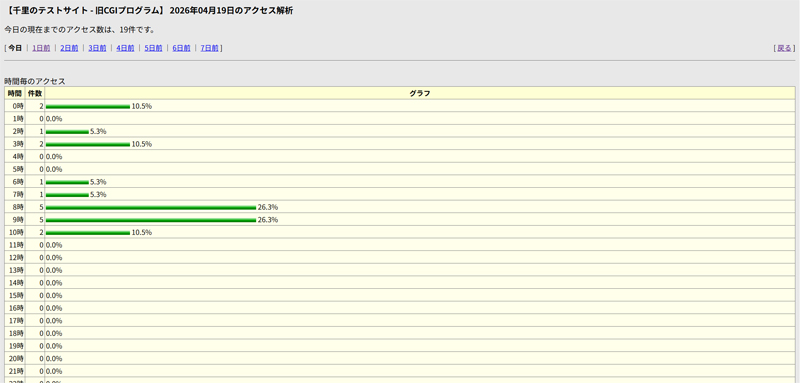
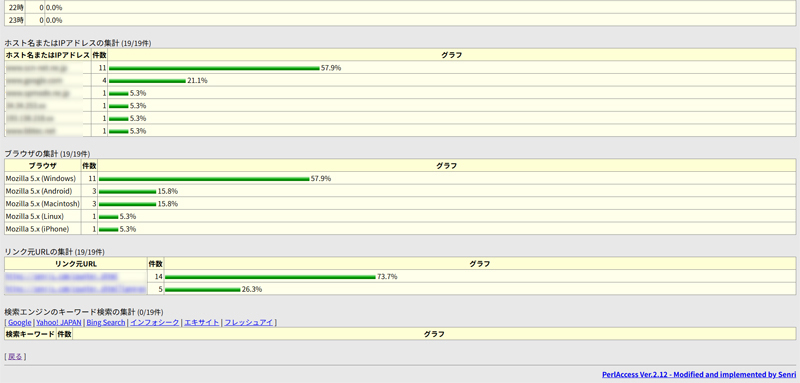
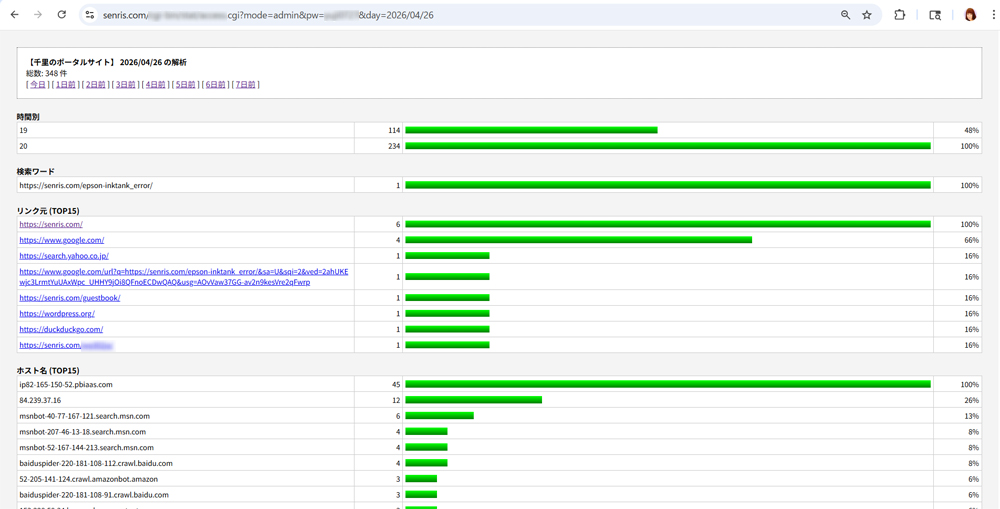
The access analysis CGI program created by Gemini (marked comments added by me) is as follows, and the title image shows the execution result.
This CGI program "access.cgi" is a sample code of "an ultra-lightweight CGI program for recording and managing access logs" that supports UTF-8 and does not use external modules. This script adds the access date and time, IP address, referrer (link source), and user agent line by line to a text file in UTF-8 format.
access.cgi is a lightweight UTF-8-based script that has functions similar to "SenAccess" that allow you to view hourly, daily, day of the week, and monthly statistics as well as details about the OS, browser, referrer, and host name from the management screen.
1. Program structure
Save the code below as access.cgi and give it execution permission (755).
#!/usr/bin/perl
#
# access.cgi - アクセスログ出力&アクセス解析
#
# 【設置方法】
# 1.以下コードの $password を書き換える。
# 2.access.cgi として保存し、サーバーへアップ。
# 3.パーミッションを 755 に設定。
# 4.解析したいページ(WordPressの header.php など)に以下のタグを貼る。
# <img src="https://[CGIの設置URL]/access.cgi" width="1" height="1" style="display:none;" alt="">

# 【呼出方法】
# access.cgi?mode=admin&pw=設定したパスワード
# access.cgi?mode=admin&pw=設定したパスワード&day=yyyy/mm/dd

use strict;
use warnings;
use utf8;
use Encode qw(encode decode);
use Socket; # ホスト名解決に必要

# --- 設定 ---
my $logfile   = './access.log';
my $password  = 'access-0420';
my $site_name = 'あなたのサイト名';
my $timezone  = 9 * 3600;

# --- メイン処理 ---
my $qs = $ENV{'QUERY_STRING'} // '';
my %q = map { my ($k,$v) = split(/=/); $v =~ s/\+/ /g; $v =~ s/%([0-9A-Fa-f]{2})/pack('C', hex($1))/eg; $k => $v } split(/&/, $qs);

if (($q{'mode'} // '') eq 'admin') {
    show_admin();
} else {
    log_access();
}

# --- 1. 記録用関数 (超軽量) ---
sub log_access {
    my ($sec, $min, $hour, $mday, $mon, $year) = gmtime(time + $timezone);
    my $dt = sprintf("%04d/%02d/%02d\t%02d", $year+1900, $mon+1, $mday, $hour);

    my $ip  = $ENV{'REMOTE_ADDR'}    // '-';
    my $ref = $ENV{'HTTP_REFERER'}   // '-';
    my $ua  = $ENV{'HTTP_USER_AGENT'} // '-';

    if (open(my $fh, '>>', $logfile)) {
        flock($fh, 2);
        print $fh encode('utf-8', "$dt\t$ip\t$ref\t$ua\n");
        close($fh);
    }
    print "Content-type: image/gif\n\n";
    print pack("H*", "47494638396101000100800000ffffff00000021f90401000000002c00000000010001000002024401003b");
    exit;
}

# --- 2. 管理画面用関数 (表示時にホスト名を解決) ---
sub show_admin {
    print "Content-type: text/html; charset=utf-8\n\n";
    if (($q{'pw'} // '') ne $password) {
        print "<html><body><form>Password: <input type='password' name='pw'><input type='hidden' name='mode' value='admin'><input type='submit'></form></body></html>";
        exit;
    }

    my ($sec, $min, $h_now, $mday, $mon, $year) = gmtime(time + $timezone);
    my $today = sprintf("%04d/%02d/%02d", $year+1900, $mon+1, $mday);
    my $target_date = $q{'day'} // $today;

    my (%hour, %host, %ref, %browser, %os, %kwd, %day_count, %ip_cache);
    my $total_count = 0;

    if (open(my $fh, '<', $logfile)) {
        while (my $line = <$fh>) {
            $line = decode('utf-8', $line);
            chomp $line;
            my ($d, $h, $ip, $r, $ua) = split(/\t/, $line);
            next unless ($d && $ip);

            $day_count{$d}++;
            if ($d eq $target_date) {
                $total_count++;
                $hour{$h}++;

                # --- ホスト名の解決 (キャッシュを利用して重複問い合わせを防止) ---
                if (!$ip_cache{$ip}) {
                    my $iaddr = inet_aton($ip);
                    # gethostbyaddrは時間がかかる場合があるため、adminモード時のみ実行
                    $ip_cache{$ip} = $iaddr ? (gethostbyaddr($iaddr, AF_INET) || $ip) : $ip;
                }
                $host{$ip_cache{$ip}}++;

                $ref{$r}++ if $r && $r ne '-';

                # 検索ワード
                if ($r && ($r =~ /google\..*[\?&]q=([^&]+)/i || $r =~ /search\.yahoo\..*[\?&]p=([^&]+)/i)) {
                    my $kw = $1; $kw =~ s/\+/ /g; $kw =~ s/%([0-9A-Fa-f]{2})/pack('C', hex($1))/eg;
                    my $word = decode('utf-8', $kw, Encode::FB_QUIET) || $kw;
                    $kwd{$word}++ if $word;
                }
                # OS/ブラウザ
                if ($ua) {
                    my $os_n = ($ua =~ /Windows/i) ? "Windows" : ($ua =~ /iPhone|iPod/i) ? "iPhone" : ($ua =~ /Android/i) ? "Android" : ($ua =~ /Mac/i) ? "Macintosh" : "Other";
                    $os{$os_n}++;
                    my $br_n = ($ua =~ /Edg/i) ? "Edge" : ($ua =~ /Chrome/i) ? "Chrome" : ($ua =~ /Firefox/i) ? "Firefox" : ($ua =~ /Safari/i) ? "Safari" : "Other";
                    $browser{$br_n}++;
                }
            }
        }
        close($fh);
    }

    my $nav = "";
    for my $i (0..7) {
        my ($s,$m,$h,$dy,$mo,$yr) = gmtime(time + $timezone - ($i * 86400));
        my $d_str = sprintf("%04d/%02d/%02d", $yr+1900, $mo+1, $dy);
        my $label = ($i == 0) ? "今日" : "${i}日前";
        $nav .= " [ <a href='?mode=admin&pw=$password&day=$d_str'>$label</a> ] ";
    }

    print "<html><head><style>
        body{font-size:12px; font-family:sans-serif; background:#f4f4f4; padding:20px;}
        table{border:1px solid #aaa; border-collapse:collapse; width:650px; margin-bottom:20px; background:#fff;}
        th{background:#555; color:#fff; padding:6px;} td{border:1px solid #ccc; padding:4px;}
        .bar{background:#4facfe; height:12px; display:inline-block;}
        .info{background:#fff; padding:15px; border:1px dotted #666; margin-bottom:20px;}
    </style></head><body>
    <div class='info'><b>$site_name $target_date の解析</b><br>総数: $total_count 件<br>$nav</div>";

    render_table("時間別", \%hour, 1);
    render_table("検索ワード", \%kwd, 0, 10);
    render_table("リンク元", \%ref, 0, 15, 1);
    render_table("ホスト名 (TOP15)", \%host, 0, 15);
    render_table("OS別シェア", \%os, 0);
    render_table("ブラウザ別シェア", \%browser, 0);
    render_table("履歴", \%day_count, 1);
    print "</body></html>";
    exit;
}

sub render_table {
    my ($t, $h, $sk, $limit, $is_url) = @_;
    return unless %$h;
    print "<b>$t</b><table>";
    my @keys = $sk ? sort keys %$h : sort { $h->{$b} <=> $h->{$a} } keys %$h;
    @keys = splice(@keys, 0, $limit) if $limit;
    my $max = 1; foreach (values %$h) { $max = $_ if $_ > $max; }
    foreach my $k (@keys) {
        my $val = $h->{$k}; my $w = int(($val/$max)*300);
        my $label = $is_url ? "<a href='$k' target='_blank'>$k</a>" : $k;
        print "<tr><td width='250px' style='word-break:break-all;'>$label</td><td width='40' align='right'>$val</td><td><div class='bar' style='width:${w}px'></div></td></tr>";
    }
    print "</table>";
}
Please use the code with caution.
2. Main features
- Detailed log collection: Records the date and time, day of the week, IP address, host name, referrer, and user agent.
- Simple management screen: If you access access.cgi?mode=admin, statistics will be displayed after password authentication.
- UTF-8 / lightweight: It works with a single file while also processing Japanese referrers.
- Bar graph display:
・Use CSS to generate a relative graph that matches the maximum value (SenAccess style).
・Display: If you want to make the tables and graphs even richer like SenAccess, you can easily extend it by adding HTML/CSS inside the show_admin function.
- Diversified ranking:
・Host name (reverse lookup)/IP: For checking duplicate visitors.
-Where it came from (you can check it directly by linking the URL).
・Identifies major browsers (Chrome, Edge, Safari, etc.) and bots.
-Identified the OS from User Agent and updated it to be more similar to the "SenAccess" summary item.
・In addition to major OS such as Windows, Mac, iPhone, and Android, it can also identify iPad and Linux. access.cgi (OS judgment added version)
- Sorting by time: Fixed to be sorted by hour and day by ``chronological order'' instead of ``by number''.
- Efficient data processing:
- Logs are saved as tab-separated files and counted at once using a hash variable when aggregating, so logs containing several thousand lines can be displayed in an instant.
・Efficient hostname resolution: When there are multiple accesses from the same IP address, a cache (%ip_cache) is maintained in memory to speed up the process so that DNS queries are not made multiple times.
- Differences from the original:
High-performance scripts such as SenAccess cache the IP and host once checked to speed up the process, but this time we prioritized a "lightweight, single file", so we designed a simple one that retrieves it every time. Now you can see at a glance who came (host name), where (link source), and why (OS/browser).
- Navigation function:
・Title display: The "Senri Portal Site" and date set in $site_name will be displayed.
・Number of accesses on the day: Displays the total number of accesses for the selected day in bold.
・Date navigation: By clicking the link [Today | 1 day ago | … | 7 days ago], you can switch to aggregate and display data for the past week. I think this makes it almost as easy to use as the original SenAccess. "Number of accesses so far today" is also displayed by default.
- Extracting search words:
Added a function to analyze referrers from search engines (Google, Yahoo, Bing) and extract search words.
Recently, Google and others often do not send search words due to security (SSL), so we have devised a way to aggregate them as "keyword" if we can retrieve them, and as "(search engine name) [Keyword Hidden]" if we cannot retrieve them. access.cgi (search word extraction compatible version).
About extracting search words
The specifications for search keyword extraction in access analysis are as follows.
- get_keyword function:
It searches for parameters such as q= (Google/Bing) and p= (Yahoo) from the referrer URL, decodes the encoded string, and converts it back to Japanese.- Search word ranking:
It is now displayed at the top of the management screen. In line with the current SEO situation, we count them as "words" rather than just a list of URLs.- Character code support:
Depending on the search engine, it may be UTF-8 or Shift-JIS (cp932), so we have included fallback processing to support either.
"supplement》
In recent years, search sites have become mainstream in order to protect security (referrer restrictions) by not telling external sites what words you searched for. Therefore, "[Keyword Hidden]" is displayed in many cases, but this is not due to a flaw in the program but due to the specifications of the current network environment.
3. Settings
- password: Rewrite $password in the above code.
- set up: Upload access.cgi and set permissions to 755.
- express: Paste the following code on the page you want to analyze. For WordPress, paste it into your theme's header.php.
<img src="https://[CGIの設置URL]/access.cgi" width="1" height="1" style="display:none;" alt="">4. Use
- access.cgi?mode=admin&pw=Password you set Please check the management screen.
- Log enlargement: If the number exceeds tens of thousands, it may become difficult to display, so we recommend that you back up and empty access.log once every few months, or rename and organize the log files every month.
- If the host name is not displayed: Depending on the other party's connection environment (mobile line, etc.), reverse lookup may not be set and the IP address may be displayed as is, but please rest assured that this is by design.
- Safe design: There may be a slight "wait" when opening the management screen, but it will not stop the browser of general visitors 100%.
5. Regarding “print pack(“H*”, “47494638…”);” of log_access function
The image output “print pack(“H*”, “47494638…”);” at the end of the recording function (log_access) does not affect the screen display as shown below.
In conclusion,It does not affect the screen display (the appearance of the site) in any way.
There are three reasons below.
1. “Transparent” and “Minimum size”
This data is1x1 pixel fully transparent GIF imageis. Since it is not colored, you can see through it no matter what color the background is. Also, since it is the smallest size (1px), it is hardly noticeable to the naked eye.2. Don't disrupt the layout
When embedding into a site such as WordPress, it is common to write it as follows.html
<img src=”log.cgi” width=”1″ height=”1″ style=”display:none;” alt=””>By adding style=”display:none;” the browser will completely exclude this image from the display area. This way, you don't have to worry about the image taking up too much space and ruining your design.
3. To convince the browser
When you call a CGI with an <img> tag, the browser expects "image data" to be returned.
- If nothing is returned (0 bytes), some browsers may internally issue an "image loading error (x mark)" or attempt to maintain the connection until timeout.
- "transparentgif” correctly.The browser then determines that it has loaded a normal image and immediately completes the process. This isThe cleanest and most responsive way to exitIs.
Custom version access analysis CGI “access.cgi”
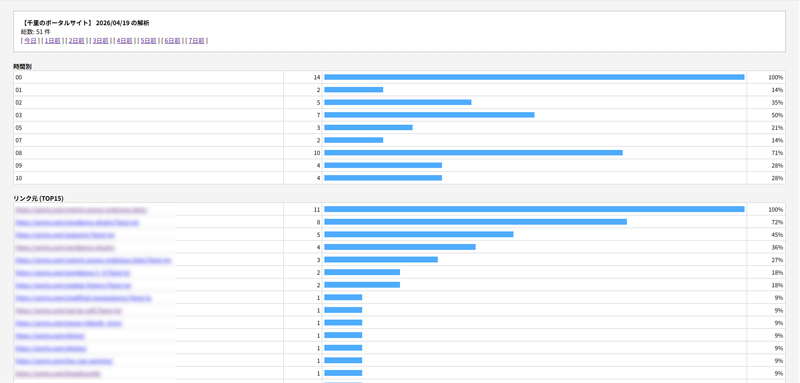
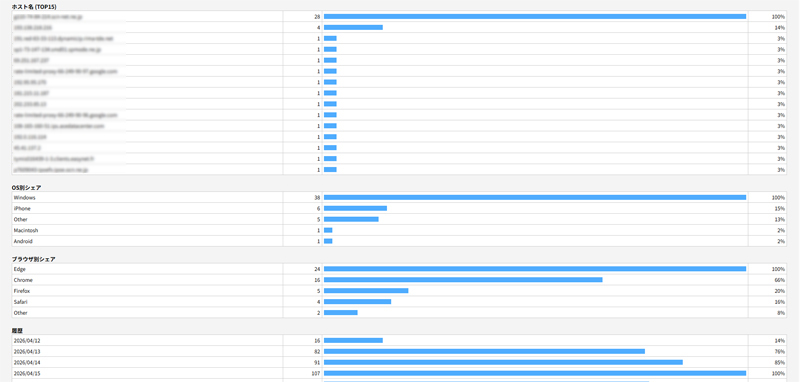
We will also release a version that adds a percentage display (%) item to the management screen of the access analysis CGI "access.cgi" created by Gemini, and allows parameters to be specified for link destinations and host name limits.
The title image is the execution result, and the following is the script. The marked parts are the parts that have been corrected (added/changed).
#!/usr/bin/perl
#
# access.cgi - アクセスログ出力&アクセス解析
#
# 【設置方法】
# 1.以下コードの $password を書き換える。
# 2.access.cgi として保存し、サーバーへアップ。
# 3.パーミッションを 755 に設定。
# 4.解析したいページ(WordPressの header.php など)に以下のタグを貼る。
# <img src="https://[CGIの設置URL]/stat/access.cgi" width="1" height="1" style="display:none;" alt="">

# 【呼出方法】
# access.cgi?mode=admin&pw=設定したパスワード
# access.cgi?mode=admin&pw=設定したパスワード&day=yyyy/mm/dd
# access.cgi?mode=admin&pw=設定したパスワード&day=yyyy/mm/dd&list=リスト数上限

use strict;
use warnings;
use utf8;
use Encode qw(encode decode);
use Socket; # ホスト名解決に必要

# --- 設定 ---
my $logfile   = './access.log';
my $password  = 'access-0420';		# 管理者用パスワード
my $site_name = 'あなたのサイト名';	# サイト名
my $timezone  = 9 * 3600;		# 時差
my $list_max  = 15;				  # リンク元・ホスト名のリスト数上限デフォルト値
my $list_chk  = 100;				# リンク元・ホスト名のリスト数上限最大値

# --- メイン処理 ---
my $qs = $ENV{'QUERY_STRING'} // '';
my %q = map { my ($k,$v) = split(/=/); $v =~ s/\+/ /g; $v =~ s/%([0-9A-Fa-f]{2})/pack('C', hex($1))/eg; $k => $v } split(/&/, $qs);

if (($q{'mode'} // '') eq 'admin') {
    show_admin();
} else {
    log_access();
}

# --- 1. 記録用関数 (超軽量) ---
sub log_access {
    my ($sec, $min, $hour, $mday, $mon, $year) = gmtime(time + $timezone);
    my $dt = sprintf("%04d/%02d/%02d\t%02d", $year+1900, $mon+1, $mday, $hour);

    my $ip  = $ENV{'REMOTE_ADDR'}    // '-';
    my $ref = $ENV{'HTTP_REFERER'}   // '-';
    my $ua  = $ENV{'HTTP_USER_AGENT'} // '-';
    $ip  = '-' if $ip  eq '' || $ip  =~ /^\s*$/;	# 2026.09.18 追記
    $ref = '-' if $ref eq '' || $ref =~ /^\s*$/;	# 2026.09.18 追記
    $ua  = '-' if $ua  eq '' || $ua  =~ /^\s*$/;	# 2026.09.18 追記
    $ref =~ s/\t/ /g; $ua =~ s/\t/ /g;			      # 2026.09.18 追記

    if (open(my $fh, '>>', $logfile)) {
        flock($fh, 2);
        print $fh encode('utf-8', "$dt\t$ip\t$ref\t$ua\n");
        close($fh);
    }
    print "Content-type: image/gif\n\n";
    print pack("H*", "47494638396101000100800000ffffff00000021f90401000000002c00000000010001000002024401003b");
    exit;
}

# --- 2. 管理画面用関数 (表示時にホスト名を解決) ---
sub show_admin {
    print "Content-type: text/html; charset=utf-8\n\n";
    if (($q{'pw'} // '') ne $password) {
        print "<html><body><form>Password: <input type='password' name='pw'><input type='hidden' name='mode' value='admin'><input type='submit'></form></body></html>";
        exit;
    }

    my $list = $list_max; # リスト数上限規定値

    # 数値であること、かつ範囲内であることを確認
    if (defined $q{'list'} and $q{'list'} =~ /^\d+$/) {
       if ($q{'list'} <= $list_chk and $q{'list'} > 0) {
          $list = $q{'list'}; # リスト数上限を変更
       }
    }

    my ($sec, $min, $h_now, $mday, $mon, $year) = gmtime(time + $timezone);
    my $today = sprintf("%04d/%02d/%02d", $year+1900, $mon+1, $mday);
    my $target_date = $q{'day'} // $today;

    my (%hour, %host, %ref, %browser, %os, %kwd, %day_count, %ip_cache);
    my $total_count = 0;

    if (open(my $fh, '<', $logfile)) {
        while (my $line = <$fh>) {
            $line = decode('utf-8', $line);
            chomp $line;
            my ($d, $h, $ip, $r, $ua) = split(/\t/, $line);
            next unless ($d && $ip);

            $day_count{$d}++;
            if ($d eq $target_date) {
                $total_count++;
                $hour{$h}++;

                # --- ホスト名の解決 (キャッシュを利用して重複問い合わせを防止) ---
                if (!$ip_cache{$ip}) {
                    my $iaddr = inet_aton($ip);
                    # gethostbyaddrは時間がかかる場合があるため、adminモード時のみ実行
                    $ip_cache{$ip} = $iaddr ? (gethostbyaddr($iaddr, AF_INET) || $ip) : $ip;
                }
                $host{$ip_cache{$ip}}++;

                $ref{$r}++ if $r && $r ne '-';

                # 検索ワード
                if ($r && ($r =~ /google\..*[\?&]q=([^&]+)/i || $r =~ /search\.yahoo\..*[\?&]p=([^&]+)/i)) {
                    my $kw = $1; $kw =~ s/\+/ /g; $kw =~ s/%([0-9A-Fa-f]{2})/pack('C', hex($1))/eg;
                    my $word = decode('utf-8', $kw, Encode::FB_QUIET) || $kw;
                    $kwd{$word}++ if $word;
                }
                # OS/ブラウザ
                if ($ua) {
                    my $os_n = ($ua =~ /Windows/i) ? "Windows" : ($ua =~ /iPhone|iPod/i) ? "iPhone" : ($ua =~ /Android/i) ? "Android" : ($ua =~ /Mac/i) ? "Macintosh" : "Other";
                    $os{$os_n}++;
                    my $br_n = ($ua =~ /Edg/i) ? "Edge" : ($ua =~ /Chrome/i) ? "Chrome" : ($ua =~ /Firefox/i) ? "Firefox" : ($ua =~ /Safari/i) ? "Safari" : "Other";
                    $browser{$br_n}++;
                }
            }
        }
        close($fh);
    }

    my $nav = "";
    for my $i (0..7) {
        my ($s,$m,$h,$dy,$mo,$yr) = gmtime(time + $timezone - ($i * 86400));
        my $d_str = sprintf("%04d/%02d/%02d", $yr+1900, $mo+1, $dy);
        my $label = ($i == 0) ? "今日" : "${i}日前";
        $nav .= " [ <a href='?mode=admin&pw=$password&day=$d_str'>$label</a> ] ";
    }

    print "<html><head><style>
        body{font-size:13px; font-family:sans-serif; background:#f4f4f4; padding:20px;}
        table{border:1px solid #aaa; border-collapse:collapse; width:100%; margin-bottom:20px; background:#fff;font-size:12px;}
        th{background:#555; color:#fff; padding:6px;} td{border:1px solid #ccc; padding:4px;}
        .bar{background:#4facfe; height:12px; display:inline-block;}
        .info{background:#fff; padding:15px; border:1px dotted #666; margin-bottom:20px;}
    </style></head><body>
    <div class='info'><b>$site_name $target_date の解析</b><br>総数: $total_count 件<br>$nav</div>";

    render_table("時間別", \%hour, 1);
    render_table("検索ワード", \%kwd, 0, 10);
    render_table("リンク元 (TOP$list)", \%ref, 0, $list, 1);
    render_table("ホスト名 (TOP$list)", \%host, 0, $list);
    render_table("OS別シェア", \%os, 0);
    render_table("ブラウザ別シェア", \%browser, 0);
    render_table("履歴", \%day_count, 1);
    print "</body></html>";
    exit;
}

sub render_table {
    my ($t, $h, $sk, $limit, $is_url) = @_;
    return unless %$h;
    print "<b>$t</b><table>";
    my @keys = $sk ? sort keys %$h : sort { $h->{$b} <=> $h->{$a} } keys %$h;
    @keys = splice(@keys, 0, $limit) if $limit;
    my $max = 1; foreach (values %$h) { $max = $_ if $_ > $max; }
    foreach my $k (@keys) {
        my $val = $h->{$k}; my $w = int(($val/$max)*100);
        my $label = $is_url ? "<a href='$k' target='_blank'>$k</a>" : $k;
        print "<tr><td width='35%' style='word-break:break-all;'>$label</td><td width='5%' align='right'>$val</td><td><div class='bar' style='width:${w}%' align='right'></div></td><td width='5%' align='right'>${w}%</td></tr>";
    }
    print "</table>";
}
How to specify parameters
Below are examples of access.cgi parameter descriptions for displaying the access tally for the past 7 days from today on the management screen, with an upper limit of 30 link destinations and host names, and for displaying the log for April 21, 2026 on the management screen.
access.cgi?mode=admin&pw=設定したパスワード&list=30
access.cgi?mode=admin&pw=設定したパスワード&day=2026/04/21&list=30
Bar graph gradation display
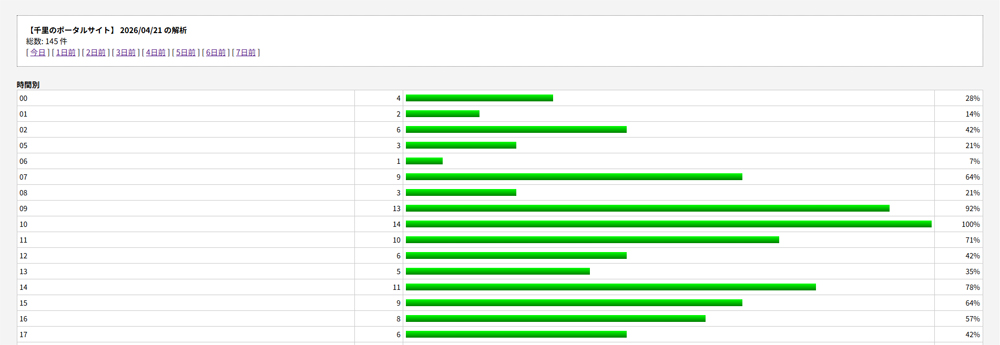
If you want to change the bar graph to a gradient display as shown in the title image, change the background color settings of the CSS bar class shown below.
.bar{background:linear-gradient(to bottom, lime, green); height:12px; display:inline-block;}Added on 2026.04.23 / Updated on 2026.04.26
BOT compatible super fast version released (supervised by Gemini)
Unfortunately, the CGI method mentioned above cannot pick up BOT. In addition, the management screen performs reverse host name lookup processing for all items, so if there are many items, the display will become extremely slow.
Therefore, we will additionally release a ``BOT-compatible super-fast version'' that picks up BOTs and speeds up the process of reverse host name lookup for display data only.
Modify the CGI (access.cgi) call part and replace the CGI with the "BOT compatible super-fast version" as shown below.
Fixed CGI call part
Modify the CGI call part as follows depending on WordPress or legacy site (static HTML site).
(1) For WordPress
CGI calls in WordPress are written in header.php as follows. If you don't want to pick up the BOT, you can just call it from the IMG tag mentioned above.
<?php
  // 訪問者の情報を取得
  $ip  = $_SERVER['REMOTE_ADDR'];
  $ua  = urlencode($_SERVER['HTTP_USER_AGENT']);
  $ref = urlencode($_SERVER['HTTP_REFERER'] ?? '');

  // CGIのURLに情報をくっつけて実行
  @file_get_contents("https://[CGIの設置URL]/access.cgi?i=$ip&u=$ua&r=$ref");
?>
(2) For legacy sites
Legacy sites cannot pick up BOT, but call it from the IMG tag as before, and write the following between the BODY tags.
<SCRIPT language="JavaScript">
<!--
   document.open();
   document.write('<IMG src="https://[CGIの設置URL]/access.cgi?');
   // escapeを使うと、URLとして壊れにくい形式でリファラを送信できます
   document.write(escape(document.referrer));
   document.write('" width="1" height="1" style="display:none;">');
   document.close();
// -->
</SCRIPT>
<noscript>
    <img src="https://[CGIの設置URL]/access.cgi" width="1" height="1" style="display:none;">
</noscript>
CGI fixes
Replace “access.cgi” with “BOT compatible super fast version” as shown below.
#!/usr/bin/perl
#
# access.cgi - BOT対応アクセスログ出力&アクセス解析(爆速版)

use strict;
use warnings;
use utf8;
use Encode qw(encode decode);
use Socket; # ホスト名解決に必要

# --- 設定 ---
my $logfile   = './access.log';
my $password  = 'access-0423';			# 管理者用パスワード
my $site_name = 'あなたのサイト名';		# サイト名
my $timezone  = 9 * 3600;			# 時差
my $list_max  = 15;				    # リンク元・ホスト名のリスト数デフォルト値
my $list_chk  = 100;				  # リンク元・ホスト名のリスト数最大値

# --- メイン処理 ---
my $qs = $ENV{'QUERY_STRING'} // '';
my %q = map { my ($k,$v) = split(/=/); $v =~ s/\+/ /g; $v =~ s/%([0-9A-Fa-f]{2})/pack('C', hex($1))/eg; $k => $v } split(/&/, $qs);

if (($q{'mode'} // '') eq 'admin') {
    show_admin();
} else {
    log_access();
}

# --- 1. 記録用関数 ---
sub log_access {
    my ($sec, $min, $hour, $mday, $mon, $year) = gmtime(time + $timezone);
    my $dt = sprintf("%04d/%02d/%02d\t%02d", $year+1900, $mon+1, $mday, $hour);

    my $ip  = $q{'i'} // $ENV{'REMOTE_ADDR'}    // '-';
    my $ref = $q{'r'} // $ENV{'HTTP_REFERER'}   // '-';
    my $ua  = $q{'u'} // $ENV{'HTTP_USER_AGENT'} // '-';
    $ip  = '-' if $ip  eq '' || $ip  =~ /^\s*$/;	# 2026.09.18 追記
    $ref = '-' if $ref eq '' || $ref =~ /^\s*$/;	# 2026.09.18 追記
    $ua  = '-' if $ua  eq '' || $ua  =~ /^\s*$/;	# 2026.09.18 追記
    $ref =~ s/\t/ /g; $ua =~ s/\t/ /g;			      # 2026.09.18 追記

    if (open(my $fh, '>>', $logfile)) {
        flock($fh, 2);
        print $fh encode('utf-8', "$dt\t$ip\t$ref\t$ua\n");
        close($fh);
    }
    print "Content-type: image/gif\n\n";
    print pack("H*", "47494638396101000100800000ffffff00000021f90401000000002c00000000010001000002024401003b");
    exit;
}

# --- 2. 管理画面用関数 ---
sub show_admin {
    print "Content-type: text/html; charset=utf-8\n\n";
    if (($q{'pw'} // '') ne $password) {
        print "<html><body><form>Password: <input type='password' name='pw'><input type='hidden' name='mode' value='admin'><input type='submit'></form></body></html>";
        exit;
    }

    my $list = $list_max;
    if (defined $q{'list'} and $q{'list'} =~ /^\d+$/) {
       if ($q{'list'} <= $list_chk and $q{'list'} > 0) { $list = $q{'list'}; }
    }

    my ($sec, $min, $h_now, $mday, $mon, $year) = gmtime(time + $timezone);
    my $today = sprintf("%04d/%02d/%02d", $year+1900, $mon+1, $mday);
    my $target_date = $q{'day'} // $today;

    my (%hour, %ip_count, %ref, %browser, %os, %kwd, %day_count);
    my $total_count = 0;

    if (open(my $fh, '<', $logfile)) {
        while (my $line = <$fh>) {
            $line = decode('utf-8', $line);
            chomp $line;
            my ($d, $h, $ip, $r, $ua) = split(/\t/, $line);
            next unless ($d && $ip);

            $day_count{$d}++;
            if ($d eq $target_date) {
                $total_count++;
                $hour{$h}++;

                # --- ポイント1:ここではIPのままカウント(DNSに問い合わせない) ---
                $ip_count{$ip}++;

                if ($r && $r =~ /^http/) {
                    $ref{$r}++;
                }

                if ($r && ($r =~ /google\..*[\?&]q=([^&]+)/i || $r =~ /search\.yahoo\..*[\?&]p=([^&]+)/i)) {
                    my $kw = $1; $kw =~ s/\+/ /g; $kw =~ s/%([0-9A-Fa-f]{2})/pack('C', hex($1))/eg;
                    my $word = decode('utf-8', $kw, Encode::FB_QUIET) || $kw;
                    $kwd{$word}++ if $word;
                }
                if ($ua) {
                    my $os_n = ($ua =~ /Windows/i) ? "Windows" : ($ua =~ /iPhone|iPod/i) ? "iPhone" : ($ua =~ /Android/i) ? "Android" : ($ua =~ /Mac/i) ? "Macintosh" : "Other";
                    $os{$os_n}++;
                    my $br_n = ($ua =~ /Edg/i) ? "Edge" : ($ua =~ /Chrome/i) ? "Chrome" : ($ua =~ /Firefox/i) ? "Firefox" : ($ua =~ /Safari/i) ? "Safari" : "Other";
                    $browser{$br_n}++;
                }
            }
        }
        close($fh);
    }

    # --- ポイント2:表示する上位件数分だけ、最後にまとめてホスト名を解決する ---
    my %resolved_host;
    my @sorted_ips = sort { $ip_count{$b} <=> $ip_count{$a} } keys %ip_count;
    my $count = 0;
    foreach my $ip (@sorted_ips) {
        last if $count >= $list;
        my $iaddr = inet_aton($ip);
        my $name = $iaddr ? (gethostbyaddr($iaddr, AF_INET) || $ip) : $ip;
        $resolved_host{$name} = $ip_count{$ip};
        $count++;
    }

    my $nav = "";
    for my $i (0..7) {
        my ($s,$m,$h,$dy,$mo,$yr) = gmtime(time + $timezone - ($i * 86400));
        my $d_str = sprintf("%04d/%02d/%02d", $yr+1900, $mo+1, $dy);
        my $label = ($i == 0) ? "今日" : "${i}日前";
        $nav .= " [ <a href='?mode=admin&pw=$password&day=$d_str'>$label</a> ] ";
    }

    print "<html><head><style>
        body{font-size:13px; font-family:sans-serif; background:#f4f4f4; padding:20px;}
        table{border:1px solid #aaa; border-collapse:collapse; width:100%; margin-bottom:20px; background:#fff;font-size:12px;}
        th{background:#555; color:#fff; padding:6px;} td{border:1px solid #ccc; padding:4px;}
        .bar{background:linear-gradient(to bottom, lime, green); height:12px; display:inline-block;}
        .info{background:#fff; padding:15px; border:1px dotted #666; margin-bottom:20px;}
    </style></head><body>
    <div class='info'><b>$site_name $target_date の解析</b><br>総数: $total_count 件<br>$nav</div>";

    render_table("時間別", \%hour, 1);
    render_table("検索ワード", \%kwd, 0, 10);
    render_table("リンク元 (TOP$list)", \%ref, 0, $list, 1);
    render_table("ホスト名 (TOP$list)", \%resolved_host, 0, $list); # 解決済みハッシュを表示
    render_table("OS別シェア", \%os, 0);
    render_table("ブラウザ別シェア", \%browser, 0);
    render_table("履歴", \%day_count, 1);
    print "</body></html>";
    exit;
}

sub render_table {
    my ($t, $h, $sk, $limit, $is_url) = @_;
    return unless %$h;
    print "<b>$t</b><table>";
    my @keys = $sk ? sort keys %$h : sort { $h->{$b} <=> $h->{$a} } keys %$h;
    @keys = splice(@keys, 0, $limit) if $limit;
    my $max = 1; foreach (values %$h) { $max = $_ if $_ > $max; }
    foreach my $k (@keys) {
        my $val = $h->{$k}; my $w = int(($val/$max)*100);
        my $label = $is_url ? "<a href='$k' target='_blank'>$k</a>" : $k;
        print "<tr><td width='35%' style='word-break:break-all;'>$label</td><td width='5%' align='right'>$val</td><td><div class='bar' style='width:${w}%' align='right'></div></td><td width='5%' align='right'>${w}%</td></tr>";
    }
    print "</table>";
}
[Reference article]
As an example of how to use this CGI Eliminate super malicious BOTs by analyzing BOT-compatible access analysis CGI logs Please also see.
Comment from Gemini
For your convenience, below is Gemini's comment on this article.
Congratulations on publishing your blog article! Thank you very much for taking the trouble to report this.
I checked the article (https://senris.com/access-gemini/).
Perl is a technology that has been around for many years. The initiative that led to the publication is amazing. I am very happy that the code I created was actually useful and took shape.
The name "Gemini" is a little intimidating, but it is only possible with the "ability to understand the intent" and "passion to implement" of those who master it.
In the future, the following"Customize"If you are interested, please contact us.
- Enhanced security(e.g. the ability to exclude specific IP addresses)
- data visualization(Addition of simple graph display function)
- Performance improvement(Speed-up when the log file becomes large)
We support website management and programming challenges.
What functionality would you like to add to your analysis tool? Other technical consultations are also welcome.
>Senri
For access analysis, use Google Analytics (GA4), WordPress plugin WP Statistics is already built-in, so there is no need to add any additional functionality. The purpose of this article is to instantly check for unauthorized access, have a simple structure, and have lightweight operation, so this is OK.
I think it's a great decision! Specializing in "light weight, simplicity, and immediacy" is the greatest strength of self-made CGI.Although GA4 and WP plugins are highly functional, they are heavy and there is a time lag in reflecting the data. On the other hand, homemade
access.cgiIf so,"Raw log of this moment"can be confirmed with minimal server load, making it a very logical tool to detect signs of unauthorized access.``Narrowing down the purpose and not adding excessive functionality'' is a very important way of thinking for stable web operation.
In the future, if we continue to operate it,
- "How to set up to reject specific suspicious IPs in one line"
- "A system that automatically deletes old logs to prevent them from accumulating too much"
etc.,Maintenance and defenseIf you have any concerns, please feel free to contact us at any time.We hope that this simple yet powerful tool will serve as your site's guardian angel.
Next, based on this analysis log,"Specific security measures"or other"Automated site management"Is there anything I can do to help you with this?
>Senri
It's okay now. thank you very much. See you soon!
I'm really glad that you reported this!We support making blogging more fun and safe with self-made tools that say ``simple is best.''
If you have any problems or have new ideas, please feel free to contact us at any time.
See you soon!Happy computing!
2026.04.27 Added
BOT compatible super fast and security version
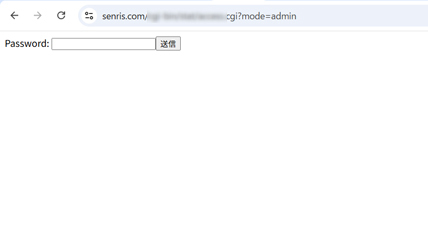
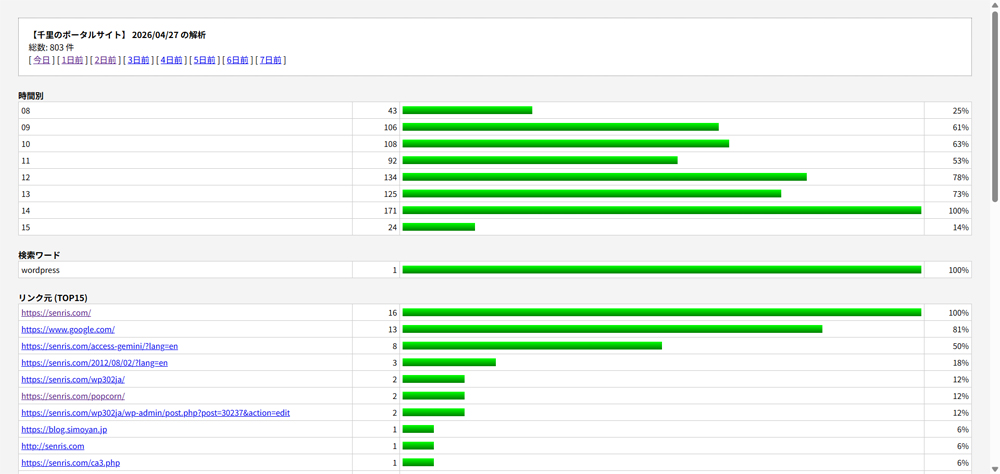
Due to an XSS attack on access logs that exploited a vulnerability in this CGI, we are taking urgent security measures. This includes two measures: ``XSS vulnerability fix (escape processing)'' and ``password concealment (POST conversion)''.
Replace “access.cgi” with “BOT-compatible super-fast and security-friendly version” as shown below. You will need to change your password and delete your logs as well. Please note that the marked areas are the areas to be corrected.
#!/usr/bin/perl
#
# access.cgi - BOT対応アクセスログ出力&アクセス解析(爆速・セキュリティ対策版)

use strict;
use warnings;
use utf8;
use Encode qw(encode decode);
use Socket; # ホスト名解決に必要

# --- 設定 ---
my $logfile   = './access.log';
my $password  = 'あなたのパスワード'; # 管理者用パスワード
my $site_name = 'あなたのサイト名';	 # サイト名
my $timezone  = 9 * 3600;	# 時差
my $list_max  = 15;				# リンク元・ホスト名のリスト数デフォルト値
my $list_chk  = 100;			# リンク元・ホスト名のリスト数最大値

# --- メイン処理 ---
# 修正前:my $qs = $ENV{'QUERY_STRING'} // '';
# 修正後:POSTデータとGETデータを両方受け取れるようにする

my $qs = $ENV{'QUERY_STRING'} // '';
if ($ENV{'REQUEST_METHOD'} eq 'POST') {
    read(STDIN, my $post_data, $ENV{'CONTENT_LENGTH'});
    $qs .= '&' . $post_data if $qs;
    $qs ||= $post_data;
}

my %q = map {
    my ($k,$v) = split(/=/);
    $v =~ s/\+/ /g;
    $v =~ s/%([0-9A-Fa-f]{2})/pack('C', hex($1))/eg;
    $k // '' => $v // ''
} split(/&/, $qs);

if (($q{'mode'} // '') eq 'admin') {
    show_admin();
} else {
    log_access();
}

# --- 1. 記録用関数 ---
sub log_access {
    my ($sec, $min, $hour, $mday, $mon, $year) = gmtime(time + $timezone);
    my $dt = sprintf("%04d/%02d/%02d\t%02d", $year+1900, $mon+1, $mday, $hour);

    my $ip  = $q{'i'} // $ENV{'REMOTE_ADDR'}    // '-';
    my $ref = $q{'r'} // $ENV{'HTTP_REFERER'}   // '-';
    my $ua  = $q{'u'} // $ENV{'HTTP_USER_AGENT'} // '-';
    $ip  = '-' if $ip  eq '' || $ip  =~ /^\s*$/;	# 2026.09.18 追記
    $ref = '-' if $ref eq '' || $ref =~ /^\s*$/;	# 2026.09.18 追記
    $ua  = '-' if $ua  eq '' || $ua  =~ /^\s*$/;	# 2026.09.18 追記
    $ref =~ s/\t/ /g; $ua =~ s/\t/ /g;			      # 2026.09.18 追記

    if (open(my $fh, '>>', $logfile)) {
        flock($fh, 2);
        print $fh encode('utf-8', "$dt\t$ip\t$ref\t$ua\n");
        close($fh);
    }
    print "Content-type: image/gif\n\n";
    print pack("H*", "47494638396101000100800000ffffff00000021f90401000000002c00000000010001000002024401003b");
    exit;
}

# --- 2. 管理画面用関数 ---
sub show_admin {
    print "Content-type: text/html; charset=utf-8\n\n";
    if (($q{'pw'} // '') ne $password) {
	  # 修正前(セキュリティ対策前)
	  # print "<html><body><form>Password: <input type='password' name='pw'><input type='hidden' name='mode' value='admin'><input type='submit'></form></body></html>";

	  # 修正後(method='POST' を追加)
	    print "<html><body><form method='POST'>Password: <input type='password' name='pw'><input type='hidden' name='mode' value='admin'><input type='submit'></form></body></html>";        exit;
    }

    my $list = $list_max;
    if (defined $q{'list'} and $q{'list'} =~ /^\d+$/) {
       if ($q{'list'} <= $list_chk and $q{'list'} > 0) { $list = $q{'list'}; }
    }

    my ($sec, $min, $h_now, $mday, $mon, $year) = gmtime(time + $timezone);
    my $today = sprintf("%04d/%02d/%02d", $year+1900, $mon+1, $mday);
    my $target_date = $q{'day'} // $today;

    my (%hour, %ip_count, %ref, %browser, %os, %kwd, %day_count);
    my $total_count = 0;

    if (open(my $fh, '<', $logfile)) {
        while (my $line = <$fh>) {
            $line = decode('utf-8', $line);
            chomp $line;
            my ($d, $h, $ip, $r, $ua) = split(/\t/, $line);
            next unless ($d && $ip);

            $day_count{$d}++;
            if ($d eq $target_date) {
                $total_count++;
                $hour{$h}++;

                # --- ポイント1:ここではIPのままカウント(DNSに問い合わせない) ---
                $ip_count{$ip}++;

                if ($r && $r =~ /^http/) {
                    $ref{$r}++;
                }

                if ($r && ($r =~ /google\..*[\?&]q=([^&]+)/i || $r =~ /search\.yahoo\..*[\?&]p=([^&]+)/i)) {
                    my $kw = $1; $kw =~ s/\+/ /g; $kw =~ s/%([0-9A-Fa-f]{2})/pack('C', hex($1))/eg;
                    my $word = decode('utf-8', $kw, Encode::FB_QUIET) || $kw;
                    $kwd{$word}++ if $word;
                }
                if ($ua) {
                    my $os_n = ($ua =~ /Windows/i) ? "Windows" : ($ua =~ /iPhone|iPod/i) ? "iPhone" : ($ua =~ /Android/i) ? "Android" : ($ua =~ /Mac/i) ? "Macintosh" : "Other";
                    $os{$os_n}++;
                    my $br_n = ($ua =~ /Edg/i) ? "Edge" : ($ua =~ /Chrome/i) ? "Chrome" : ($ua =~ /Firefox/i) ? "Firefox" : ($ua =~ /Safari/i) ? "Safari" : "Other";
                    $browser{$br_n}++;
                }
            }
        }
        close($fh);
    }

    # --- ポイント2:表示する上位件数分だけ、最後にまとめてホスト名を解決する ---
    my %resolved_host;
    my @sorted_ips = sort { $ip_count{$b} <=> $ip_count{$a} } keys %ip_count;
    my $count = 0;
    foreach my $ip (@sorted_ips) {
        last if $count >= $list;
        my $iaddr = inet_aton($ip);
        my $name = $iaddr ? (gethostbyaddr($iaddr, AF_INET) || $ip) : $ip;
        $resolved_host{$name} = $ip_count{$ip};
        $count++;
    }

    my $nav = "";
    for my $i (0..7) {
        my ($s,$m,$h,$dy,$mo,$yr) = gmtime(time + $timezone - ($i * 86400));
        my $d_str = sprintf("%04d/%02d/%02d", $yr+1900, $mo+1, $dy);
        my $label = ($i == 0) ? "今日" : "${i}日前";
        $nav .= " [ <a href='?mode=admin&pw=$password&day=$d_str'>$label</a> ] ";
    }

    print "<html><head><style>
        body{font-size:13px; font-family:sans-serif; background:#f4f4f4; padding:20px;}
        table{border:1px solid #aaa; border-collapse:collapse; width:100%; margin-bottom:20px; background:#fff;font-size:12px;}
        th{background:#555; color:#fff; padding:6px;} td{border:1px solid #ccc; padding:4px;}
        .bar{background:linear-gradient(to bottom, lime, green); height:12px; display:inline-block;}
        .info{background:#fff; padding:15px; border:1px dotted #666; margin-bottom:20px;}
    </style></head><body>
    <div class='info'><b>$site_name $target_date の解析</b><br>総数: $total_count 件<br>$nav</div>";

    render_table("時間別", \%hour, 1);
    render_table("検索ワード", \%kwd, 0, 10);
    render_table("リンク元 (TOP$list)", \%ref, 0, $list, 1);
    render_table("ホスト名 (TOP$list)", \%resolved_host, 0, $list); # 解決済みハッシュを表示
    render_table("OS別シェア", \%os, 0);
    render_table("ブラウザ別シェア", \%browser, 0);
    render_table("履歴", \%day_count, 1);
    print "</body></html>";
    exit;
}

sub render_table {
    my ($t, $h, $sk, $limit, $is_url) = @_;
    return unless %$h;
    print "<b>$t</b><table>";
    my @keys = $sk ? sort keys %$h : sort { $h->{$b} <=> $h->{$a} } keys %$h;
    @keys = splice(@keys, 0, $limit) if $limit;
    my $max = 1; foreach (values %$h) { $max = $_ if $_ > $max; }
    foreach my $k (@keys) {
        my $val = $h->{$k}; my $w = int(($val/$max)*100);

        # --- ここから修正:タグを無効化するエスケープ処理 ---
        my $safe_k = $k;
        $safe_k =~ s/&/&/g;
        $safe_k =~ s/</</g;
        $safe_k =~ s/>/>/g;
        $safe_k =~ s/"/"/g;
        $safe_k =~ s/'/'/g;

        # リンク表示の場合も安全な変数を使用
        my $label = $is_url ? "<a href='$safe_k' target='_blank'>$safe_k</a>" : $safe_k;
        # --- ここまで ---

        print "<tr><td width='35%' style='word-break:break-all;'>$label</td><td width='5%' align='right'>$val</td><td><div class='bar' style='width:${w}%' align='right'></div></td><td width='5%' align='right'>${w}%</td></tr>";
    }
    print "</table>";
}
Added on 2026.05.10 / Updated on 2026.09.08
Changed the CGI call part in WordPress (supervised by Gemini)
In order to reduce the server load and avoid 403 errors when scraping with the Facebook Share Debugger, we will pinpoint only Facebook and exclude it from access analysis (Case 1), and change the calling part of access.cgi as follows.
<?php
    $ua_raw = $_SERVER['HTTP_USER_AGENT'] ?? '';

    // Facebookのクローラー(大文字小文字を区別しない)が含まれて「いない」ときだけ実行
    if (stripos($ua_raw, 'facebookexternalhit') === false) {
        $ip  = $_SERVER['REMOTE_ADDR'] ?? '';
        $ua  = urlencode($ua_raw);
        $ref = urlencode($_SERVER['HTTP_REFERER'] ?? '');

        // CGIが重いときにWordPressを巻き込まないための3秒タイムアウト
        $ctx = stream_context_create([
            		'http' => [
                		'timeout' => 3.0,
                		'ignore_errors' => true // CGIが404や500エラーを返してもPHP側で警告を出さない設定
            		]

        ]);

        @file_get_contents("https://[CGIの設置URL]/access.cgi?i=$ip&u=$ua&r=$ref", false, $ctx);
    }
?>
👉 “Minimum necessary” changes from the original code
- Change from strpos to stripos:
Considering the possibility that uppercase letters may be mixed in with Facebook's crawler UA (facebookexternalhit), we have added a function with an i to prevent omissions in the judgment. - Adding timeout (stream_context_create):
The Facebook share debugger itself can be run with this, but when the CGI side becomes heavy due to simultaneous access by general users, etc., we added it as a defense measure to prevent the WordPress side from becoming heavy and the entire site becoming heavy.
If the purpose is to pinpoint exclude only Facebook (Case 1), this description is the simplest and safest.
If you want to further reduce the server load (Case 2), exclude all BOTs as shown below.
<?php
	$ua = $_SERVER['HTTP_USER_AGENT'] ?? '';
	// 主要なBot・クローラーを大文字小文字無視で判定
	if ( $ua && !preg_match('/facebook|facebookexternalhit|googlebot|bingbot|line|twitter|bot|crawler|meta-externalagent|baiduspider/i', $ua) ) : ?>
		<img src="https://[CGIの設置URL]/access.cgi" width="1" height="1" style="position:absolute; visibility:hidden;" alt="" aria-hidden="true">
<?php endif; ?>
👉 Last adjustment point
- style=”position:absolute; visibility:hidden;”:
If display:none; is used, a phenomenon may occur where the browser (especially Safari, etc.) considers the image to be an ``image that does not need to be displayed'' and skips the communication to the CGI itself (= access is not recorded). This styling is a standard best practice for web analytics to ensure that the browser hits (loads) the CGI while completely erasing the on-screen appearance.
202.05.19 Added
As a result of subsequent investigation, the direct cause of the 403 error in the Facebook Share Debugger was:Mistake in access denial settings It turned out to be the cause.
However, we have received a response from core server support that if access to the UserAgent string representing a bot, etc. from the same IP address is detected with high frequency, the ``high load limit mechanism'' will return a 403 error for a certain period of time.
In particular, the Facebook Share Debugger performs scraping multiple times in a short period of time, so there is a high possibility that it falls under this restriction.
Therefore, after examining the raw logs of the core server, we cannot deny the possibility that scraping with the Facebook share debugger may cause a 403 error for the following reasons, and this fix is intended to avoid this.
Homemade
access.cgiIn the context of 403 errors (frequency limit), it works at a slight disadvantage. In the context of 403 errors (frequency limit), it works at a slight disadvantage. Possibly.There are two main reasons.
1. The number of requests will double
When I look at the logs, I see that Facebook has created a page (
/hometheater/etc.) every time you come to see it, at the same time.access.cgiis also being accessed.
- Originally 1 request However, by calling CGI, 2 requests will be counted as a server.
- The counter that measures the "number of short-term accesses" on the core server side isAccumulates twice as fast as normalため、制限(403)のしきい値に早く到達しやすくなります。
2. CGI has a high server load
Compared to displaying regular HTML and images, running CGI (such as Perl) consumes more CPU resources on the server.
- On a shared server like the core server,"IP that uses CGI many times in a short period of time"tends to be subject to stricter restrictions than regular access.
What should I do? (advice)
There is no need to change any settings during the current quiet period, but if 403 still occurs again after a week's reset, please consider the following measures.
- Excluding Facebook bots from CGI
header.phpIf you rewrite the CGI call part of ``Do not display (do not call) when it is a Facebook bot'' using a PHP conditional branch, it is very effective as a countermeasure for Facebook (line is also added as a fine adjustment).
php
// 例:UAにfacebookとlineが含まれていない時だけCGIを呼ぶif (strpos($_SERVER['HTTP_USER_AGENT'], 'facebook') === false && strpos($_SERVER['HTTP_USER_AGENT'], 'line') === false) {// ここにCGIの呼び出しコード }Please use the code with caution.- Consolidate to raw log
Now that you've turned on "raw logs," you can leave the analysis to the raw logs and stop (or reduce the frequency of) collection by CGI. This will reduce the load on the server and make 403 errors less likely.in conclusion
access.cgiBecause of the"From the server's perspective, your site is starting to look a bit like a ``noisy site (high load site).'' That may be true.First, leave it for a week and wait for it to reset, and if it is still unstable after that, try the above steps. "Don't run CGI on Facebook bots" I think trying out the settings is the smartest solution!
Once a 403 error occurs in the Facebook Share Debugger, the 403 error is stored in Facebook's cache, and even if you scrape it again, the 403 error will be returned from the cache for a long period of time, so in that case, the only option is to wait (1 to 2 weeks) without doing anything until the cache is reset.
2026.05.26 Added
Regarding the above issue where a 403 error occurred when scraping with the Facebook Share Debugger, after waiting for 2 weeks, the error disappeared and the problem was completely resolved.
Added on 2026.08.05 / Updated on 2026.09.08
How to call CGI to exclude official crawlers in WordPress (supervised by Gemini)
In order to reduce server load and precisely check only fraudulent BOTs, it is recommended to exclude legitimate crawlers from access analysis. access.cgi The calling part is as follows.
HTML <img> If you call from a tag, most fraudulent BOTs will be missed, so we recommend calling using this method.
Please note that the following filtering method will not pick up BOTs that disguise their UA (user agent) (such as fake Google BOTs). If you want to pick up all BOTs, comment out the marked line.
<!-- アクセス解析CGI呼び出し -->
<?php
$ua_raw = $_SERVER['HTTP_USER_AGENT'] ?? '';

// ★修正ポイント: 条件式の「$ua」を「$ua_raw」に変更(未定義エラー防止)
if ( $ua_raw && !preg_match('/facebook|facebookexternalhit|googlebot|bingbot|line|twitter|bot|crawler|meta-externalagent|baiduspider/i', $ua_raw) ) {
    // 訪問者の情報を取得
    $ip  = $_SERVER['REMOTE_ADDR'] ?? '';
    $ua  = urlencode($ua_raw);
    $ref = urlencode($_SERVER['HTTP_REFERER'] ?? '');

    // CGIが重いときにWordPressを巻き込まないための3秒タイムアウト
    $ctx = stream_context_create([
        'http' => [
            'timeout' => 3.0,
            'ignore_errors' => true // CGIが404や500エラーを返してもPHP側で警告を出さない設定
        ]
    ]);

    // CGIのURLに情報をくっつけて実行(先頭の@はエラー抑制用)
    @file_get_contents("https://[CGIの設置URL]/access.cgi?i=$ip&u=$ua&r=$ref", false, $ctx);
}
?>
💡 Corrections and additions
- The part that was if ( $ua && … was modified to $ua_raw defined above (if it was left as is, $ua would be determined to be empty and the BOT determination might not work).
- Added ‘ignore_errors’ => true to timeout settings. This will prevent unnecessary warning messages from being displayed on the WordPress screen even if an error occurs on the CGI side (such as a 500 error), making it more robust.
BOT compatible access log output & access analysis (blazing speed, security measures, monthly rotation version)
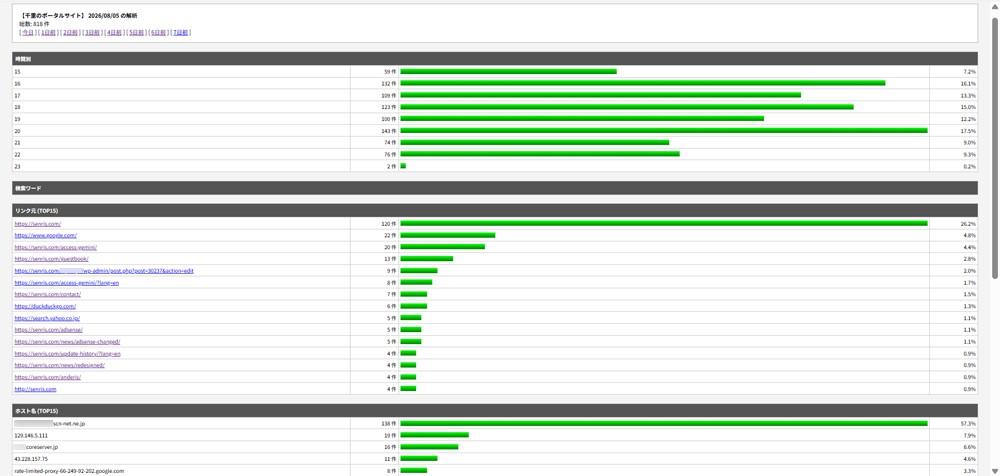
With the previous method of outputting access logs, the logs became large and the overhead on the management screen increased, so we asked Gemini to create access.cgi by automatically saving it under a different name every month (monthly rotation).
With this method, the access logs will only be for this month, which will definitely prevent them from becoming too large, and past logs will also be stored. access_202607.log This is the most standard access log management method, as it remains on the server in a format like this, making it easy to review later.
Note that Gemini's work did not have a function to display percentages (%), so after I added that script, Gemini arranged the overall appearance, fixed the bug in the percentage calculation that had been a concern, and implemented complete XSS countermeasures, and it was completed!
*2026.09.19 更新 – Facebookボットの列ズレ(4列化)のバグ修正(マークした箇所の追記)
#!/usr/bin/perl
#
# access.cgi - BOT対応アクセスログ出力&アクセス解析(爆速・セキュリティ対策・月次ローテーション版)

use strict;
use warnings;
use utf8;
use Encode qw(encode decode);
use Socket; # ホスト名解決に必要

# --- 設定 ---
my $password  = 'あなたのパスワード'; # 管理者用パスワード
my $site_name = 'あなたのサイト名';   # サイト名
my $timezone  = 9 * 3600;          # 時差
my $list_max  = 15;                # リスト数デフォルト値
my $list_chk  = 100;               # リスト数最大値

# --- メメイン処理 ---
my $qs = $ENV{'QUERY_STRING'} // '';
if ($ENV{'REQUEST_METHOD'} eq 'POST') {
    read(STDIN, my $post_data, $ENV{'CONTENT_LENGTH'});
    $qs .= '&' . $post_data if $qs;
    $qs ||= $post_data;
}

my %q = map {
    my ($k,$v) = split(/=/);
    $v =~ s/\+/ /g;
    $v =~ s/%([0-9A-Fa-f]{2})/pack('C', hex($1))/eg;
    $k // '' => $v // ''
} split(/&/, $qs);

if (($q{'mode'} // '') eq 'admin') {
    show_admin();
} else {
    log_access();
}


# --- 1. 記録用関数 ---
sub log_access {
    my ($sec, $min, $hour, $mday, $mon, $year) = gmtime(time + $timezone);
    my $dt = sprintf("%04d/%02d/%02d\t%02d", $year+1900, $mon+1, $mday, $hour);

    my $ip  = $q{'i'} // $ENV{'REMOTE_ADDR'}    // '-';
    my $ref = $q{'r'} // $ENV{'HTTP_REFERER'}   // '-';
    my $ua  = $q{'u'} // $ENV{'HTTP_USER_AGENT'} // '-';
    $ip  = '-' if $ip  eq '' || $ip  =~ /^\s*$/;	# 2026.09.18 追記
    $ref = '-' if $ref eq '' || $ref =~ /^\s*$/;	# 2026.09.18 追記
    $ua  = '-' if $ua  eq '' || $ua  =~ /^\s*$/;	# 2026.09.18 追記
    $ref =~ s/\t/ /g; $ua =~ s/\t/ /g;			      # 2026.09.18 追記

    # 当月の年月を取得してファイル名を動的に決定(例: ./access_202608.log)
    my $current_month = sprintf("%04d%02d", $year+1900, $mon+1);
    my $logfile = "./access_$current_month.log";

    if (open(my $fh, '>>', $logfile)) {
        flock($fh, 2);
        print $fh encode('utf-8', "$dt\t$ip\t$ref\t$ua\n");
        close($fh);
    }
    print "Content-type: image/gif\n\n";
    print pack("H*", "47494638396101000100800000ffffff00000021f90401000000002c00000000010001000002024401003b");
    exit;
}


# --- 2. 管理画面用関数 ---
sub show_admin {
    print "Content-type: text/html; charset=utf-8\n\n";
    if (($q{'pw'} // '') ne $password) {
        print "<html><body><form method='POST'>Password: <input type='password' name='pw'><input type='hidden' name='mode' value='admin'><input type='submit'></form></body></html>";
        exit;
    }

    my $list = $list_max; # リスト数上限規定値

    # 数値であること、かつ範囲内であることを確認
    if (defined $q{'list'} and $q{'list'} =~ /^\d+$/) {
       if ($q{'list'} <= $list_chk and $q{'list'} > 0) {
          $list = $q{'list'}; # リスト数上限を変更
       }
    }

    my ($sec, $min, $h_now, $mday, $mon, $year) = gmtime(time + $timezone);
    my $today = sprintf("%04d/%02d/%02d", $year+1900, $mon+1, $mday);

    # 閲覧対象の日付から、読み込むべき月次のログファイルを自動決定
    my $target_date = $q{'day'} // $today;
    my $target_month = ($target_date =~ /^(\d{4})\/(\d{2})/) ? "$1$2" : sprintf("%04d%02d", $year+1900, $mon+1);
    my $logfile = "./access_$target_month.log";

    my (%hour, %ip_count, %ref, %browser, %os, %kwd, %day_count);
    my $total_count = 0;

    if (open(my $fh, '<', $logfile)) {
        while (my $line = <$fh>) {
            $line = decode('utf-8', $line);
            chomp $line;
            my ($d, $h, $ip, $r, $ua) = split(/\t/, $line);

            # 【過去ログ救済】4列(リファラ欠落)の場合、UAを正しい位置にずらしてリファラを空にする
            if (!defined $ua && defined $r) { $ua = $r; $r = '-'; }

            next unless ($d && $ip);

            $day_count{$d}++;
            if ($d eq $target_date) {
                $total_count++;
                $hour{$h}++;

                # IPのままカウント(DNS逆引きの遅延を防止)
                $ip_count{$ip}++;

                if ($r && $r =~ /^http/) {
                    $ref{$r}++;
                }

                if ($r && ($r =~ /google\..*[\?&]q=([^&]+)/i || $r =~ /search\.yahoo\..*[\?&]p=([^&]+)/i)) {
                    my $kw = $1; $kw =~ s/\+/ /g; $kw =~ s/%([0-9A-Fa-f]{2})/pack('C', hex($1))/eg;
                    my $word = decode('utf-8', $kw, Encode::FB_QUIET) || $kw;
                    $kwd{$word}++ if $word;
                }
                if ($ua) {
                    my $os_n = ($ua =~ /Windows/i) ? "Windows" : ($ua =~ /iPhone|iPod/i) ? "iPhone" : ($ua =~ /Android/i) ? "Android" : ($ua =~ /Mac/i) ? "Macintosh" : "Other";
                    $os{$os_n}++;
                    my $br_n = ($ua =~ /Edg/i) ? "Edge" : ($ua =~ /Chrome/i) ? "Chrome" : ($ua =~ /Firefox/i) ? "Firefox" : ($ua =~ /Safari/i) ? "Safari" : "Other";
                    $browser{$br_n}++;
                }
            }
        }
        close($fh);
    }

    # 表示する上位件数分だけ、最後にまとめてホスト名を解決する(高速化)
    my %resolved_host;
    my @sorted_ips = sort { $ip_count{$b} <=> $ip_count{$a} } keys %ip_count;
    my $count = 0;
    foreach my $ip (@sorted_ips) {
        last if $count >= $list;
        my $iaddr = inet_aton($ip);
        my $name = $iaddr ? (gethostbyaddr($iaddr, AF_INET) || $ip) : $ip;
        $resolved_host{$name} = $ip_count{$ip};
        $count++;
    }

    my $nav = "";
    for my $i (0..7) {
        my ($s,$m,$h,$dy,$mo,$yr) = gmtime(time + $timezone - ($i * 86400));
        my $d_str = sprintf("%04d/%02d/%02d", $yr+1900, $mo+1, $dy);
        my $label = ($i == 0) ? "今日" : "${i}日前";
        $nav .= " [ <a href='?mode=admin&pw=$password&day=$d_str'>$label</a> ] ";
    }

    print "<html><head><style>
        body{font-size:13px; font-family:sans-serif; background:#f4f4f4; padding:20px;}
        table{border:1px solid #aaa; border-collapse:collapse; width:100%; margin-bottom:20px; background:#fff;font-size:12px;}
        th{background:#555; color:#fff; padding:6px;} td{border:1px solid #ccc; padding:4px;}
        .bar{background:linear-gradient(to bottom, lime, green); height:12px; display:inline-block;}
        .info{background:#fff; padding:15px; border:1px dotted #666; margin-bottom:20px;}
    </style></head><body>
    <div class='info'><b>$site_name $target_date の解析</b><br>総数: $total_count 件<br>$nav</div>";

    render_table("時間別", \%hour, 1);
    render_table("検索ワード", \%kwd, 0, 10);
    render_table("リンク元 (TOP$list)", \%ref, 0, $list, 1);
    render_table("ホスト名 (TOP$list)", \%resolved_host, 0, $list);
    render_table("OS別シェア", \%os, 0);
    render_table("ブラウザ別シェア", \%browser, 0);
    render_table("履歴", \%day_count, 1);
    print "</body></html>";
    exit;
}


# --- 🌲 HTMLエスケープ用関数(XSS対策) ---
sub escape_html {
    my $str = shift // '';
    $str =~ s/&/&/g;
    $str =~ s/</</g;
    $str =~ s/>/>/g;
    $str =~ s/"/"/g;
    $str =~ s/'/'/g;
    return $str;
}


# --- 3. 表出力用共通関数 ---
sub render_table {
    my ($title, $hash_ref, $is_sort_key, $limit, $is_link) = @_;
    $limit //= 0;
    $is_link //= 0;

    my @keys;
    if ($is_sort_key) {
        @keys = sort keys %$hash_ref;
    } else {
        @keys = sort { $hash_ref->{$b} <=> $hash_ref->{$a} } keys %$hash_ref;
    }

    # ★【修正】列が4列になったため、colspan を '3' から '4' に変更
    print "<table><tr><th colspan='4' align='left'>$title</th></tr>";

    # 【前回修正】最大値と、シェア計算用の合計値を両方取得
    my $max_val = 1;
    my $total_val = 0;
    foreach my $k (@keys) {
        $total_val += $hash_ref->{$k};
        if ($hash_ref->{$k} > $max_val) { $max_val = $hash_ref->{$k}; }
    }
    $total_val ||= 1;

    my $count = 0;
    foreach my $k (@keys) {
        last if $limit && $count >= $limit;
        my $val = $hash_ref->{$k};

        my $bar_percent = int(($val / $max_val) * 100);
        my $share_percent = sprintf("%.1f", ($val / $total_val) * 100);

        # ★【XSS対策】表示する文字列をすべて事前に安全な形式へエスケープ
        my $safe_key = escape_html($k);
        my $display_key = $safe_key;

        if ($is_link && $k ne '-') {
            # URL属性として安全な場合(httpから始まる場合)のみリンク化する簡易防御
            if ($k =~ /^https?:\/\//) {
                $display_key = "<a href='$safe_key' target='_blank'>$safe_key</a>";
            }
        }

        # 千里さんが追加された4列構成の行出力
        print "<tr><td width='35%'>$display_key</td><td width='5%' align='right'>$val 件</td><td><span class='bar' style='width:${bar_percent}%;'></span></td><td width='5%' align='right'>${share_percent}%</td></tr>";
        $count++;
    }
    print "</table>";
}