Last updated: July 20, 2026 at 11:30 AM

A plugin for cutting the number of characters from the beginning of the article in WordPress article list, and adding the link string "Read more" to display an excerpt Auto Limit Posts Reloaded Regarding this, the following "JVN iPedia - Vulnerability Prevention Information Database" reports a vulnerability in Cross-Site Request Forgery (CSRF).
You can no longer download plugins from the WordPress directory.
Therefore, websites using this plugin are required to address this security issue.

What is Cross-Site Request Forgery (CSRF)?
This is a quote from Copilot, but the general explanation of Cross-Site Request Forgery (CSRF) is as follows:
Cross-site Request Forgery (CSRF) isAttack techniques that make users perform unintended operations on web applicationsIs.
For example, if a user remains logged in to a bank's website and accesses a "trap site" set up by an attacker, the scripts installed on that site will automatically execute the transfer process...
CSRF Features
- Target of attack: Login Web Application
- Attack method: User clicks a trap link or button to send an unintended request
- Caused cases: Unauthorized transfers, posting on social media, changing account information, etc.
Main measures
- Introducing CSRF tokens: Embed random tokens in the form to verify that they are legitimate requests
- Checking Referer and Origin headers: Check if the request source is correct
- Setting the SameSite attribute: Restricting cookie transmission to prevent requests from external sites
It is often confused with XSS (cross-site scripting), but the key to CSRF is that it "spoofs user actions."
"Auto Limit Posts Reloaded" functions are replaced by programs based on the theme
With normal usage, there is no particular problem with continuing to use this plugin, but taking into account that the plugin had stopped maintenance for three years, that it has security issues, that it cannot be downloaded from WordPress and that it cannot be expected to maintain it in the future, I thought it would be appropriate to uninstall this plugin and use an alternative to it with the thematic program, so I added a snippet to functions.php (creating a program).
First, we will explain the prerequisites as follows:
Rewrite to "the_excerpt" function that outputs excerpts from the post.
Currently, this site uses a method in which excerpts are applied in the article list, as shown in the article below.

In other words, the template part program (content.php) that displays a list of theme blogs and archive pages shows excerpts of articles using the following function calls:
the_excerpt();This site uses a programme based on the theme of Home Page Builder 22 (hpb22) provided by JustSystem.
JustSystem has released a new version of Home Page Builder 23 and is now compatible with WordPress 6.7, but it has finally been compatible with the block editor, so I don't think there will be any major changes to the theme program.
The program that displays excerpted articles in the system configuration of this site is as follows, including custom post types.
- content.php
- blog.php
- blog_gallery.php (custom post)
- blog_news.php (custom post)
However, in the above programs, the original programs that display blogs and custom posts do not support displaying excerpted articles in article lists.
For example, in the list of blog articles (blog.php), the function call on line 16 marked is "the_content();" as follows:
						<h3><a href="<?php echo esc_attr( add_query_arg( $query_more, home_url( '' ) ) ); ?>">ブログ一覧</a></h3>
						<?php while ( $wp_query->have_posts() ) : $wp_query->the_post(); ?>
							<article id="post-<?php the_ID(); ?>" <?php post_class(); ?>>
								<header class="entry-header">
									<h4><a href="<?php the_permalink(); ?>"><?php the_title(); ?></a></h4>
								</header><!-- .entry-header -->

								<?php if ( has_post_thumbnail() ) : ?>
									<p class="entry-thumbnail"><?php the_post_thumbnail( 'thumbnail' ); ?></p>
								<?php endif; ?>

								<div class="entry-content">
									<?php
									global $more;
									$more = 0;
									the_content();
									?>
								</div><!-- .entry-content -->
Therefore, this function call part (line 16) has been modified as follows:
						<h3><a href="/post/">ブログのアーカイブ</a></h3>
						<?php while ( $wp_query->have_posts() ) : $wp_query->the_post(); ?>
							<article id="post-<?php the_ID(); ?>" <?php post_class(); ?>>
								<header class="entry-header">
									<h4><a href="<?php the_permalink(); ?>"><?php the_title(); ?></a></h4>
								</header><!-- .entry-header -->

								<?php if ( has_post_thumbnail() ) : ?>
									<p class="entry-thumbnail"><a href="<?php the_permalink(); ?>"><?php the_post_thumbnail( 'thumbnail' ); ?></a></p>
								<?php endif; ?>

								<div class="entry-content">
									<?php
									global $more;
									$more = 0;
									the_excerpt();
									?>
								</div><!-- .entry-content -->
In the example above, as shown in the code on the first line marked, the blog list can be displayed on an archive page that allows pagination.
How to implement this feature is summarized in the article below, so please take a look if you are interested.

The following modifications have been made to the original in the "content.php," a template part program that displays content on the archive page. The lines marked in the revised program list are added and modified code.
[content.php – original before modification]
<?php
/**
 * @package _hpb
 */
?>

<article id="post-<?php the_ID(); ?>" <?php post_class(); ?>>
	<header class="entry-header">
		<h1 class="entry-title"><a href="<?php the_permalink(); ?>" rel="bookmark"><?php the_title(); ?></a></h1>
	</header><!-- .entry-header -->

	<?php if ( is_search() ) : // Only display Excerpts for Search ?>
	<div class="entry-summary">
		<?php the_excerpt(); ?>
	</div><!-- .entry-summary -->
	<?php else : ?>
	<div <?php if ( get_post_type() == 'page' ) : ?>id="page-content"<?php endif; ?> class="entry-content">
		<?php the_content( __( 'Continue reading <span class="meta-nav">→</span>', '_hpb' ) ); ?>
		<?php
			wp_link_pages( array(
				'before' => '<div class="page-links">' . __( 'Pages:', '_hpb' ),
				'after'  => '</div>',
			) );
		?>
	</div><!-- .entry-content -->
	<?php endif; ?>

	<footer class="entry-meta">
		<?php if ( get_post_type() != 'page' ) : ?>
		<?php hpb_entry_meta( get_post_type() ); ?>
		<?php endif; ?>

		<?php if ( ! post_password_required() && ( comments_open() || '0' != get_comments_number() ) ) : ?>
		<span class="sep"> | </span>
			<span class="comments-link"><?php comments_popup_link( __( 'Leave a comment', '_hpb' ), __( '1 Comment', '_hpb' ), __( '% Comments', '_hpb' ) ); ?></span>
		<?php endif; ?>

		<?php edit_post_link( __( 'Edit', '_hpb' ), '<span class="sep"> | </span><span class="edit-link">', '</span>' ); ?>
	</footer><!-- .entry-meta -->
</article><!-- #post-## -->
【content.php – After correction】
<?php
/**
 * @package _hpb
 */
?>

<article id="post-<?php the_ID(); ?>" <?php post_class(); ?>>
	<header class="entry-header">
		<h1 class="entry-title"><a href="<?php the_permalink(); ?>" rel="bookmark"><?php the_title(); ?></a></h1>

	</header><!-- .entry-header -->
	<?php if ( !is_search() && has_post_thumbnail() ) : ?>
		<!-- 検索ページ以外でサムネイル画像があればアイキャッチ画像を追加 -->
		<p class="entry-thumbnail"><a href="<?php the_permalink(); ?>"><?php the_post_thumbnail( 'thumbnail' ); ?></a></p>
	<?php endif; ?>
	<?php if ( is_search() ) : ?>
		<!-- 検索ページなら抜粋のみを表示 -->
		<div class="entry-summary">
		<?php the_excerpt(); ?>
		</div><!-- .entry-summary -->
	<?php else : ?>
		<!-- 抜粋と記事へのリンクを表示 -->
		<div <?php if ( get_post_type() == 'page' ) : ?>id="page-content"<?php endif; ?> class="entry-content">
		<?php the_excerpt(); ?>
	</div><!-- .entry-content -->
	<?php endif; ?>

	<footer class="entry-meta">
		<?php if ( get_post_type() != 'page' ) : ?>
		<?php hpb_entry_meta( get_post_type() ); ?>
		<?php endif; ?>

		<?php if ( ! post_password_required() && ( comments_open() || '0' != get_comments_number() ) ) : ?>
		<span class="sep"> | </span>
			<span class="comments-link"><?php comments_popup_link( __( 'Leave a comment', '_hpb' ), __( '1 Comment', '_hpb' ), __( '% Comments', '_hpb' ) ); ?></span>
		<?php endif; ?>

		<?php edit_post_link( __( 'Edit', '_hpb' ), '<span class="sep"> | </span><span class="edit-link">', '</span>' ); ?>
	</footer><!-- .entry-meta -->
</article><!-- #post-## -->This is for reference, but the following is a fix when using the pagination plugin "WP-PageNavi" in archive.php, a theme program that displays archives.
The position immediately after the loop is the corrected area. Below is the original code before and after modification.
[archive.php – original before modification]
			<?php /* Start the Loop */ ?>
			<?php while ( have_posts() ) : the_post(); ?>

				<?php
					/* Include the Post-Format-specific template for the content.
					 * If you want to overload this in a child theme then include a file
					 * called content-___.php (where ___ is the Post Format name) and that will be used instead.
					 */
					get_template_part( 'content', get_post_format() );
				?>

			<?php endwhile; ?>

			<?php _hpb_content_nav( 'nav-below' ); ?>
【archive.php – After correction】
			<?php /* Start the Loop */ ?>
			<?php while ( have_posts() ) : the_post(); ?>

				<?php
					/* Include the Post-Format-specific template for the content.
					 * If you want to overload this in a child theme then include a file
					 * called content-___.php (where ___ is the Post Format name) and that will be used instead.
					 */
					get_template_part( 'content', get_post_format() );
				?>

			<?php endwhile; ?>

<!-- HPBのページナビを削除
  php _hpb_content_nav( 'nav-below' ); -->

<!-- for WP-PageNavi -->
<?php if(function_exists('wp_pagenavi')) { wp_pagenavi(); } ?>
Details about the plugin "WP-PageNavi" are explained in the article below.

With the above in mind, assuming that WP Multibyte Patch, an essential plugin for extending the multibyte functionality for the Japanese WordPress package, has been installed, and below explains how to replace the Auto Limit Posts Reloaded functionality by adding a snippet to the theme function.php.
Adding a snippet to the theme function.php
Add the following snippet to functions.php to replace the Auto Limit Posts Reloaded functionality with a themed program:
// 「続きを読む」をカスタマイズするためのコード
function my_excerpt_more($post) {
    return  '... <a href="'. get_permalink($post->ID) . '">' . ' 続きを読む »' . '</a>';
}

// 抜粋(the_excerpt())を指定文字数でカットして表示するコード
function my_trim_excerpt( $text = '' , $cut = 130 ) {
    global $post; // ★2026.07.05 追加(WordPressの標準の記事データ読込)

    $raw_excerpt = $text;
    if ( '' == $text ) {
        // 抜粋が未設定の場合、記事から取得
        $text = get_the_content('');
        $text = strip_shortcodes( $text );
        $text = apply_filters('the_content', $text);
        $text = str_replace(']]>', ']]>', $text); //セクション終端のエスケープ
        $text = strip_tags($text);
    }
    $excerpt_mblength = apply_filters('excerpt_mblength', $cut );
    $excerpt_more = my_excerpt_more( $post );
    $text = wp_trim_words( $text, $excerpt_mblength, $excerpt_more );

    return apply_filters('wp_trim_excerpt', $text, $raw_excerpt);
}

// the_excerpt()にフィルターをかけるコード
remove_filter('get_the_excerpt', 'wp_trim_excerpt');
add_filter('get_the_excerpt', 'my_trim_excerpt' );
In the above PHP script, in the callback function for performing a filter hook on the 7th marked line, the numerical definition of the parameter (130) is the number of characters extracted from the beginning of the article.
This will result in the article list displaying the article if the number of characters in the article exceeds 130 characters, a link "... Read more »" will be displayed at the end of the article.
The marked function call “text = str_replace(‘]]>’, ‘]]>’, $text);” on the 16th line looks like a meaningless code at first glance because nothing is converted, but it is an escape process to prevent the XML parser from misinterpreting the string “]]>” in variable definitions in JavaScript as the end of a CDATA section, so please do not delete this line.
Incidentally, instead of the above snippet, you can also specify the number of characters in the excerpt (the default for WordPress is 110 characters) as follows:
In that case, the excerpt will be cut out and the string "[...]" will be added to the end. However, the link "...Read more »" will not be displayed.
/* 抜粋の表示文字数を130文字に変更(Googleは120文字)
---------------------------------------------------------------- */
function edit_excerpt_mblength($length)
{
     return 130;
}
add_filter('excerpt_mblength', 'edit_excerpt_mblength');
View excerpted articles
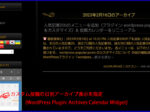
The following gallery shows an example of adding a snippet to the theme's functions.php, and excerpted articles are displayed in the program list. In the example below, the article has more than 130 characters in its character count.
List of blogs