
 Last updated: September 11, 2026 at 7:52 PM
* This page is constantly being updated!😅
After moving the server at the end of 2014, from the beginning of 2015, we set up a development period of about 2 months, and in the free time, it is a WordPress plugin, Transposh as a multilingual site based on , I have been building this site every day.
In this development, we are focusing on improving the UI of WordPress and system administration.
I still have some complaints, but I would like to complete the development at the end of February and try to expand the content in the future.
As a development completion report, all of the recommended WordPress plugins introduced on this site are summarized below in chronological order.
This page also serves as a memorandum, and we will continue to reflect the development status of this website in the following articles.
Features added by February 16, 2015
1. UI related
(1) カレンダーRepresentation – Biz Calendar → XO Event Calendar
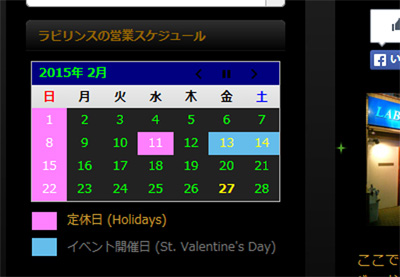
A calendar has been placed in the sidebar to display business days, holidays, and event dates.
Plug-ins "Biz Calendar" have realized in the introduction of it."
Biz Calendar is a Japanese plugin. Very simple and easy to use.
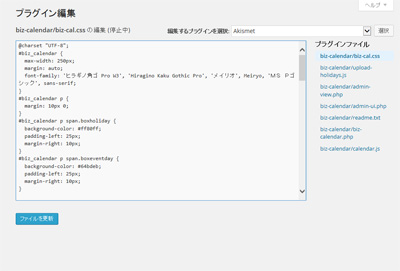
I customized the appearance of the calendar by modifying the CSS definitions of this plugin written in PHP.
2021.03.15 update
Biz Calendar cannot register multiple events.Business Day Calendar Plug-in' is currently being used. I made some minor tweaks to the CSS and PHP program (business-calendar.php). For more information, see the news article below.

2022.08.08 update
The above plug-in "Business Day Calendar" stopped working after WordPress 6.0, so I replaced it with the following plug-in "XO Event Calendar".

To change the color of the XO Event Calendar title and navigation buttons, add the following CSS.
/*
	タイトルの背景色(ブルー)・キャプションの色(白)変更
*/
.xo-event-calendar table.xo-month > caption {
	background-color: #0000cc;
	color: #fff;
}

/*
	ナビゲーションボタンの色(水色)変更
*/
.xo-event-calendar table.xo-month button span.nav-prev,
.xo-event-calendar table.xo-month button span.nav-next {
	border-color:#97cbff !important;
}

/*
	曜日ヘッダの背景色(灰色)変更
*/
.xo-event-calendar table.xo-month thead th {
	background-color: #b5b5b5;
}
2026.06.23 Added
XO Event Calendar will be released in January 2026Permanently suspended due to "author's request"(closed). This means that it was difficult to fix critical security issues, or the developer has completely abandoned support, and there is no hope that it will be safe in the future.
Currently, a vulnerability due to "Stored Cross-Site Scripting (Stored
CVE record: CVE-2026-0556
(2) Multilingual support – Transposh
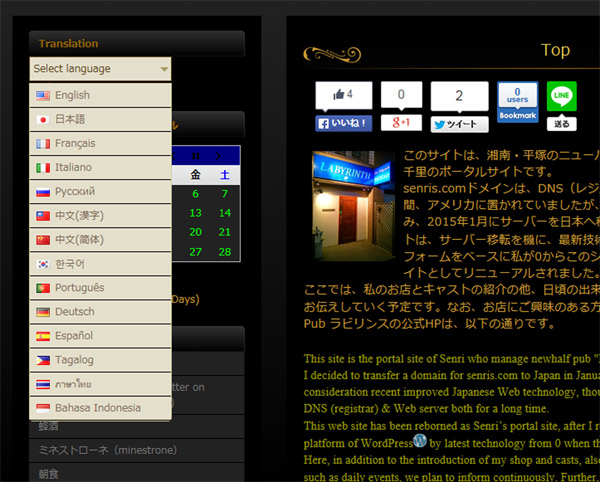
Plug-in to display this site in multiple languages "Transposh" was introduced.
From the sidebar, you can switch the display language.
As for the automatic translation engine, you can choose Google, Bing, Apertium, Yandex, Baidu by default.
Regarding that automatic translation, there are problems such as impairing accurate translation if tags are included in the context, but with the introduction of Transposh, it is possible to smartly realize multilingualization of the site.
This plugin can be used easily, but since it is only machine translation, I don't think it can be used for official multilingual sites.
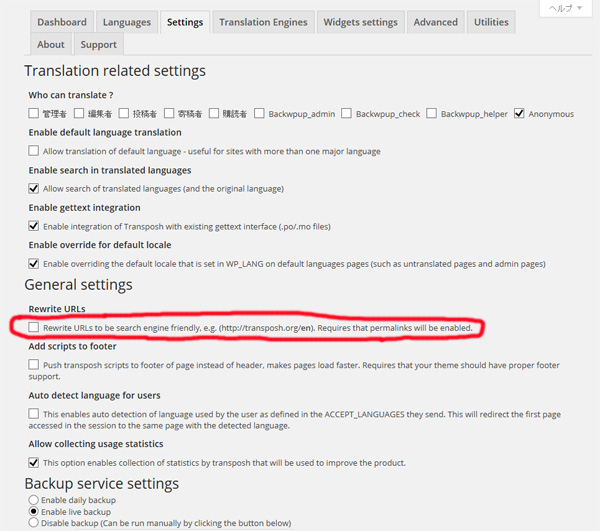
By the way, it seems that you should not check "Rewrite URLs" in "General Settings" in Transposh's plug-in setting "Settings" tab. If you set this permalink setting, links to external sites in pages other than the default language will not work properly.
【Transposh – General settings】
2018.03.28 Addendum
It seems that the development of Transposh has stopped, and it no longer works properly with the latest WordPress, so currently, regarding automatic translation, "Google Website Translator by Prisna" using. ⇒ See the news Transposh's Automatic Translation Glitches
2018.04.3 Addendum
Currently, depending on the settings of the translation engine, this plugin may not work properly for Japanese processing, Transposh's translation proxy server response is slow, and there is a considerable time lag in completing the translation of all sentences. I am confirming there is an issue. However, since this site supports bilinguals, it is very convenient to send parameters for automatic link processing to other sites, so for the time being, the Transposh menu is preserved. In addition, it is unique in that it is equipped with a correction function for translation results that other automatic translation plug-ins do not have. There are still some translation accuracy issues compared to his other Google automatic translation plugins, but I hope the author will fix those issues in due time.
In manual translation, the recommended plug-ins arePolylang And WPML (paid version)is. Previously, when Polylang was introduced, the WordPress pagination function was hooked, and the functionality of some plugins (WP-PageNavi, etc.) was lost. I have confirmed that it works properly.
Click here for an introduction example of Polylang ⇒ Multi-lingual club ferris web site by WordPress plugin Polylang
2020.03.28 Addendum
This morning, I chatted with the author of Transposh and learned how to fix the Japanese translation problem that occurred in Transposh (V1.0.6.1).
By setting the following, you can now convert correctly!
Translation Engines ⇒ Select preferred auto translation engine ⇒ Put Bing on top
Advanced ⇒ Parser related settings ⇒ Check "Disable punctuations break"
*See Transposh's WordPress support forum ⇒ Support ThreadsCan't convert from Japanese to English"
2020.03.29 Addendum
【Transposh – Advanced】
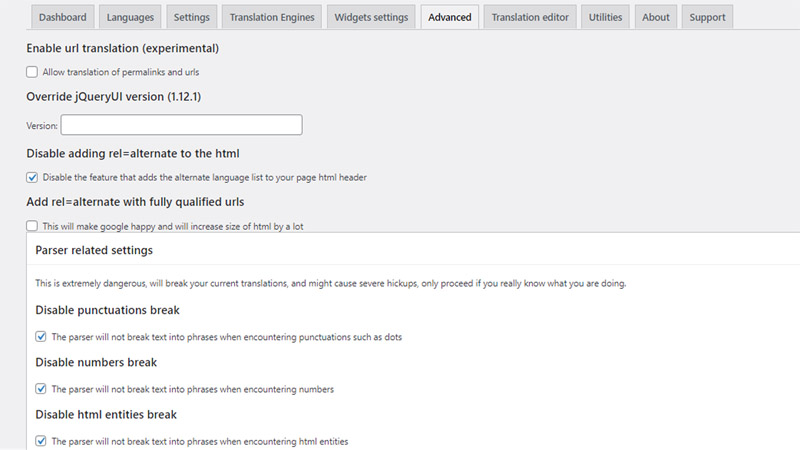
Earlier, the author of Transposh contacted me and said that it became possible to translate even if Google was set to the top in the priority setting of the translation engine, so once change Google to the top in Transposh's translation engine settings and check the situation I decided to see it. After that, when I gave priority to Google, the operation was unstable as before, so I returned to Bing again. For reference, in the latest version of Transposh (Version 1.0.6), if there are Japanese punctuation marks, numbers in sentences, and HTML tags in the default settings, the sentences will be cut off and the translation process will not work well. .
As a countermeasure, you need to check "Disable punctuations break", "Disable numbers break", and "Disable html entities break" in the Parser settings in the "Advanced" tag of Transposh's settings, but currently other Google Translate plugins (such as Google Website Translator by Prisna) will function more correctly.
2022.08.22 Added
Unfortunately, WordPress has closed this plugin as of February 7, 2022 and is no longer available for download. However, you can download it from the official site and it works fine. However, WordPress vulnerability information (Sensitive Information Disclosure Vulnerability) have been reported should be considered. Probably, it seems that it is a case of setting to allow translation to non-administrators.
2023.03.30 Added
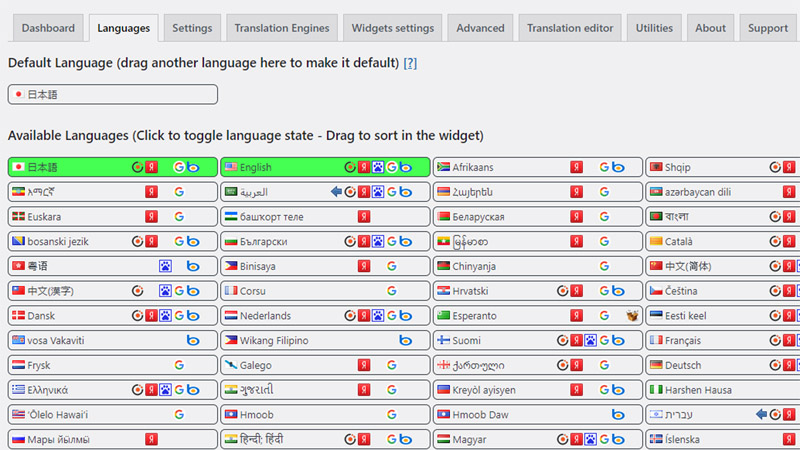
Transposh default language setting
After installing and activating this plugin, all WordPress settings will switch to English mode. To return to Japanese mode, drop down “Japanese” from the “Languages” tab to the “Default Language” select field in the Transposh settings.
【Transposh – Languages】
Transposh development platform moves to github
Tranposh is available from wordpress.org since version 1.0.9.2 github Moved the development platform to
As of March 30, 2023, the latest version of Transposh is 1.0.9.3, and you can get the plugin from the official website below.

【Transposh – Translation Engines】
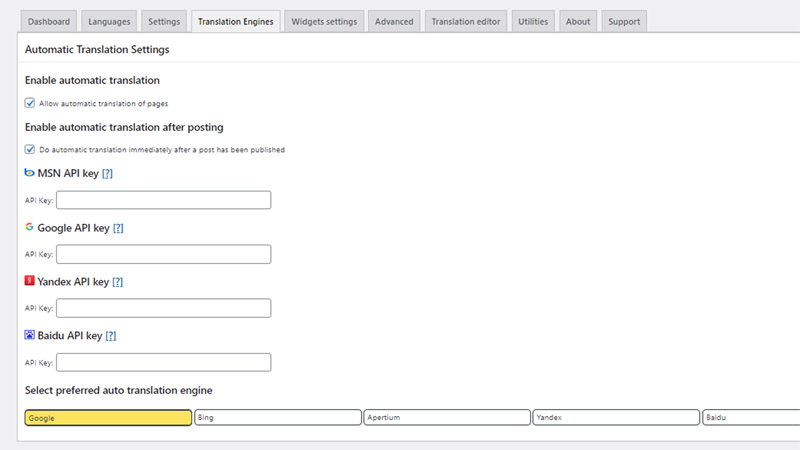
Version 1.0.9.3, together with our collaborators, fixed reported security issues, fixed most of the bugs, and is much more stable than previous versions.
It used to be unstable, but now it works fine when I set the translation engine to Google. Compatibility with PHP 8.0 and WordPress seems to be maintained.
Regarding the operation of Transposh, if you value security, it is recommended that you do not allow translations except for administrators.
In addition, if UTF-8 pictograms are included in the article, translation processing and character conversion will not be performed properly, so it seems better not to use pictograms as much as possible. If you use it, you can avoid this problem by excluding pictograms from the translation target with the following tags to avoid mistranslation.
<span class="no_translate">🍷</span>2025.09.01 Added
I updated the Transposh version from 1.0.9.6 to the latest version 1.0.10 and experienced a fatal error.
When I sent the author a server debug log and checked it, I was asked to upgrade to 8.x, as it could be due to the PHP version of 7.4.
So, I quickly increased the PHP version from 7.4 to 8.3 in the core server site settings. As a result, the site is now displayed safely.
2026.08.27 Added
If automatic translation stops working when you select "Google" in the Traslation Engines settings, select "Bing" in the settings, run the translation, and then select "Google" again to get automatic translation to work.
(3) Setting up a contact form – Contact Form 7
This is a contact form that supports Google's "reCAPTCHA." Plugin:Contact Form 7」、"Really Simple CAPTCHA"This has been achieved with the introduction of
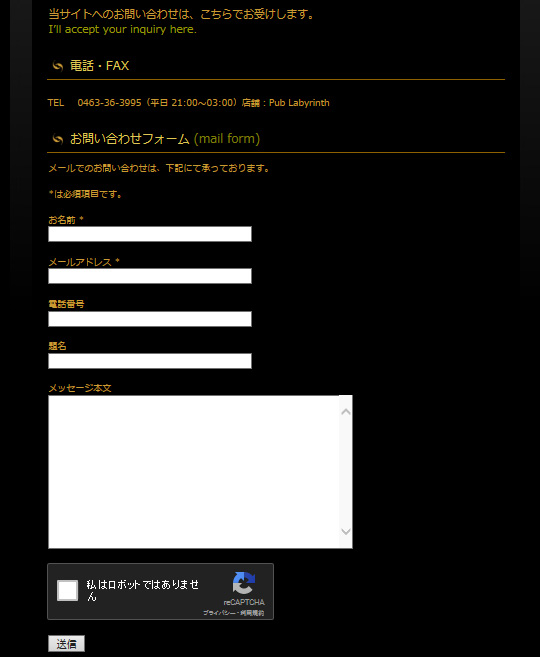
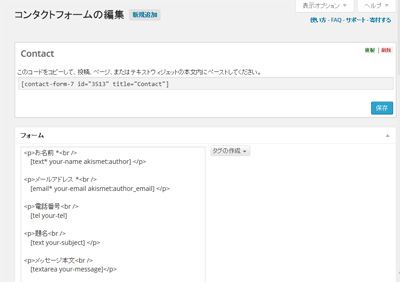
As mentioned in the news article below, when filling out Contact Form 7 forms from a smartphone, the default settings make the input fields narrower and inconvenient, so we recommend changing the CSS.

Define additional CSS like this:
/*
	Contact Form 7 入力欄の幅を調整
*/
.wpcf7 input[name="your-name"] { /* 名前入力欄 */
	width: 75%;
}
.wpcf7 input[name="your-email"] { /* メール入力欄 */
	width: 75%;
}
.wpcf7 input[name="your-subject"] { /* タイトル入力欄 */
	width: 100%;
}
.wpcf7 textarea[name="your-message"] { /* 本文入力欄 */
	width: 100%;
}
As for the reCAPTCHA integration module,Google reCAPTCHA(v3) With support for , the reCAPTCHA v3 badge will now appear on your screen.
In order to hide this, first you need to add the following description in the contact form.
<p class="recaptcha_policy">This site is protected by reCAPTCHA and the Google <a href="https://policies.google.com/privacy" target="_blank" rel="noopener">Privacy Policy</a> and <a href="https://policies.google.com/terms" target="_blank" rel="noopener">Terms of Service</a> apply.</p>Then add the following CSS to your WordPress to hide the reCAPTCHA v3 badge.
/*
    reCAPTCHA v3のバッジを非表示にする
*/
.grecaptcha-badge { visibility: hidden; }
2025.04.16 Added
Google reCAPTCHA will be migrated to reCAPTCHA Enterprise on Google Cloud by the end of 2025 and will be charged. Therefore, the Contact Form 7 specifications will also be changed.
For more information,About the alternative plugin for Google reCAPTCHA, "Cloudflare Turnstile" Please refer to
2026.06.27 Added
I uninstalled the plug-in "Really Simple CAPTCHA" that was installed with Contact Form 7 because its security level is low and its existence is only a disadvantage.
In Contact Form 7's "Integration settings with external APIs", Akismet and reCAPTCHA have already been selected as SPAM measures, so Really Simple CAPTCHA is not necessary at all.
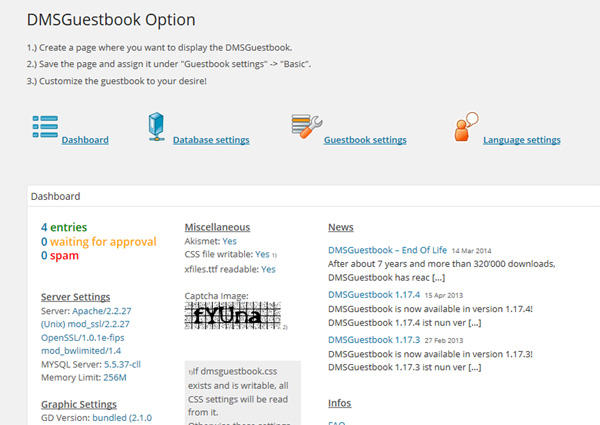
(4) Setting up a guestbook – DMSGuestbook → Gwolle Guestbook
This is a guest book corresponding to Google's "reCAPTCHA".
It is realized by the introduction of the plug-in "DMSGuestbook".
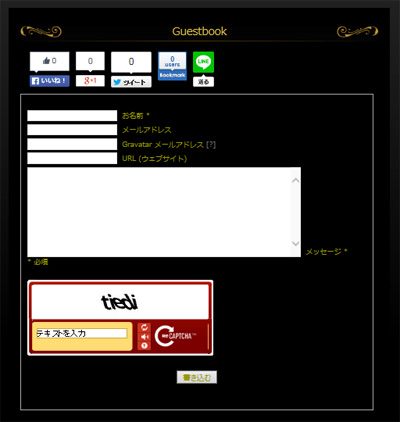
2018.03.28 Addendum
DMSGuestbook is no longer being maintained, so it is now "Gwolle Guestbook " using. ⇒ See the news Changing the Guestbook
2021.07.30 Added
Gwolle Guestbook has been translated into Japanese. For more information, please see the article below.

(5) Site map – PS Auto Sitemap → WP Sitemap Page
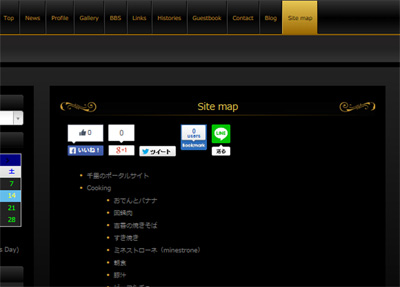
Added "Sitemap" menu to Top menu.
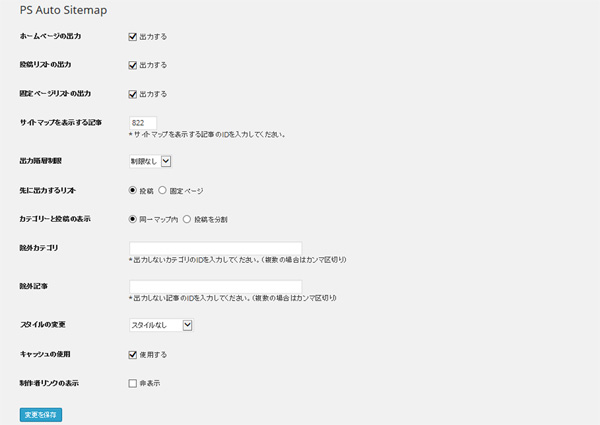
Plug-ins "PS Auto Sitemap" have realized in the introduction of it."
2021.06.06 Added
Currently, the operation of "PS Auto Sitemap" is stopped, and the following "WP Sitemap Page" is used instead.
2. Measures against SPAM
(1) Akismet
"Akismet” is a SPAM countermeasure plugin that comes standard with WordPress.
This plugin catches most SPAM posts.
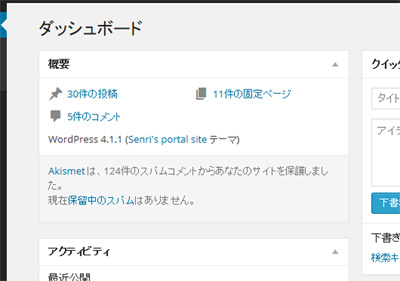
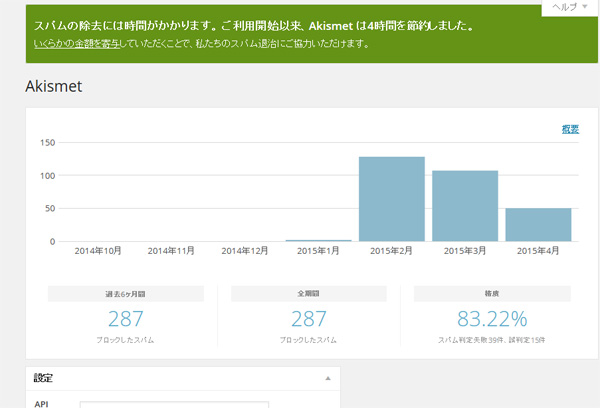
Akismet comes in both free and paid versions, and you can choose a personal plan (free) if it is not for commercial purposes, such as not displaying ads.
To activate Akismet, first select "Akismet Antispam" from the Jetpack settings in your WordPress dashboard, then click the "Set up Akismet account" button to obtain the "AKISMET API KEY".
After obtaining the API key, you can use it by selecting "Connect using API key" from the WordPress administration screen.
(2) Google No CAPTCHA reCAPTCHA → reCAPTCHA v3 (reCAPTCHA integration module for Contact Form 7) / reCaptcha by BestWebSoft / Cloudflare Turnstile
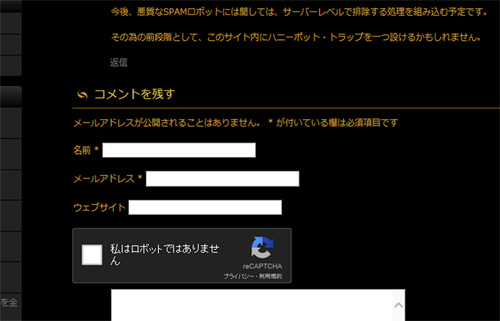
"No CAPTCHA reCAPTCHA” is the latest human-robot API developed by Google and a mechanism for filtering out SAPM posts at the source.
Google reCAPTCHA (v3) is currently the latest version.
This has a deterrent effect on SAPM posts that Akismet can't catch, and posts that are difficult to determine whether they are from a SPAM robot or a human post.
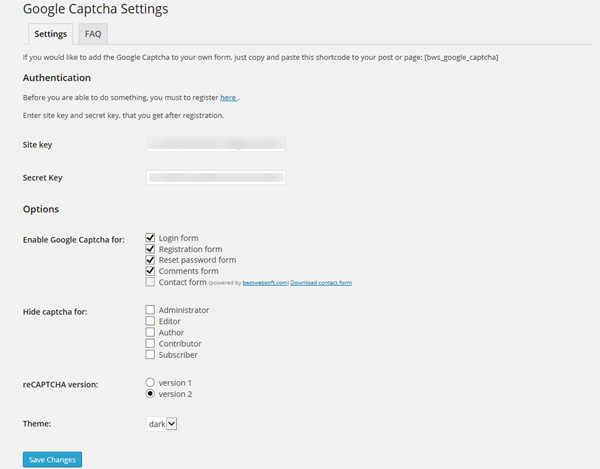
It is realized by introducing the plug-in "reCaptcha by BestWebSoft".
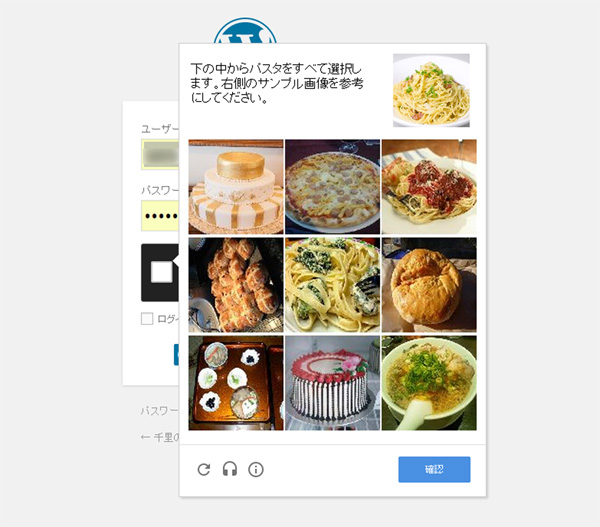
2018.11.08 update
This plugin no longer works due to the version upgrade of WordPress, so now a replacement plugin "Invisible reCaptcha for WordPress"using. (*Return to "reCaptcha by BestWebSoft" in June 2021)
*WordPress Forums › Support » Reviews ⇒ Doesn't work in login form
2019.01.08 update
Google's reCAPTCHA is now upgraded to v3, so the related plugins have also been changed to support v3.
Therefore, this website is set to operate in v3 mode by re-registering the v3 site key and secret key newly obtained from google in the reCAPTCHA integration module settings of Contact Form 7.
In addition, reCAPTCHA v2 required user operation such as checking the checkbox "I'm not a robot" (I'm not a robot), but reCAPTCHA v3 uses Google's AI to perform a series of user actions. It is a mechanism that analyzes the operation and scores how suspicious the movement is, eliminating the need for any user operation.
2021.07.12 Update
The plugin "Invisible reCaptcha for WordPress" has been reported to not work properly in WordPress 5.7.2, and it was found that it does not support PHP 8.0, so we have disabled this plugin. ,It has been deleted.
Please note that deleting this plugin in WordPress 5.7.2 / PHP 7.4 environment caused a system error.
So, instead of this plug-in, we used the previous "reCaptcha by BestWebSoftI introduced. It is currently operating without problems, and it seems that maintenance is being carried out continuously, so it seems to be able to use it with confidence.
The plug-in "reCaptcha by BestWebSoft" has a function to hide the badge (logo) of Google reCAPTCHA, which is a very useful plug-in.
Note that reCaptcha by BestWebSoft is a paid option for Contact Form 7, so you can work around this issue by using the Contact Form 7 reCAPTCHA Integration Module.
2023.11.16 Update
With the introduction of Jetpack comments, the plugin "reCaptcha by BestWebSoft" has been uninstalled. If you enable reCaptcha, Jetpack commenting does not work.
Even if reCaptcha is disabled, the login form and comment form will be protected from SPAM and brute force attacks by Jetpack's Akismet and Kadence Security (formerly Solid Security/iThemes Security), so I don't think there will be any problems.
2025.03.05 Added
I installed and enabled the plugin "reCaptcha by BestWebSoft" on the test site and confirmed that Jetpack comment input works.
If you are using Google AdSense, that is, Akismet is not available for commercial use, you should use this plugin.
2025.04.16 Added
About the alternative plugin for Google reCAPTCHA, "Cloudflare Turnstile"
Google will make all reCAPTCHA users by the end of 2025 Migrate to reCAPTCHA Enterprise on Google CloudThe plan is to make the user do so, and using Google reCAPTCHA will automatically be subject to a fee.
A workaround is to use a free alternative plugin with reCAPTCHA equivalent functionality Cloudflare Turnstile There is also a way to install it.
In Contact Form 7 version 6.1, the reCAPTCHA integration module has been revised to be compatible with Google Cloud reCAPTCHA, and Contact Form 7 6.1 will introduce the integration module for Cloudflare Turnstile, an alternative CAPTCHA solution.
Cloudflare Turnstile is free (at least for now) and is said to be possible to work better than Google reCAPTCHA.
3. Statistical information
(1) NewStatPress → SlimStat Analytics → WP Statistics
Sidebar site statistics plugin "NewStatPress" I have to display using. The details of the statistics can be viewed from the site administrator's administration screen.
In addition, if you specify anything other than "Never" in the NewStatPress Data Purge setting, all statistical information will be deleted when the specified time limit is reached from the start of aggregation, and the aggregation will start again. , please be careful.
I've failed once with this setting. (Lol) *
* May 8 postscript
After that, with the latest version of NewStatPress, I set the Data Purge setting to one month and cleared the DB, leaving one month of data and saving the counter values. It seems that the phenomenon that the counter value becomes 0 was just a bug. orz
👉 Look at [resolved] access number automatically reset everyday (4 posts)
* July 30 postscript
If you specify a value other than "Never" in the Data Purge settings, the counter values are aggregated only for that period of time.
Therefore, please note that the general counter is not saved.
By the way, in order to prevent the NewStatPress DB from becoming bloated, I set the aggregation period to 3 months, and for the aggregation of the general counter, I used the aggregation value of the Perl program instead of using the counter value of NewStatPress. I made it
For more information on counter management, see this related article. 👉 Support for mobile phone and system renovation
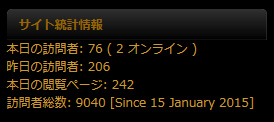
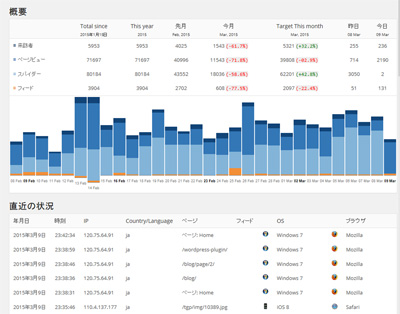
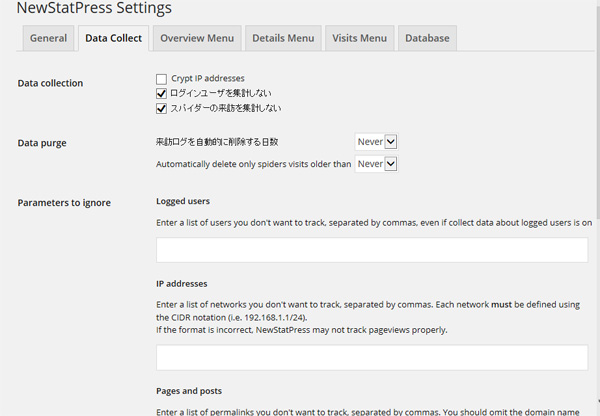
Updated 2025.03.04
This plugin has an older design compared to recent access analysis plugins, consumes too many resources, is slow to operate, and has not been updated for over two years, causing problems with compatibility and other issues, so I stopped using it and uninstalled it.
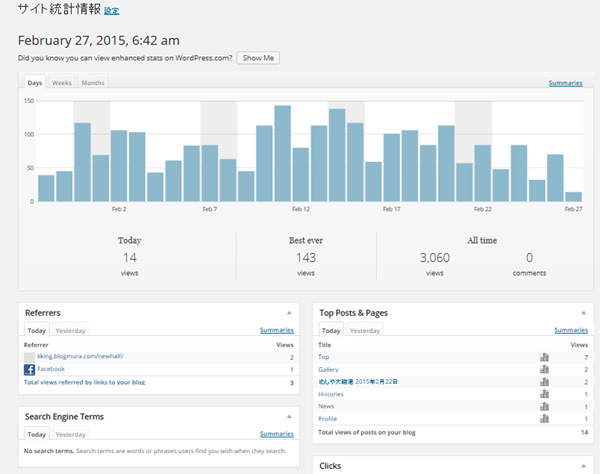
Jetpack's "Statistics" is a plug-in that provides access analysis and statistical information, but it will no longer be available for free on commercial sites from 2023. If your site uses AdSense or affiliate marketing, it is considered a commercial site.
This site uses Google AdSense, so Jetpack's "statistical information" is no longer available. Therefore, statistical information is managed by calling an access analysis cgi program written in Perl from WordPress. Other WordPress plugins SlimStat Analytics We also use Google Analytics 4 and core server access analysis.
If you have a cache-based plug-in installed, you must set the tracking mode to "Client" when setting up SlimStat Analytics.
For more information about SlimStat Analytics, please also refer to the following article.
2026.03.13 Added
Since SlimStat Analytics version 5.4.1 caused trouble due to a serious bug in WordPress 6.9.4 and later, we uninstalled the SlimStat Analytics plugin and installed the following plugin WP Statistics.

2026.04.25 Added
In order to check for malicious BOT and unauthorized access in real time, we have implemented the ``BOT-compatible super-fast version'' from the following access analysis CGI ``ultra-light access analysis CGI program supervised by Gemini''.
(2) Jetpack
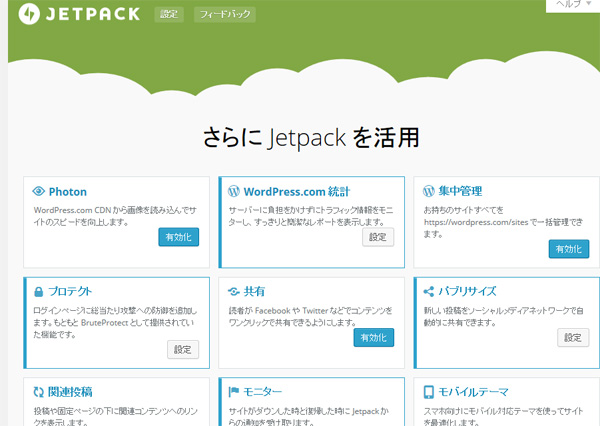
Plugin provided by Automattic, the original WordPressJetpack by WordPress.com"is. Jetpack's Dashboard WordPress.com Stats also allows you to view simple site stats right from your admin panel.
Jetpack allows you to connect your blog with your WordPress.com account and enjoy a variety of useful features.
2023.03.31 update
I use the functions of "Akismet Anti-spam", "Site Statistics", "Gravater Hover Card", "Protect", "Subscribe", "WP.me Abbreviated Link", "Comments", and "Boost".
In addition,If you enable "Site Accelerator (formerly known as Photon, now move function to boost image CDN)" then the plugin "EasyFancyBox" will be disabled, so this is not enabled.
2020.01.28 Addendum
If you enable Jetpack, OGP tags will be output without permission in your blog. If the theme program supports his OGP tag output, the OGP tag will be duplicated, so in that case he can suppress the OGP tag output by adding the following line to the theme program “functions.php” You can.
/* 【Jetpack】OGPタグの出力抑制 */
add_filter( 'jetpack_enable_open_graph', '__return_false' );
2020.03.30 Addendum
In Jetpack version 8.3 and later, if you enable "Site Accelerator (formerly known as Photon, now move function to boost image CDN)" then all images may no longer be displayed. This may be because SDN (Software Defined Networking) may not work properly depending on the server's security settings. This setting has the potential to cause many problems in operation, so we recommend that you remove it.
More information about this problem can be read in the following articles:
2023.03.31 Added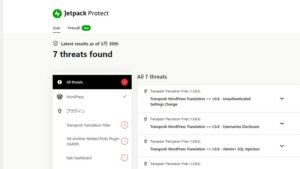
Currently, I have the following Jetpack security plugin "Jetpack Protect" installed.
Jetpack Protect leverages Automattic brand WPScan's extensive database of over 25,000 registered malware and vulnerabilities to scan your WordPress site for malware and keep your site secure. Jetpack's dashboard shows the results of security checks for WordPress itself, plugins, and themes.

2026.07.26 Added
Jetpack Protect continues to issue alerts even if the plug-in is compatible with a security patch, and in addition to the fact that the plug-in scan is not accurate, the excellent security plug-in "Kadence Security Basic" is already installed.Jetpack Protect I disabled and uninstalled it.
Kadence Security isJetpack Protect Compared to Kadence, the detection accuracy is very high, and the "Mute (ignore)" function is also easy to use, so you can protect your site with just Kadence.
Features added between February 17th and February 2015
1. UI related
When the blog becomes multiple pages, the function to jump directly to the specified page has been added. Plugin"WP-PageNavi"And"Wp Pagenavi Style” and refurbishment of the WordPress PHP program.
Fixed a total of 9 WordPress PHP programs.
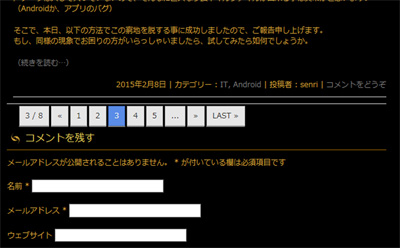
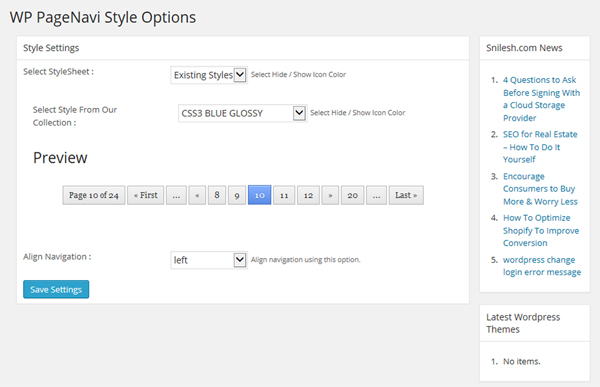
HPB theme template program * The code in the page navigation part was replaced with the following PHP code "for WP-PageNavi".
* blog.php / blog_news.php / archive.php / blog_gallery.php / search.php
<?php /*-- HPBのページナビを削除
<div class="nav-previous"><?php next_posts_link( __( '« 古い記事', '_hpb' ) ); ?></div>
<div class="nav-next"><?php previous_posts_link( __( '新しい記事 »', '_hpb' ) ); ?></div>
*/ ?>

<!-- for WP-PageNavi -->
<?php if(function_exists('wp_pagenavi')) { wp_pagenavi(); } ?>
2019.04.13 update
Currently, the plug-in "Wp Pagenavi Style" has not been updated and is not compatible with PHP 7.1.
Therefore, stop using this plugin and replace it with the alternative plugin "Styles For WP Pagenavi Addon" using.
2023.04.02 update
Regarding “Styles For WP Pagenavi Addon”, I confirmed the phenomenon that it conflicted with the CSS of the theme and the design of the menu was broken, so I stopped and uninstalled this plugin.
[WP-PageNavi settings]
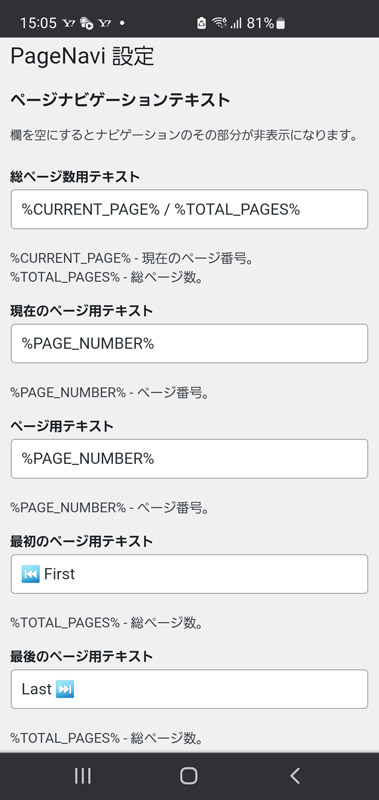
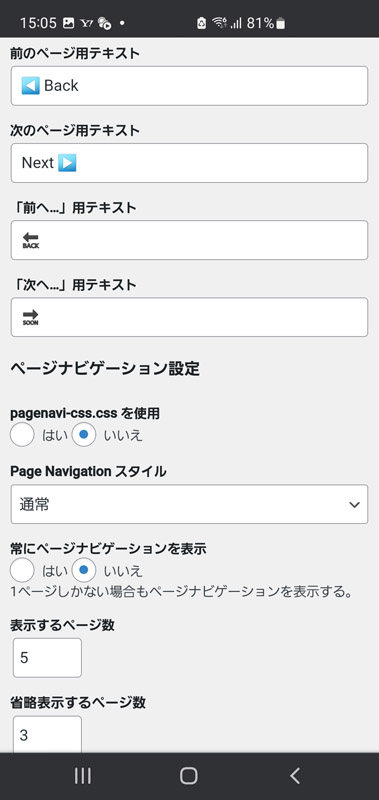
Currently, regarding page navigation design, select "No" in the WP-PageNavi settings listed in the "Use pagenavi-css.css" and the additional CSS definitions shown below have been supported.
With this CSS, the navigation button does not protrude when viewed on a smartphone, so it is also responsive.
[WP-PageNavi CSS settings]
/*
	WP-PageNavi のスタイル
*/
.wp-pagenavi {
	padding: 10px 9px 10px !important;
	display:block !important;
	clear:both !important;
}
.wp-pagenavi a ,.wp-pagenavi span.pages, .wp-pagenavi span.extend {
	display: inline-block;
	color:#333333 !important;
	text-shadow:0px 1px #F6F6F6 !important;
	padding:3px 9px 3px 9px !important;
	border:solid 1px #B6B6B6 !important;
	box-shadow:0px 1px #EFEFEF !important;
	-moz-box-shadow:0px 1px #EFEFEF !important;
	-webkit-box-shadow:0px 1px #EFEFEF !important;
	background:#E6E6E6 !important;
	background:-moz-linear-gradient(top,#FFFFFF 1px,#F3F3F3 1px,#E6E6E6) !important;
	background:-webkit-gradient(linear,0 0,0 100%,color-stop(0.02,#FFFFFF),color-stop(0.02,#F3F3F3),color-stop(1,#E6E6E6)) !important;
	font-size:14px !important;
	margin-right:3px !important;
	margin-bottom:4px !important;
	text-decoration:none !important;
}
.wp-pagenavi a:hover {
	display: inline-block;
	color:#fff !important;
	text-shadow:0px 1px #3C3C3C !important;
	border-color:#202020 !important;
	background:#525252 !important;
	background:-moz-linear-gradient(top,#9F9F9F 1px,#6C6C6C 1px,#525252) !important;
	background:-webkit-gradient(linear,0 0,0 100%,color-stop(0.02,#9F9F9F),color-stop(0.02,#6C6C6C),color-stop(1,#525252)) !important;
	color:#FFFFFF !important;
	box-shadow:0px 1px #E7E7E7 !important;
	-moz-box-shadow:0px 1px #E7E7E7 !important;
	-webkit-box-shadow:0px 1px #E7E7E7 !important;
}
.wp-pagenavi span.current{
	display: inline-block;
	padding:3px 9px 3px 9px !important;
	border:solid 1px #DCDCDC !important;
	color:#fff !important;
	box-shadow:0px 1px #E7E7E7 !important;
	-moz-box-shadow:0px 1px #E7E7E7 !important;
	-webkit-box-shadow:0px 1px #E7E7E7 !important;
	margin-right:3px !important;
	text-shadow:0px 1px #3C3C3C !important;
	border-color:#202020 !important;
	background:#525252 !important;
	background:-moz-linear-gradient(top,#9F9F9F 1px,#6C6C6C 1px,#525252) !important;
	background:-webkit-gradient(linear,0 0,0 100%,color-stop(0.02,#9F9F9F),color-stop(0.02,#6C6C6C),color-stop(1,#525252)) !important;
}
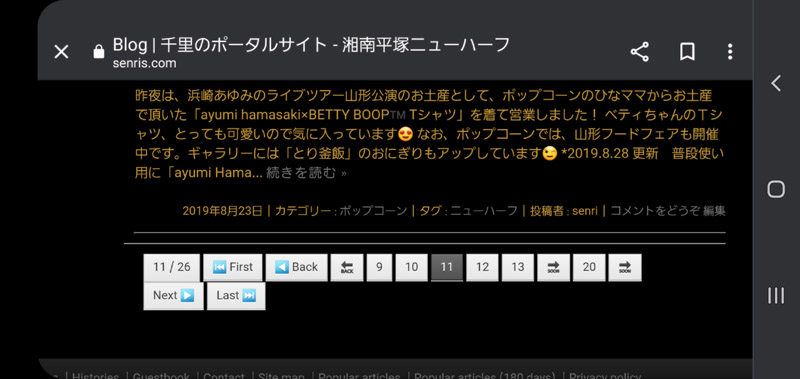
In addition, in the Japanese version of WordPress environment, in the theme I use, if the WP-PageNavi settings are left as default, the size of the navigation button becomes strange when in smartphone mode. However, it seems to work fine on the English version of WordPress.
Therefore, by changing all the fonts on the setting screen to the UTF-8 code system (input including pictograms), this problem was successfully resolved.
[Page navigation when viewing on a smartphone]
2023.04.09 update
In the settings of WP-PageNavi, the "Previous..." and "Next..." texts are defined as follows so that UTF-8 pictograms are not subject to translation in order to prevent Transposh's conversion errors. increase. (Setting example of "Previous...")
<span class="no_translate">🔙</span>2025.03.16 Added
To avoid cluttering pagination, we have deleted the text "Previous..." and "Next...".
(2) Add scrollback button to Top page to WordPress blog – WPFront Scroll Top
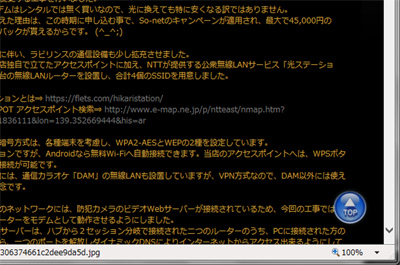
The scrollback button is now floating so that you can quickly return to the beginning of the page even if the page is long. Plugin"WPFront Scroll Top" have realized in the introduction of it."
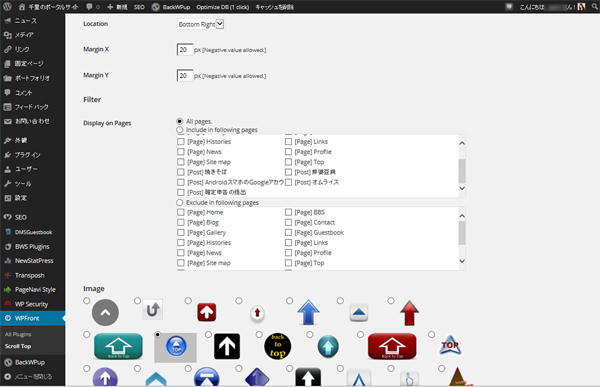
2021.02.14 Added
Since WordPress 5.6, "WPFront Scroll Top" no longer works due to conflicts with other plugins, so instead use "To Top" using.
In the To Top setting, the style is set to image, and the image of WPFront Scroll Top is borrowed. 😅
2026.03.13 Update
In WordPress 6.9.4, there was an issue with the button size of To Top version 3.0, so we disabled the To Top plugin and reverted to WPFront Scroll Top.
(3) Add today’s popular articles tab to the sidebar – WordPress Popular Posts
The currently read popular pages, categories, and eye-catching images are displayed in rankings every day. Plugin"WordPress Popular Posts" have realized in the introduction of it."
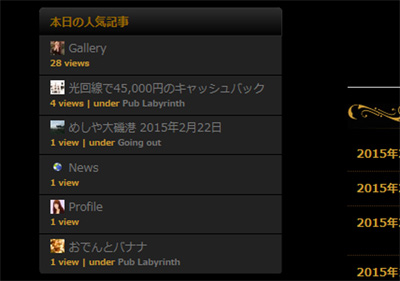
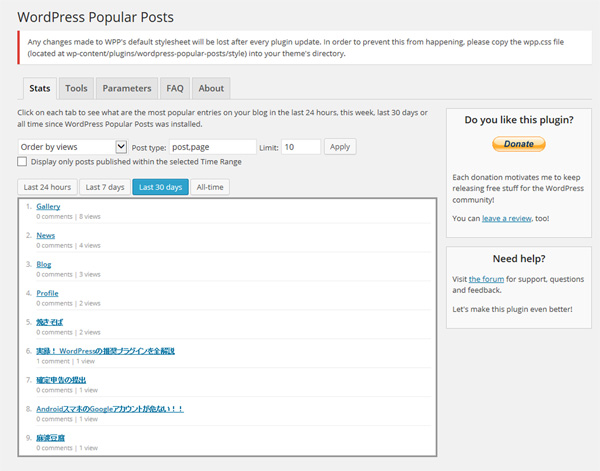
About WP Popular Posts settings (tools)
If you are using a cache plugin (WP Super Cache, WP Fastest Cache, etc.)Load list of popular posts via AJAX” to “enable”.
For more information on customizing WordPress Popular Posts, please also see the following articles:
(4) Content protection – No Right Click Images Plugin
Not perfect, but suppress saving image from right click.
Plug-ins "Content Copy Protection & Prevent Image Save" have realized in the introduction of it."
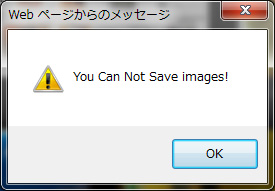
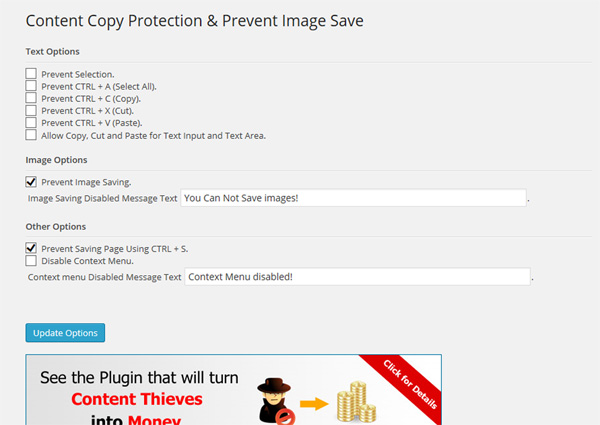
2022.07.23 update
This plugin is currently uninstalled. Instead, I use the plugin "No Right Click Images Plugin" linked below.

(5) Addition of language switching launcher – launcher.cgi
When linking to an external site from the top page, it is now possible to automatically switch the current language along the Transposh interface.
BBS is supported by the newly developed Perl CGI program Joyful X, but elsewhere, it has been achieved through the new development of Perl's CGI program "launcher.cgi." However, although the interface is multilingual, the destination is currently bilingual (Japanese and English).
In addition, a time lag of 5 seconds is set for the language switching launcher. The meaning is to give the user time to press the "back" button of the browser.
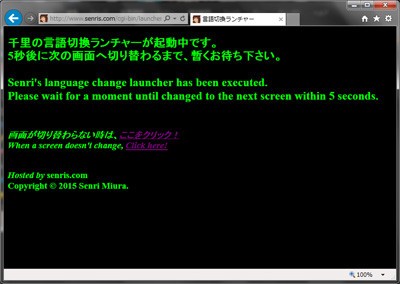
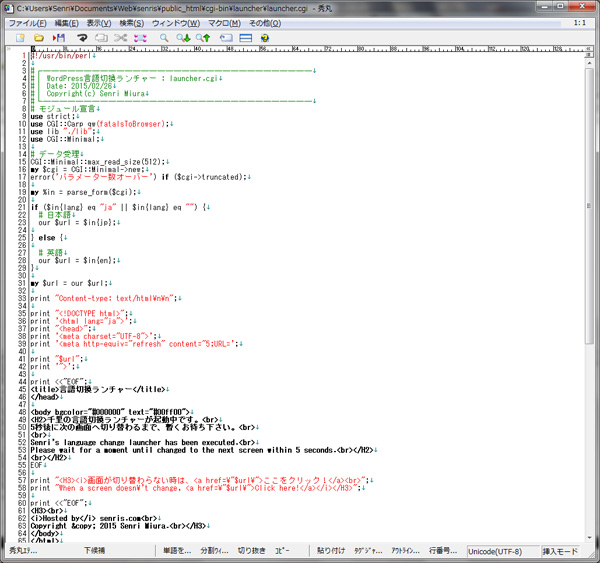
2023.03.29 Added
In Google Search Console, while checking the URLs blocked by robots.txt for page index registration, we discovered that other servers were illegally using this program (using this site as a stepping stone to lead to illegal sites). , carried out maintenance of the program in the part related to security.
Please note that the specific details of the modifications to the program will not be made public for security reasons.
2026.04.20 Added
As a result of code verification of launcher.cgi by Gemini, it is still"Open redirect"And"Cross-site scripting (XSS)"There are still vulnerabilities related to this that could be exploited, so we asked Gemini to fix the problem areas.
(6) Modification of external CGI program – Joyful Note X
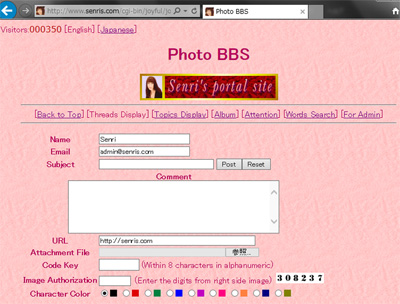
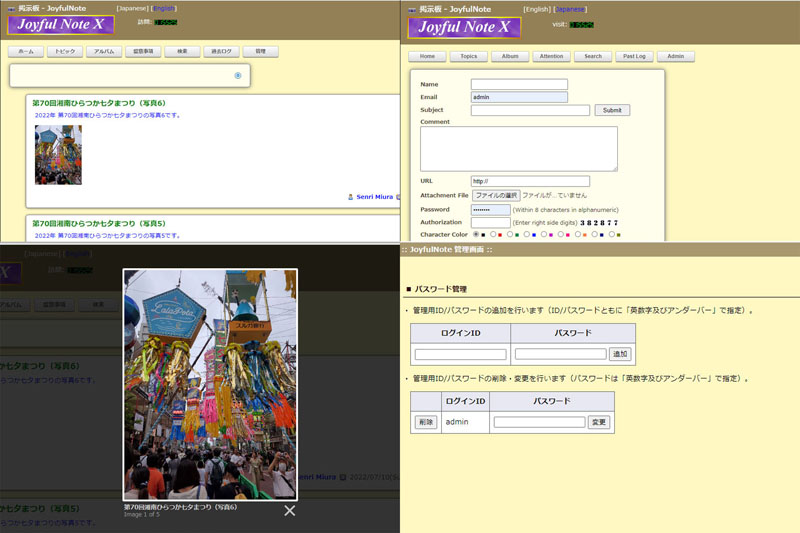
In order to automatically switch languages synchronized with Transposh, we have renovated the CGI program "joyful.cgi ⇒ joyfulx.cgi, etc.," an image message board written in Perl, and have developed a new Joyful Note X. Several program modifications and template files (html) for multilingual are added.
2022.07.24 update
Currently, this program has been upgraded to v2.0, and the source code is published in the following article.
2. System management
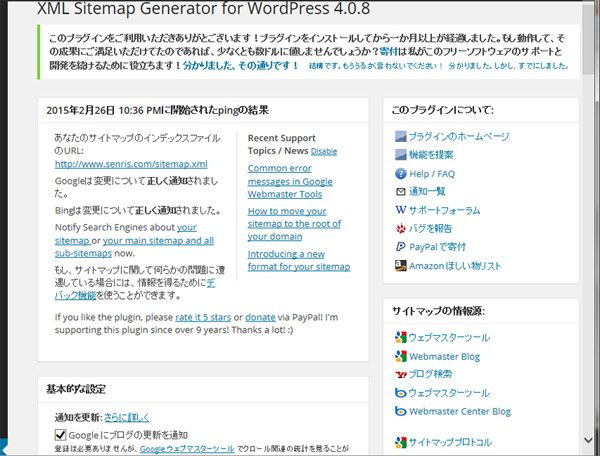
(1) Automatic generation of XML sitemap and automatic notification to search engines
Plug-ins "Google XML sitemaps" have realized in the introduction of it."
Google, Yahoo, Bing and automatic registration on Ask.com.
Added on 2022.08.02 / Updated on 2026.04.03
When I loaded a sitemap created with Google XML Sitemaps from Google Search Console, an error occurred and I had trouble loading it several times, so I disabled this plugin and replaced it with the newly introduced SEO plugin Yoast SEO (2026.04.03). Rank Math SEO (changed to ) to generate an XML sitemap.
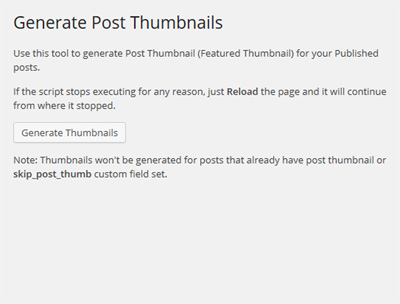
(2) Automatic registration of thumbnail images – XO Featured Image Tools
Thumbnail images can be automatically registered for post pages and custom post pages. At the time of posting, the eye-catching image is automatically set, which is very convenient.
Plug-ins "Auto Post Thumbnail" have realized in the introduction of it."
2021.11.22 Added
I currently uninstall Auto Post Thumbnail (Auto Featured Image) and use the "XO Featured Image Tools" below.

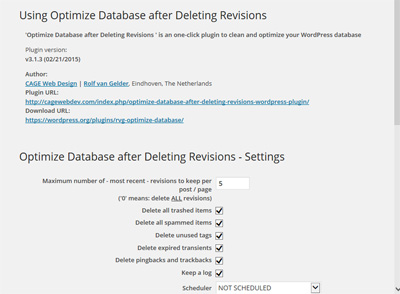
(3) Optimize Database after Deleting Revisions
Bulk delete old revision data to slim down your DB.
Plug-ins "Optimize Database after Deleting Revisions", it will be realized with the introduction of. This site is set to save posts up to 5 generations.
2023.04.23 Added
This plugin can automatically delete the following data and also optimizes InnoDB tables.
- Old revision of article
- articles in trash
- spam comments
- unused tags
- expired cache
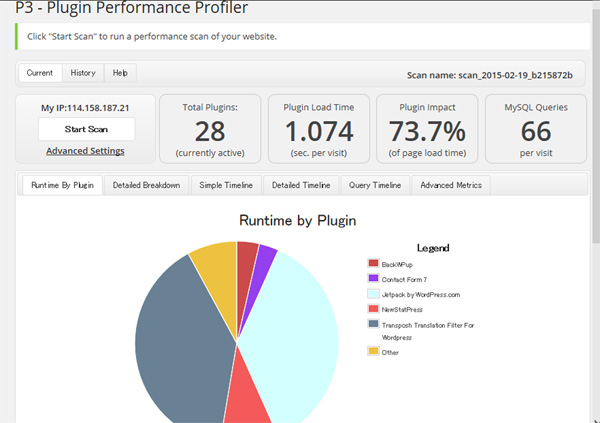
(4) Investigation of plug-in load status
Measure the performance of installed plugins to see if any plugins are overwhelming your system. Plugin"P3 (Plugin Performance Profiler)", it will be realized with the introduction of it.
2019.04.18 update
We have stopped using this plugin and have uninstalled it because we cannot confirm that it works properly with PHP 5.6/7.0.
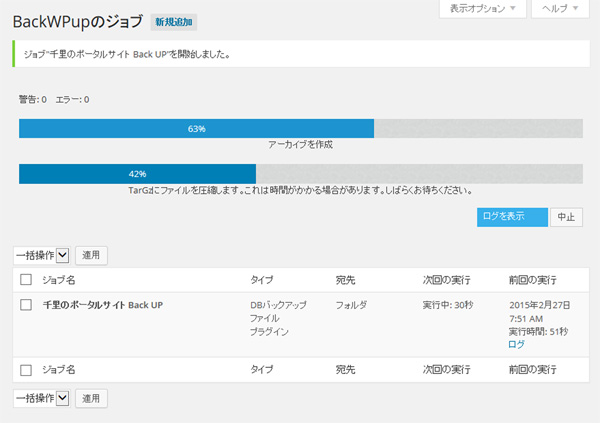
(5) WordPress backup – BackWPup → UpdraftPlus WordPress Backup Plugin
Back up your entire Wordpress system, including databases and plugins.
Plug-ins "BackWPup", it will be realized with the introduction of it.
If the plug-in "WP Super Cache" is running, it is recommended that you temporarily stop the operation before backup and clear the cache before performing backup.
2023.03.26 update
If a timeout request is issued from the server during backup and the error ends, change the setting value of "Reduce server load" from the default "disabled" to "minimum" in the backup job settings, and change the PHP setting file on the server side. It may work if you change the value of 'max_execution_time' in (php.ini) from default to 120 seconds.
Also, we recommend that you avoid backing up the whole job and separate jobs for backing up WordPress itself and content.
Below is an example of a core server, but if you change the php settings (for php 7.4) as follows, you can improve performance even further.
a) PHP OPcache configuration
opcache.enable=1
opcache.interned_strings_buffer=8
opcache.max_accelerated_files=10000
opcache.memory_consumption=128
opcache.save_comments=1
opcache.revalidate_freq=1
b) Change the maximum memory value consumed by scripts
memory_limit = 2048M ; Maximum amount of memory a script may consume (8MB)2021.11.25 Update
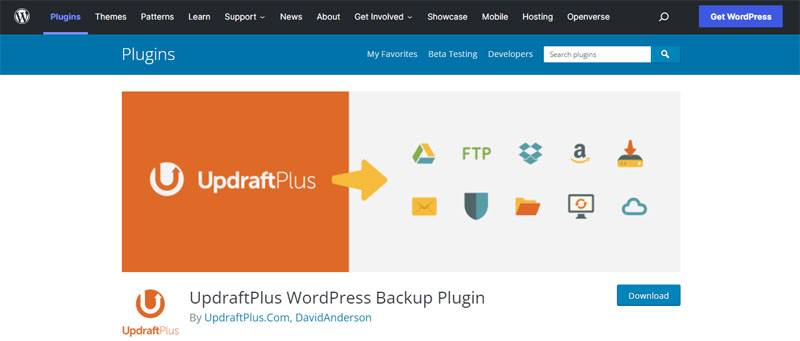
BackWPup has a heavy load on the server and frequently stops processing in the middle of backup, so now we use the following plug-in "UpdraftPlus WordPress Backup Plugin" instead.
Note that UpdraftPlus free version cannot back up WordPress main program (core files) including .htaccess and wp-config.php.

On shared servers such as core servers, UpdraftPlus backup processing may stop midway due to load limits. To avoid this, we recommend changing the archive division size from the default 400MB to 200MB in the UpdraftPlus settings as shown below.
Settings > Show advanced settings > Split archive: > 200
2026.04.03 Update
I uninstalled BackWPup because it puts a heavy load on the server.
(6) WordPress Importer
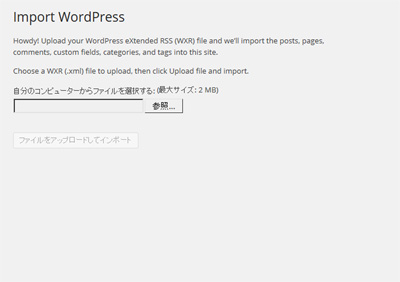
Since there is BackWPup, I don't think that "WordPress Importer" is usually necessary, but for the time being, you can read the data exported by WordPress. It may be convenient when you want to restore the DB lightly.*2026.04.04 Added – This plugin is uninstalled as it is not needed.
2021.06.17 Update
Previously, WP Database Backup, which I was trying, deleted the plug-in because it could not restore DB completely and it was not compatible with PHP 8.0.
2023.04.11 Added
A plugin that can export WordPress DB data as an XML file, one of the tools used when moving servers. DeMomentSomTres WordPress Export Posts With Images there is.
With this plugin, you can automatically import image data when importing XML files from the WordPress importer, and even if the URL of the transfer destination changes, it will automatically rewrite the DB of the post data, which is convenient.
However, when I changed the WordPress installation directory and URL and ran this plugin, it did not change the URL set with the internal links and shortcode parameters used by various plugins, so manually changing the URL was required later.
Changing the URL takes a lot of time and effort, so I think it's wise not to change it as much as possible.
In addition, although verification has not been completed, a plug-in with similar functions Export media with selected content There is also However, we do not actively recommend this plugin as it has not been maintained and supported for a long time.
Additional functions added from March 2015 to April 3, 2026
1. Additional plugins added
(1) TinyMCE Advanced → Advanced Editor Tools
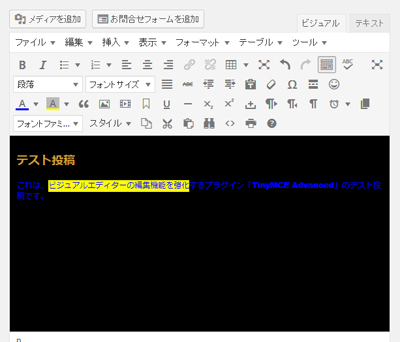
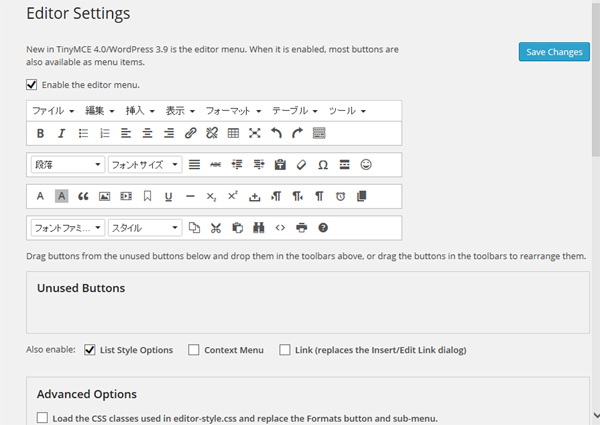
A plugin that enhances the editing function by adding an edit button to the WordPress visual editorTinyMCE Advanced" added.
2021.02.14 Added
TinyMCE Advanced was renamed to "Advanced Editor Tools" with the release of WordPress 5.6.
(2) WP Super Cache → WP Fastest Cache
A plugin for speeding up the display of WordPress "WP Super Cache" added.
In addition, if you use such a cache plug-in incorrectly, the DB may be damaged at some point, so if you cannot restore the DB by yourself, it is better not to use it.
By the way, if you activate this plugin, even the ranking display of WordPress Popular Posts will be cached, and real-time results will no longer be displayed.
This solution can be resolved by enabling "Load Popular Post List via AJAX" in the "Tools" tag in WordPress Popular Posts.
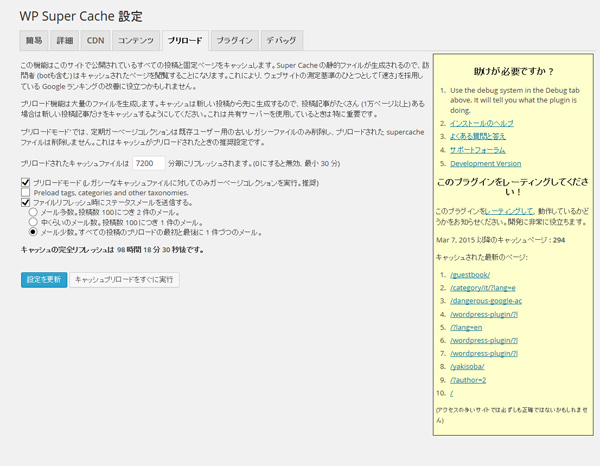
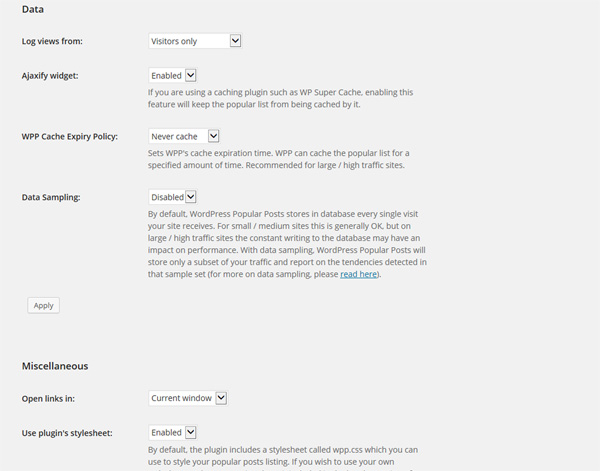
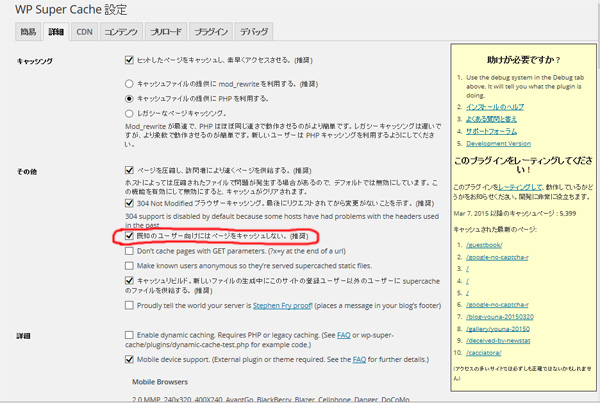
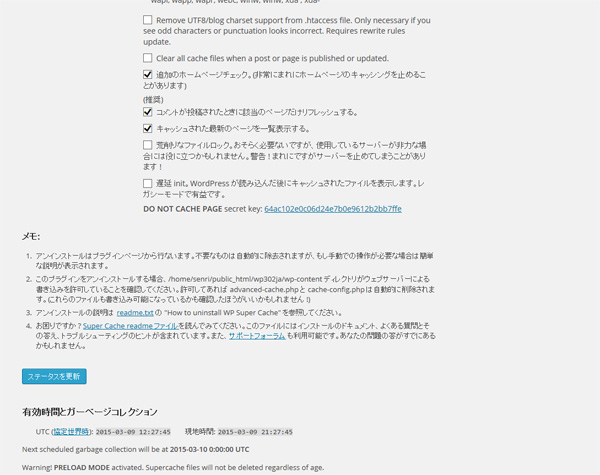
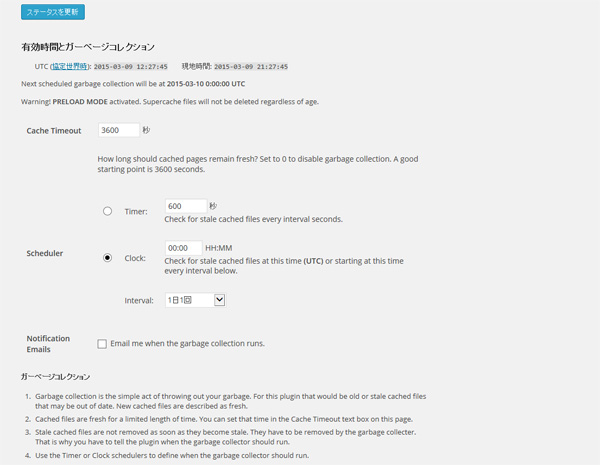
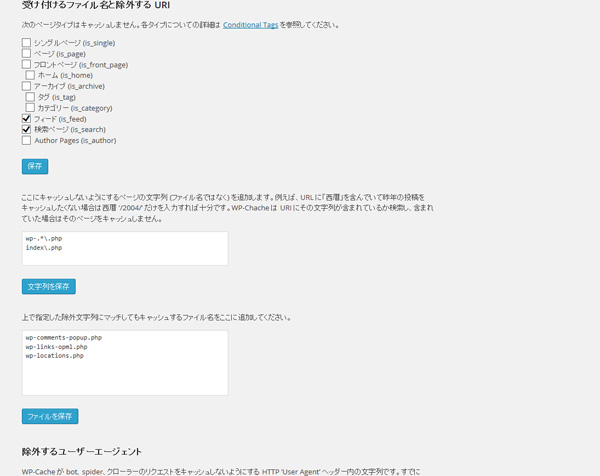
For reference, here are the settings for WP Super Cache on this site.
In order to avoid troubles, I think you should check "Do not cache pages for known users (recommended)" especially in advanced settings.
2018.03.29 Addendum
Currently, the display is faster due to the version upgrade of PHP, so this plug-in is uninstalled to avoid the hassle of operation.
2025.02.27 Added
Regarding caches, it was developed by Automattic, the company that is the origin of WordPress, similar to the developer of WP Super Cache. Jetpack Boost Alternatively, we recommend using the page cache function built into the plugin "WP-Optimize".
The caching function of WP-Optimize is in a relatively faster category than other cache-based plugins, and it seems to have a fairly high rating.
Note that on sites that operate the plugin "Transposh", article translations may not work properly due to the effects of cache, so in that case you will need to clear the cache only when translating the article or disable the cache function.
The caching function of WP-Optimize allows you to purge all pages as well as only the pages you are browsing, which is very convenient, but since there was a problem displaying the plugin "Popup Maker", "Enable Page Cache" has not been selected.
2026.04.02 Added
After installing many plugins, the display of the site became slow,GeminiAt the strong recommendation of my teacher, I installed the following cache plugin "WP Fastest Cache", which is the most stable and has the simplest settings.

WP Fastest Cache has a very high user rating (many 5-star ratings) and is stable. However, some advanced features (such as mobile caching) are only available in the paid version, and are mainly specialized in ``caching'' and ``file reduction (compression).'' Although it is simple, the settings are detailed, and it is easy to make adjustments such as excluding specific pages from the cache.
In addition, when caching is introduced, to prevent widgets from the plugin "WordPress Popular Posts" that displays popular articles and shortcodes from the plugin "WP Statistics" that displays site statistical information from being cached,Ajax must correspond to.
The following example shows how to make the WP Statistics shortcode defined in the text widget compatible with Ajax. As a result of trying it, it seems that Ajax does not work unless you activate the paid plan add-on "Rest API Add-on".
Therefore, it is physically impossible to set ``not to cache only part of the page (widgets)'' with the free version of WP Fastest Cache, so as a compromise when using the free version, we will set it to automatically clear the cache once every hour.
1. Insert the WP Statistics shortcode inside the text widget that displays statistics as below:
ajax=1include<div class="wp-statistics-widget">訪問者数: [wpstatistics stat=visitors time=today ajax=1] / [wpstatistics stat=visitors time=yesterday ajax=1] ([wpstatistics stat=usersonline ajax=1] オンライン) 全ページビュー数: [wpstatistics stat=visits time=today ajax=1] / [wpstatistics stat=visits time=yesterday ajax=1] 現ページビュー数: [wpstatistics stat=pagevisits time=today ajax=1] / [wpstatistics stat=pagevisits time=yesterday ajax=1]</div>2. WP Statistics General Settings
- Tracking Method
Set Tracking Method to "Client Side Tracking (Recommended)".- ABypass Ad Blockers
If you check "Bypass Ad Blockers", you will be able to forcibly count the accesses of users who have ad blocks installed in their browsers (such as uBlock Origin) by disguising the JS file name.
However, there are cases where this conflicts with cache plugins and causes script loading errors. In that case, try unchecking this and clicking "Refresh" to clear the cache and check the display in incognito mode.3. REST API configuration for WP Statistics
Enable “WordPress REST API Integration” (paid plan)4. Configuring WP Fastest Cache
Open the WP Fastest Cache settings screen and exclude the following paths from caching.
- Setting location:
Exclude(Exclusion settings) tab >Add New Rule(New rule added)- Setting details:
If REQUEST_URI>Contains>/wp-json/wp-statisticsIf REQUEST_URI>Contains>/wp-admin/admin-ajax.php5. WP Fastest Cache"Delete cache"from tab"Delete all caches"Execute.
(3) WP Widget Cache
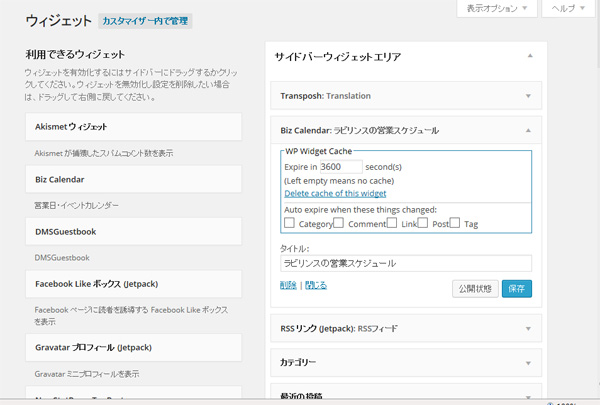
A plugin "WP Widget Cache" has been added to speed up the display of the sidebar by caching widgets.
This plugin can also be used for widget cache control.
"WP Widget Cache" can be used together with "WP Super Cache".
By adding this plugin, the setting tag of "WP Widget Cache" is added to all widgets.
* May 18 postscript
I uninstalled this plugin as it did not provide any benefits for this site.
(4) Easy FancyBox (renamed Firelight Lightbox)
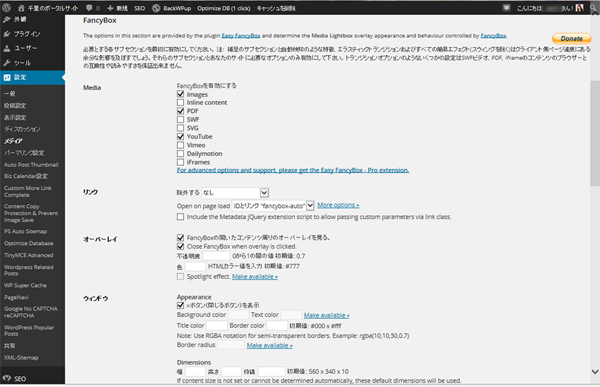
A convenient plug-in for enlarging thumbnail images in another window "Easy FancyBox" added.

2023.03.31 update
Please note that if you enable Jetpack's "Site Accelerator (formerly known as Photon, now move the function to the boost image CDN)" then this function will be disabled.
2018.03.28 Addendum
From Easy FancyBox ver.1.6.3, PHP version must be 5.6 or higher, so it is necessary to check the server environment. See blog ⇒ 500 error supating in Easy FancyBox plug-in update
(5) RSS Image Feed
A plugin that adds featured images to WordPress RSS feedsRSS Image Feed" added.
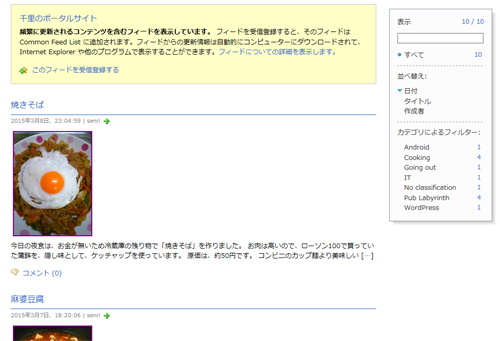
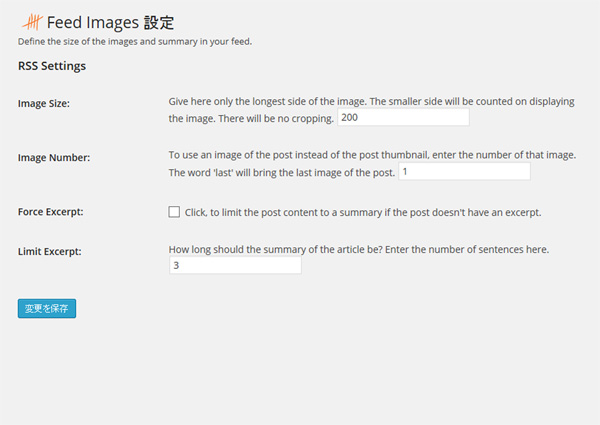
2020.01.10 update
This plugin stopped working after upgrading to PHP 7.1. Modifying “functions.php” corresponded with.
(6) Custom More Link Complete → Auto Limit Posts Reloaded
Changed the wording of the More tag "Read more" in the article ("Further" ⇒ "Read more...") and added a plug-in "Custom More Link Complete" to unify the link destination URL.
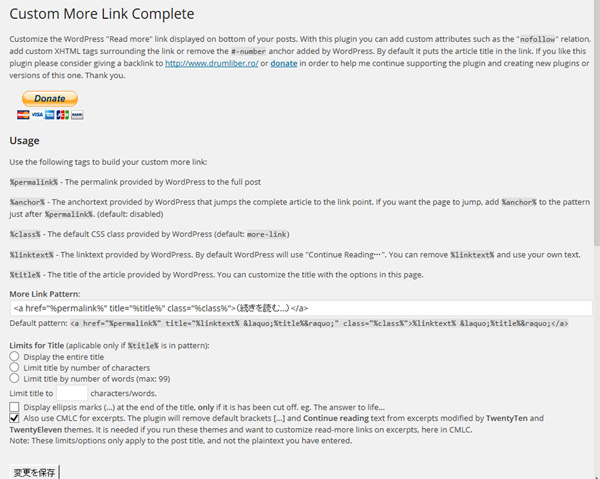
For the link pattern settings, I think the following settings are all right.
<a href="%permalink%" title="%title%" class="%class%">%linktext%</a>Or
<a href="%permalink%" title="%title%" class="%class%"> 続きを読む »</a>(Settings for this site)
2021.06.16 Update
The plugin "Custom More Link Complete" has not been updated for a long time and is no longer compatible with WordPress and PHP versions, so we stopped using this plugin and deleted it.
2023.03.27 Added
As an alternative to this plugin, I am currently using the following plugin "Auto Limit Posts Reloaded" that displays the list of posted articles in excerpts and displays "Read more".

2025.03.07 Added
As shown below, we have changed the method of applying excerpts to the article list, so we no longer have the opportunity to use Auto Limit Posts Reloaded.
2025.07.01 Added
As shown in the article below, due to a security issue with the WordPress article excerpt plugin "Auto Limit Posts Reloaded", there is a security issue, so I uninstalled the plugin and replaced it with the Home Page Builder theme program (functions.php).

(7) Wordpress Related Posts → Yet Another Related Posts Plugin (YARPP)
Added a plugin "WordPress Related Posts" that allows related articles to be displayed below articles.
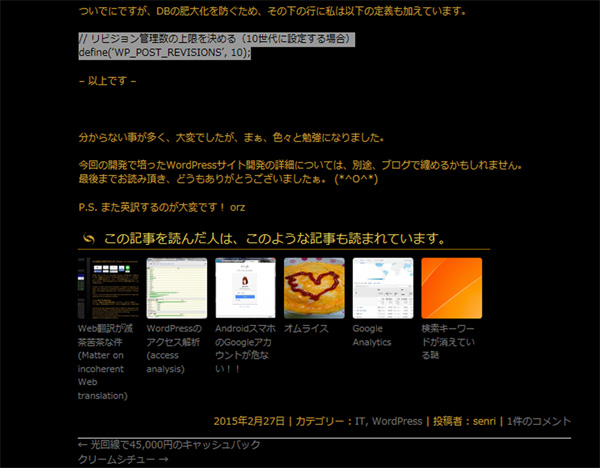
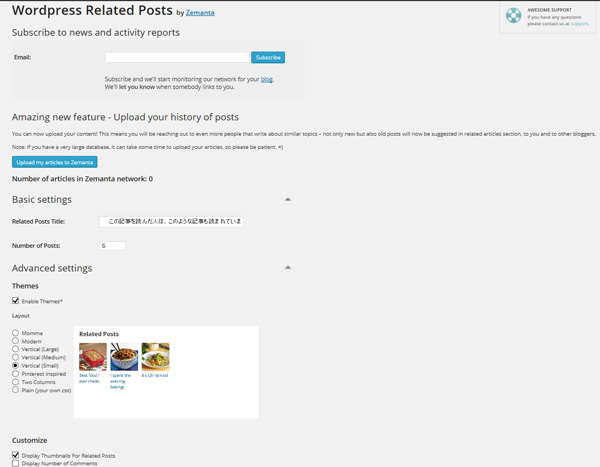
2017.07.13 update
"WordPress Related Posts" currently has the plugin "Contextual Related Posts" using. This plugin does not allow you to manually edit related articles, but by analyzing the article contents in the database, related articles will be displayed more correctly than "WordPress Related Posts".
2022.08.13 update
"Contexual Related Posts" is not very suitable for detecting related articles, so I replaced it with "Yet Another Related Posts Plugin (YARPP)" below.

How to customize the "Yet Another Related Posts Plugin (YARPP)" is summarized in the article below.
(8) WordPress SEO by Yoast → Rank Math SEO
Plugin "WordPress SEO by Yoast" added.
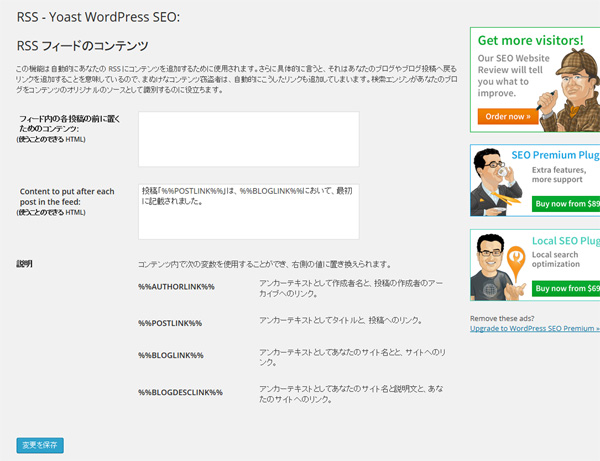
This plugin has social functions, and you can insert Facebook's OpenGraph and Twitter card meta data in the head. I think it's convenient if you have a "Like" button or something like that.
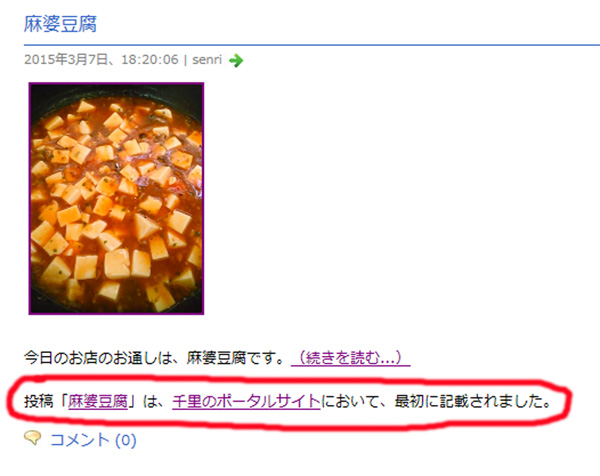
In addition, you can also insert the specified wording in the RSS feed and use it for copyright notation in the RSS feed.
2018.03.29 Addendum
Currently, it seems that the site becomes heavy when this plugin is moved, so the operation is stopped. In addition, since the theme program is also equipped with his SEO function (plugin) in the first place, I think that there is no particular problem even if this plugin is removed.
2022.08.01 update
Since the SEO plugin hpbseo provided by JustSystems stopped working on WordPress 6.0, I installed Yoast SEO again as follows.

2026.04.03 Update
In Yoast SEO version 27.3, when I clicked "Post" on the Yoast SEO settings screen, an error "t.split is not a function" appeared and settings were not possible, probably due to interference with other plugins, so I switched to the plugin "Rank Math SEO" below. Rank Math SEO can inherit Yoast SEO settings as is.
As a result of uninstalling Yoast SEO, the display problem with Firelight Lightbox was resolved, and the temporary plug-in "Load Combined Core Block Assets" for troubleshooting was no longer necessary!

The breadcrumb list generation program "breadcrumb.php" of the currently installed classic theme HPB22 displays breadcrumb lists in schema.org format, but it does not create structured data, so you can use Google Search Console as is. "itemListElement" is missing A warning will be displayed.
Rank Math SEO can output breadcrumb lists with the latest structured data, so by turning on "Enable breadcrumb list function" in the Rank Math settings, you can eliminate this warning.
Compared to Yoast SEO, which used to be heavy to process, Rank Math SEO is extremely lightweight. The reason for this is that it uses a modular approach that allows you to enable only the functions you need, thereby preventing the code from becoming bloated. However, if you greedily add features such as AI functions, the processing will become heavy, so I think it is better to limit your use to only the minimum necessary functions.
As summarized by Gemini, the features that the free version of Rank Math SEO does not have in the free version of Yoast SEO are as follows.
The free version of Rank Math SEO includes many advanced features that are restricted to paid (premium) in the free version of Yoast SEO. The main differences are:
1. Redirection Manager
- Rank Math: You can manage redirects like 301, 302, 307 etc. with the free version.
- Yoast SEO: This is a feature only available in the paid version.
2. 404 monitor
- Rank Math: Automatically record URLs that users access that result in errors, allowing you to understand broken links.
- Yoast SEO: It is not included as a standard feature and requires a separate plug-in or paid version.
3. Support for advanced structured data (Schema Markup)
- Rank Math: Over 20 predefined schemas such as FAQ, recipes, how-to, jobs, reviews, etc. are available for free.
- Yoast SEO: The free version only has a basic schema, and there are limitations when aiming for rich display.
4. Multi-Keyword Analysis
- Rank Math: You can set up to 5 target keywords for one post and analyze the degree of optimization.
- Yoast SEO: You can only set one keyword in the free version.
5. Direct integration with Google Search Console
- Rank Math: You can check data such as index status and keyword position directly within the WordPress admin screen.
- Yoast SEO: The free version does not have this integrated dashboard feature.
6. Image SEO automation
- Rank Math: Settings that automatically add alt attributes (alternative text) and title tags are available for free.
- Yoast SEO: Basic settings are possible, but the free version doesn't have as many detailed automation options as Rank Math.
summary:
Rank Math is so versatile that it is said that ``Yoast's paid functions can be used for free'', but Yoast has a reputation for stability based on many years of experience and ``readability analysis'' of content.
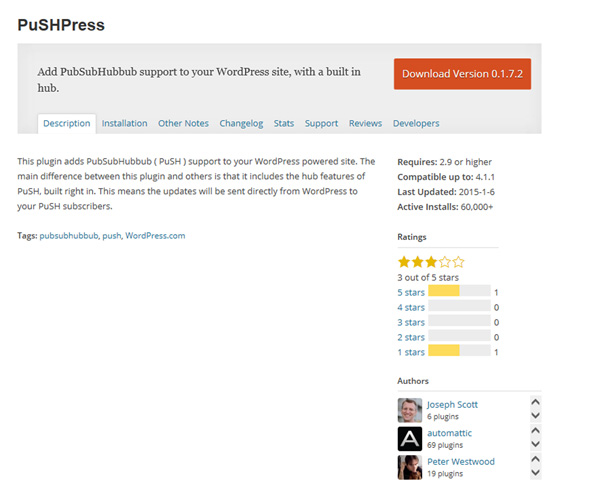
(9) PuSHPress → WebSub (FKA.PubSubHubbub)
Plugin "PuSHPress" added.
By using this plugin, you can prevent the search engine from being indexed by the paclisite first.
2023.05.08 update
This plugin uses the obsolete PuSH 0.3 and has issues with not sending updates immediately. Also, since the plugin has not been maintained for a long time, there are concerns about compatibility issues with WordPress and PHP in the future.
Therefore, we uninstalled PuSHPress and used WebSub (FKA. PubSubHubbub)" and activated it.

2026.08.26 Update
In the past, Google used WebSub (formerly PubSubHubbub) to detect site updates, but this is no longer supported.
Therefore, in the current SEO environment, there is almost no benefit to installing the WebSub plugin in WordPress, so I uninstalled it.
(10) Tag widget → Cool Tag Cloud
We have added a "Tag Widget" plugin that allows tags to be displayed as a list or dropdown in a widget.
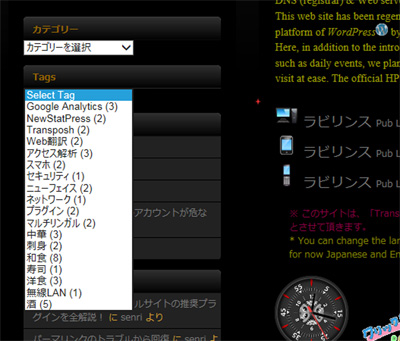
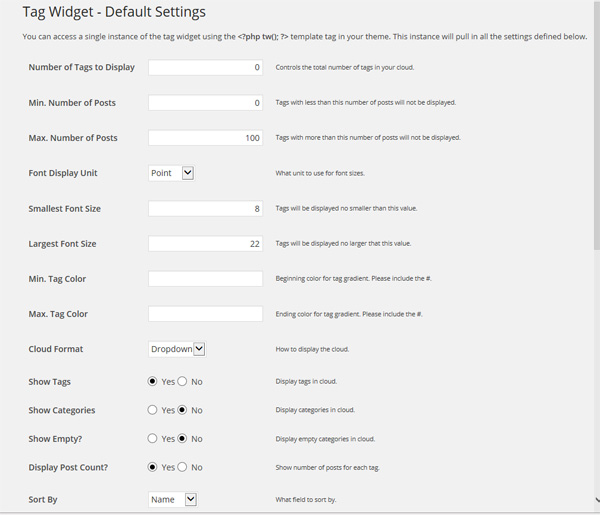
2015.5.21 Postscript
Stop this plugin and instead use the plugin to display the tag cloud during the article "TagCloudShortCode" using.
2020.5.30 update
Currently, the tag cloud display uses the following "Cool Tag Cloud".

2026.04.15 Added
The "Cool Tag Cloud" plugin includes:Stored XSS (stored cross-site scripting)A serious vulnerability (CVE-2025-13614) has been reported. In December 2025, from the official WordPress directorystop temporarilyHowever, no corrected version has been released at this time.
Therefore, I uninstalled this plugin and used my own tag cloud instead. The configuration of the self-made tag cloud does not depend on plugins,Standard tag cloud + “Additional CSS”I asked Gemini to create it with the following configuration as shown in the article below.

(11) Crayon Syntax Highlighter → Code Block Pro
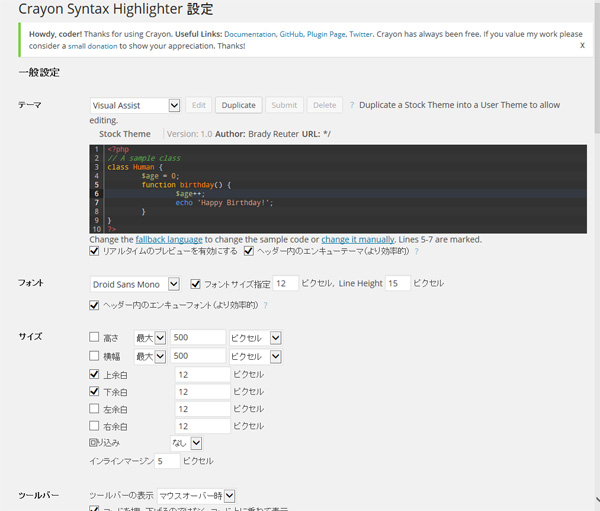
Plug-in that can display source code neatly in articles "Crayon Syntax Highlighter" added.
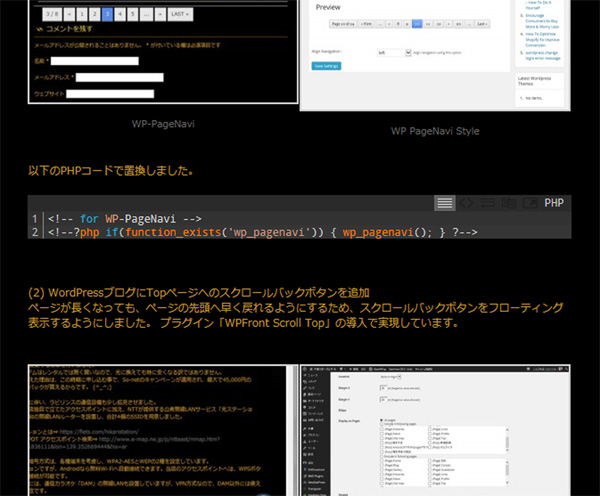
2023.03.06 update
This plugin was last updated 4 years ago, and after upgrading to WordPress 5.3, it no longer supports the classic editor, and it also doesn't work with Gutenberg (block editor). The following plugins are recommended as alternatives to Crayon Syntax Highlighter for working with WordPress 5.3 and later versions.
- Code Block Pro
Code Block Pro is a plugin that uses the rendering engine. It also supports conversion from core blocks, allowing intuitive operation. Instead of the setting screen, you can make detailed settings on the right panel of the post editing screen, but Japanese is not supported.
It supports various languages and can also write shortcodes, but clicking the copy button will copy the expanded form of the shortcode.
This plugin is the most recommended plugin among syntax highlighters because it supports many languages and works well. - Highlighting Code Block
Highlighting Code Block provides code blocks with syntax highlighting using prism.js (available for both Gutenberg and classic editors). The author is Japanese, so it is fully compatible with Japanese and has good operability, making it easy for beginners to understand. However, regarding shortcode description, it is possible to write the code in double brackets as shown below (it may not be usable depending on the plug-in environment).
[Description of shortcode] ☞ [[code]]
In addition, it may be caused by interference with other plug-ins, but with this plug-in, there are cases where the mark of the specified line protrudes outside the area without being clipped, and the highlighting does not work properly depending on the conditions. , not recommended. - Code Syntax Block
Code Syntax Block is a plugin that extends the core block, only for the block editor. As with Highlighting Code Block, shortcode description is not supported. This plugin is deprecated because it does not support the classic editor and does not work depending on the type of browser.
(12) Acunetix WP Security
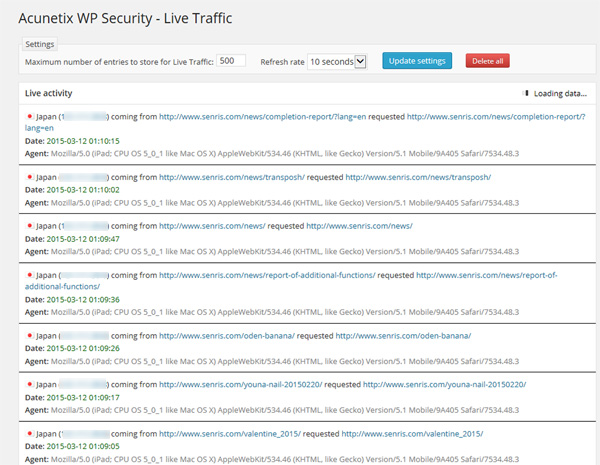
A plugin that scans for vulnerabilities and provides security measures against them "Acunetix WP Security" added.
2019.04.16 update
Since this plugin does not support PHP version 7.0/7.1, we have uninstalled this plugin today along with the server upgrade. This site is now running on PHP 7.1! ( PHP 7.4 as of 2023.03.17 )
(13) Broken Link Checker
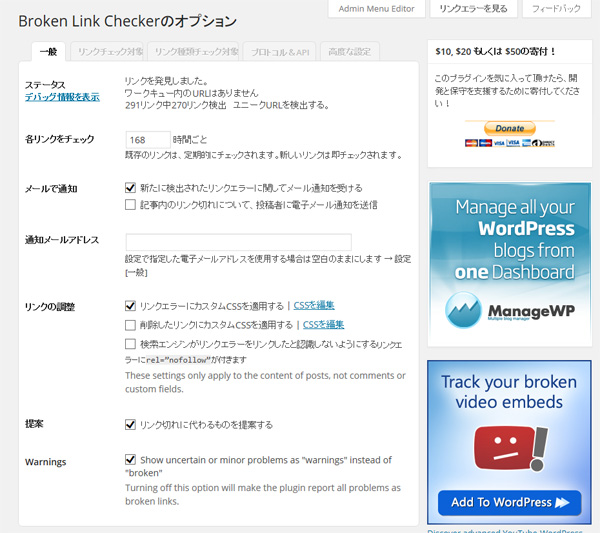
In the course of the server transfer work, several broken links occurred at the place where the dynamic link was pasted. This seems to be due to the specification of WordPress.
WordPress has a good plugin "Broken Link Checker" is available.

2023.04.29 Added
Cloud-based Broken Link Checker 2.0 (beta version) has been released, but the link check is still incomplete, so we recommend using it together with the following link checkers (broken link check tools).
It takes time to check, but it checks even broken links of tags and broken links of external sites, and reports the details of errors.

In addition, as reported in the "WordPress.org plugin review" linked below, the connection to the cloud (WPMU DEV) of Broken Link Checker 2.0 requires the account information of WordPress, and the account of the cloud cannot be deleted once registered. Also, if you have a security plugin installed, connecting to WPMU DEV will fail. In that case, it seems that you can connect by installing "WPMU DEV Dashboard Plugin" separately, but in any case, if you value security, I think it would be wise to stop connecting to WPMU DEV.

2023.05.08 Added
If you enable “BLC 2.0” during installation, local scanning will not occur.
If you want to use an earlier version, uninstall the plugun and enable "Broken Links (Old)" during the initial setup. BLC 2.0 is not recommended due to security issues.
2026.04.03 Added
This plugin has been uninstalled due to heavy server load. Check for broken links (404 errors) on your site.Google Search Console You can deal with this.
[ Supplementary explanation for the plugin on March 15, 2015 ]
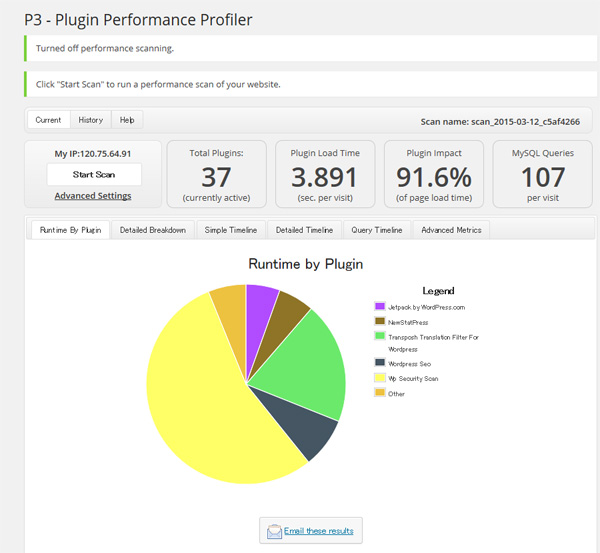
Among the plugins above, "Acunetix WP Security" significantly reduces server performance.
Including this site, I think you should avoid constant operation, especially on vulnerable servers such as One Coin Server.
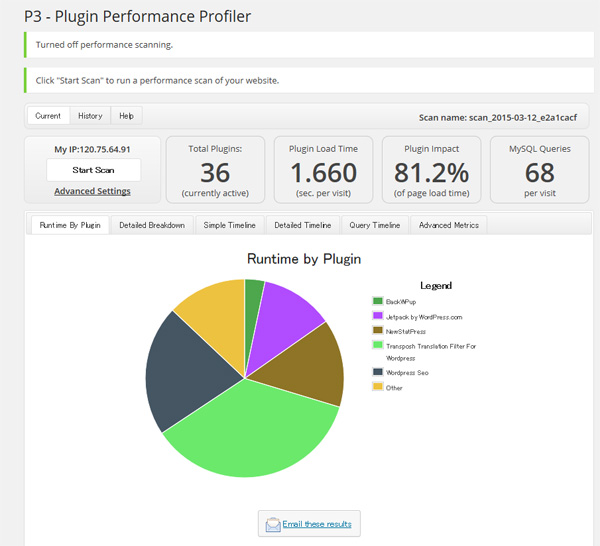
The following shows the diagnostic results of "P3 – Performance Profiler" as evidence.
Although "Transposh" is unavoidable, "WordPress SEO" seems to have a heavy server load.
I think we should carefully consider whether it is really necessary, rather than packing everything.
2019.04.14 Update
(14) PHP Compatibility Checker
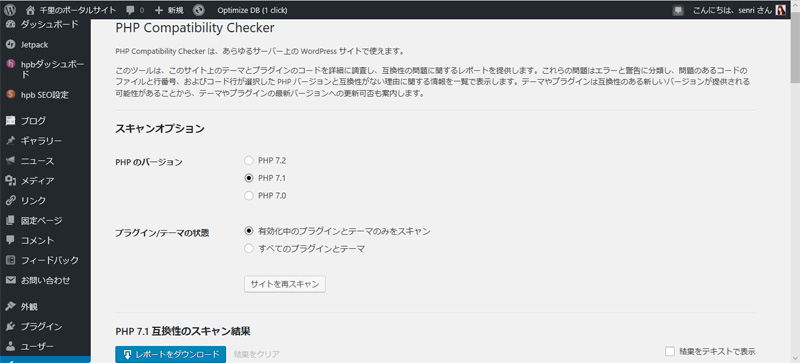
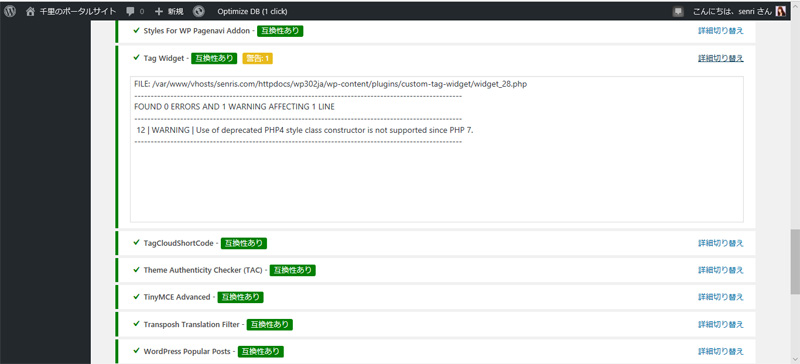
Plugin for checking PHP version compatibility of WordPress plugins "PHP Compatibility Checker" is added.
It can automatically scan installed themes and all plugins and syntax check if they conform to PHP version PHP 7.2/7.1/7.0.
If the process stops during scanning, you can recover by stopping this plug-in and restarting scanning.
2021.06.17 Update
Due to incompatibility with PHP 8.0, this plugin "PHP Compatibility Checker" has been uninstalled.
2020.04.28 Postscript
A plugin that allows you to add RSS and social buttons to your widget "Social Media and Share Icons" added.
(16) Adding Regenerate Thumbnails
A plugin that resizes eye-catching images at once "Regenerate Thumbnails" added.
Changing the size in WordPress media settings will not change the previously uploaded image size.
This plug-in can generate all images registered on the media in bulk according to the current settings.
2026.04.04 Added
I uninstalled this plugin because I don't use it all the time.
(17) Adding WP Crontrol
A plugin "WP Crontrol" added.
This also makes it possible to investigate cron events that have been arbitrarily triggered by some plugin and delete them.
(18) Google Site Kit / Google AdSense
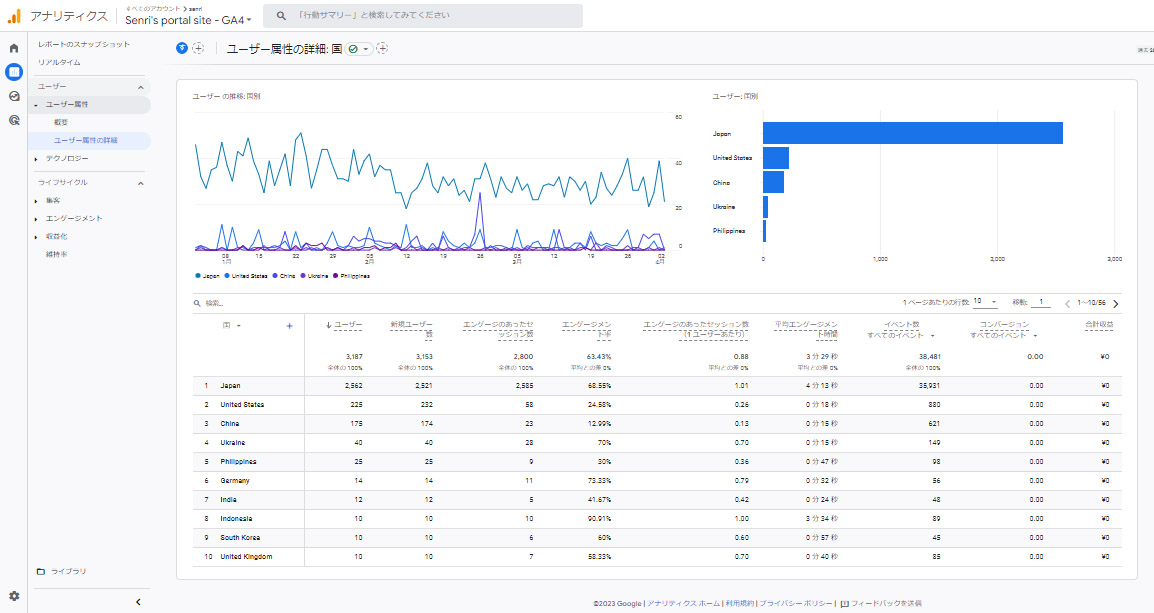
To use Google AdSense, Google's official WordPress plugin "Site Kit by Google" added.
By installing this plugin, you can use the following functions. Links from the Google Site Kit dashboard open the detail pages for these features.
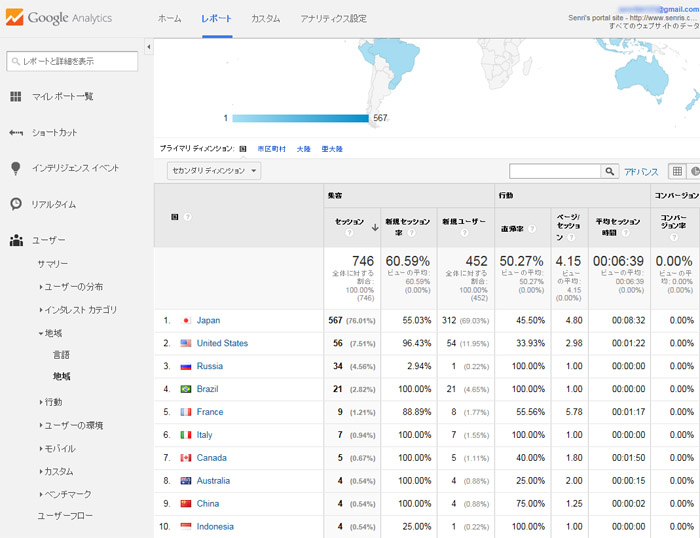
The gallery marked is a statistics on the number of visitors by country for Google Analytics GA4 properties.
Search Console
Analytics
AdSense
PageSpeed Insights
Tag
・Optimize
2026.09.11 Added
I turned off Google AdSense because the fraudulent ads (phishing scams, support scams, etc.) were too bad. Therefore, I no longer needed Google Site Kit, so I uninstalled both plugins.
2021.04.04 Added
(19) Pz-LinkCard
WordPress plugin "Pz-LinkCard" was introduced.
How to use this plug-in is described in detail in the following article.

2026.08.27 Added
With the release of Pz-LinkCard 2.6.0, countermeasures against vulnerabilities against "XSS (Cross-Site Scripting)" were implemented.
2021.07.04 Added
(20) WP Rollback
We have introduced the following plugin "WP Rollback" that allows you to rollback the specified WordPress plugin to the previous version.
Today's update of "WordPress Popular Posts" to version 5.3.4 destroyed the widget and forced us to replace it with the previous version. I decided to install .

2021.07.27 Added
(21) Classic Widgets
After upgrading to WordPress 5.8, two plugins (business day calendar, NewStatPress) did not support the new interface "Widget Block Editor" and an error occurred, so the following plugin "Classic Installed Widgets.

(22) Classic Editor
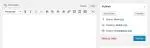
For fixed pages and page editing described in the old blog, we have installed the official plugin "Classic Editor" maintained by the following WordPress team.
2022.07.08 Update
(23) WP Last Modified Info
To display the date of article updates, I installed the following plugin "WP Last Modified Info".
By introducing this plugin, you can change the date and time on the article edit screen and lock the update date. It also provides a widget block for the site update date, etc., making it a very useful plugin.

If you want to change the font size at the time of the update, add the following CSS code in the "Custom CSS Code" settings in the "Other Settings" tab of WP Last Modified Info.
p.post-modified-info {
	font-size: 12px !important;
	margin-top: 0;
}
2023.11.16 Update
(24) Kadence Security (formerly Solid Security / iThemes Security)
To strengthen security, we have installed the following plugin "Kadence Security".

2022.08.13 Update
(25) Jetpack comment module
Enabled the following Jetpack comment modules to make the comment section on articles look smarter.

(26) Jetpack Boost → WP Fastest Cache/ AdSense lazy loading
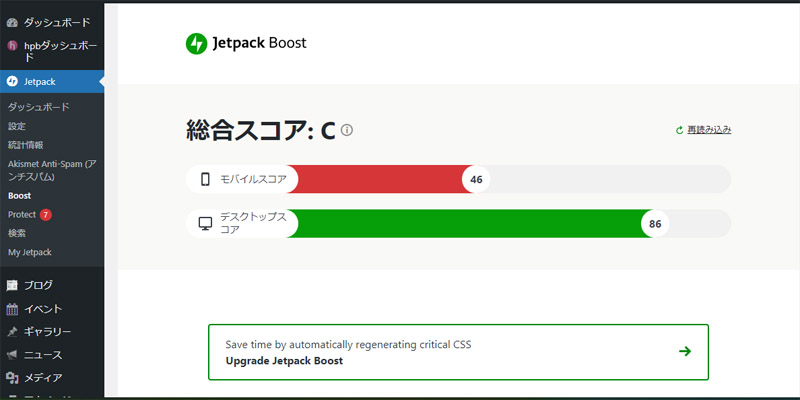
In order to increase the performance of the display speed of the site, the following plugin Jetpack Boost is installed. Click "Boost" from the Jetpack menu to open the "Jetpack Boost" control panel.

Jetpack Boost allows you to choose optimizations such as:
- Optimize critical CSS loading
Move important style information to the top of the page. This allows the page to display content faster so that users don't have to wait for the entire page to load. Commonly called critical CSS. - Optimize LCP images
LCP image optimization is a function that identifies the largest image (LCP element) that first catches the eye when the page is opened, and loads it with top priority. Here, you'll optimize important images to shorten the Largest Contentful Paint (LCP) of Cornerstone pages, so users can view them more smoothly. - Cache site pages
Save and serve preloaded content to speed loading times and improve site performance and user experience.
Jetpack Boost's caching feature is not limited to caching.Image CDN(high-speed image delivery)critical cssIt integrates features that directly improve Google's metrics (Core Web Vitals), such as (immediate display at the top of the screen).
Please note that when enabling this feature, it cannot be used in conjunction with other cache plugins (such as "WP Fastest Cache", "WP Super Cache", "LiteSpeed Cache", "W3 Total Cache", etc.). - Putting off non-essential JavaScript
Run non-essential JavaScript after page loads to allow for faster loading of styles and images. For more information web.dev Please see. - Concatenate JS
Group scripts in their original arrangements, concatenate and shrink them to reduce site load times and reduce requests. - Concatenate CSS
Group styles in their original arrangements, concatenate and shrink them to reduce site load times and reduce requests. - Lazy loading of images
Increases page loading speed by loading images only when needed.
2025.03.04 Added
This feature has been removed from Jetpack because modern browsers include this feature by default and is also built into many themes. This is a statement from the Jetpack developer, and the change is intended to simplify things and prevent redundancy. - Image CDN (I'm not recommended)
Deliver images from Jetpack's content delivery network. You can automatically resize images to the right size and convert them to the latest and efficient formats such as WebP, and use them from server networks around the world. - Image Guide
This feature helps to detect images that are too large. When you browse the site, the image guide will display information about the size of each image in an overlay.
Jetpack Boost's management screen displays display speed metrics: "Overall Score, Mobile/Desktop Score." Jetpack Boost is a great tool that optimizes and speeds up your site with just one click.
On this site, if you select "Connect CSS", the display of SNS buttons on the web page has been distorted. Also, if you enable "Putting off non-required JavaScript" then the access aggregation graph will no longer be displayed in the view of static SlimStat pages, so this feature has been removed from selection and only the "Connect JS" feature is selected.
The overall score for Jetpack Boost is not very reliable, so after optimizing with Jetpack Boost, we recommend checking the performance score values in the PageSpeed Insights below:

Optimizing with Jetpack Boost may improve performance values in PageSpeed Insights, even if only a small amount of time.
On this site, the desktop Large Contentful Paint (LCP) value is 3.3 seconds, which is the reason for the failure of "Evaluating Main Web Indicators," but this is likely due to Google Adsense scripts.
2026.04.14 Update
The "Connect JS" function in Jetpack Boost does not function as "HTTP error 403" when the server side WAF (firewall) setting is turned on in the core server (V1), that is, when "WordPress login restriction (access restriction from overseas IP)" is turned on.
Also, if you only want to use Jetpack Boost's two functions, ``concatenate JS'' and ``concatenate CSS,'' you can use the cache plugin ``WP Fastest Cache,'' so I uninstalled the Jetpack Boost plugin.
2025.03.30 Added
Adsense lazy loading
Because Google AdSense's performance drop is noticeable, we have revised the AdSense code pasted in header.php and responded to it using the method described in the article "Super Speed: How to Lazy Load AdSense Ads to Increase Display Speed." As a result, the PageSpeed Insights performance values have been increased slightly.

In the "GoogleAdSense Delayed Loading Sample Code" below, new code including the site administrator ID can be set in the parameter 'ad.src' of the marked line from July 19, 2021.
<!--Google Adsense-->
<script>
//<![CDATA[
//lazy load ads
var lazyloadads = false;
window.addEventListener("scroll", function() {
	if ((document.documentElement.scrollTop != 0 && lazyloadads === false) || (document.body.scrollTop != 0 && lazyloadads === false)) {
		(function() {
			var ad = document.createElement('script');
			ad.type = 'text/javascript';
			ad.async = true;
			ad.src = 'https://pagead2.googlesyndication.com/pagead/js/adsbygoogle.js?client=ca-pub-1234567890123456';
			var sc = document.getElementsByTagName('script')[0];
			sc.parentNode.insertBefore(ad, sc);
		})();
		lazyloadads = true;
	}
}, true)
//]]>
</script>
(27) Plugins Garbage Collector (Database Cleanup) Old!
Delete unnecessary tables in database

2026.04.04 Added
I uninstalled this plugin because I don't use it all the time. Note that WP-Optimize also has a function to delete unnecessary tables, so this plugin is basically unnecessary.
(28) Say It! → ResponsiveVoice Text To Speech
English reading aloud in blog posts

Since this plug-in does not work on iOS, it has been changed to the following plug-in.

Plugin "ResponsiveVoice Text To Speech"An HTML5-based text-to-speech library designed to add voice capabilities to WordPress on all smartphones, tablets and desktop devices.The characteristics are described in the following.
- Supports 51 languages
- 168 voices available
- No limits even in the free version
- Read aloud the entire article or a specified range
- Free version not for commercial use
Below is an example of shortcode description in ResponsiveVoice. The higher the pitch value, the higher the sound quality.
[responsivevoice voice="US English Female" pitch="1.2"]Text to speech.[/responsivevoice]Added on 2026.04.07 / Updated on 2026.04.28
When you install this plugin, when reading articles,Waiting for 2.1 seconds to load each timeoccurs,PageSpeed InsightsUnfortunately, I decided to uninstall it in order to reduce the server load, as it was causing a significant drop in my score and Google's SEO rating.
In addition to uninstalling ResponsiveVoice, you also need to delete the ResponsiveVoice script tag from the theme's header.php (or footer.php).
Therefore, as an alternative to ResponsiveVoice, we added a snippet to functions.php using JavaScript implementation so that the text-to-speech function of the browser can be called with the shortcode "say" using the following format.
[say]Interrupt me, if you need me.[/say]This shortcode "say" is used in the following articles:

By the way, regarding the implementation of the short code "say", we asked Gemini to create a spec that allows various browsers to call the voice reading function using a female synthesized voice.
For more information, see this article → Publishes a snippet that allows you to easily call the browser's voice-to-speech function from a shortcode without a plugin on the English learning WordPress page (supervised by Gemini)
(29) Word Balloon
Display conversation-style speech bubbles in articles

(30) Display Posts
In order to display blog update information, the following plug-ins have been introduced.

By defining a shortcode in the text, thumbnail images and excerpts of articles can be displayed in a list.
In addition, on this site, new thumbnails (16 x 16) have been added to the media in WordPress to match the thumbnails displayed by the widget of the plugin WordPress Popular Posts.
To add thumbnails to media, you first need to add the following line to your theme's program functions.php.
/* メディアサイズの追加(プラグイン Display Posts で使用)
---------------------------------------------------------------- */
add_image_size('img16x16', 16, 16);
In addition, we will also add thumbnails of the above sizes to the blogs described so far.
Thumbnails can be added all at once from featured images using the plug-in "Regenerate Thumbnails" below.

Below is an example of shortcode for displaying blog update information using thumbnails of the above sizes.
[display-posts display-posts wrapper="div" wrapper_class="my-grid-layout" image_size="img16x16" posts_per_page="5" date_format="Y年n月j日" include_date_modified="true" orderby="modified"]2023.04.23 Added
(31) WP-Optimize
In order to efficiently optimize the WordPress database, we have introduced the following plugins.

WP-Optimize can optimize database tables such as: This allows for powerful database slimming. However, since it does not seem to support InnoDB table optimization, Optimize Database after Deleting Revisions It seems that you have no choice but to use
Optimize database tables, clean all post revisions, clean all auto-draft posts, clean all trashed posts, delete spam and trashed comments, delete unapproved comments, expired transient Remove Options, Remove Pingbacks, Remove Trackbacks, Clean Post Metadata, Clean Comment Metadata
In addition to optimizing database tables, WP-Optimize also supports image compression and caching. In particular, the WP-Optimize cache function is built around the world's fastest caching engine, is simple to operate, easy to use, and seems to be free to some extent.
(32) Custom Post Type Cleanup
I have installed the following "Custom Post Type Cleanup" to remove the articles and metadata of custom post types that are no longer in use from the database. Although it is an old plugin, it worked in the environment of PHP 7.4 / WordPress 6.2.

Even if you do not create custom post type data yourself, it may be created by plug-ins installed in the past for testing etc., and may remain as garbage even if you uninstall it.
This plugin is installed for regular garbage cleaning, so it is normally disabled.
2026.04.04 Added
I have uninstalled this plugin because I do not use it all the time and there is no guarantee that it will work in the current environment.
(33) Media Cleaner
I installed the following plugin "Media Cleaner" to delete unnecessary automatically generated images all at once. Please note that if you delete media files that are not cited in the article in bulk, media files that are referenced by plugins (such as icons set in To Top) will also be deleted, so be careful.

2026.04.04 Added
I uninstalled this plugin because I don't use it all the time.
2025.02.23 Added
(34) Popup Maker
To set up the hamburger menu, we have installed the following plugin, "Popup Maker."

For more information about Popup Maker, see the article below.

(35) Table of Contents Plus
To set up the table of contents, we have installed the following plugin, "Table of Contents Plus."

For more information about Table of Contents Plus, see the article below.

(36) VK Blocks
I have installed the following plugin "VK Blocks" to extend the block editor.

(37) Reading Time WP
I have installed the plugin "Reading Time WP" that allows you to display the time to read blog articles.

(38) WP Mail SMTP
We have installed the plugin "WP Mail SMTP" to enable email sending from Contact Form 7 to be compatible with "DKIM" and "DMARC". ⇒For more information,News articles See also

(39) Load Combined Core Block Assets
The classic theme was not displaying correctly due to changes in the CSS loading specifications when upgrading to WordPress 6.9. This was not resolved in 6.9.1, so we had no choice but to install the following plugin "Load Combined Core Block Assets" to resolve the issue.

2026.04.04 Added
I am uninstalling this plugin because I uninstalled the Yoast SEO plugin and the replacement with Rank Math SEO resolved the issue.
2026.07.01 Added
Along with uninstalling the dashboard plugin "hpb Dashboard" that comes with the homepage builder WordPress theme, we installed the plugin "AddToAny Share Buttons" which displays the share buttons below.

2026.07.04 Added
(41) AI
I installed the AI plugin released with WordPress 7.0. The connector utilizes Gemini in its free tier.

2. Plugins that are being deleted or stopped
(1) Simple Local Avatars
It is convenient because the avatar is displayed in the post without registering with WordPress Gravatar, but conversely, even if you register with Gravatar, the Gravatar avatar will not be displayed, so I stopped using it. (delete)
(2) Custom Permalinks
It is a useful plugin to solve the branch number problem at the end of the permalink peculiar to WordPress, but if you set the permalink, it is not compatible with Transposh and cannot be used. If you change the language of Transposh while Custom Permalinks is enabled, linking with Transposh will fail and a broken link will occur. (delete)
(3) Global Translator
I tried it, but the Transposh UI was smarter, so I stopped using it. (delete)
2019.04.18 Added
(4) ktai-style
Plug-in to support display on feature phones (phones) "ktai-style" is not compatible with PHP version 7.0/7.1, so we have decided to stop this service from today along with the server upgrade. We apologize for any inconvenience caused to Garake users. 🙏
(5) Acunetix WP Security
I have uninstalled this plugin as it does not support PHP version 7.0/7.1.
(6) P3-Plugin Performance Profiler
This plugin has not been updated for more than 4 years, and I have uninstalled it because I can't confirm that it works properly with PHP 5.6/7.0.
2026.06.22 Added
(7) mb.miniAudioPlayer
This plugin has not been updated for over 4 years, with the last version being version 1.9.7 in November 2021. I uninstalled it because even if new dangerous vulnerabilities are discovered in the future, there is a very high possibility that a patch will not be provided.
Instead, the design was adjusted under the supervision of Gemini, and the following CSS was added and the standard "Audio block" was used.
/* 黒背景のサイトに最適化したミニ音声プレイヤー(左寄せ・極細ネオン版) */
.wp-block-audio audio {
    display: block;
    max-width: 280px;
    height: 28px;
    margin: 21px auto 21px 0;
    border-radius: 30px;

    /*
       1つ目の影:プレイヤーのキワを白くクッキリ光らせる(1pxの輪郭線のような効果)
       2つ目の影:外側に白くボヤッと広がる柔らかな光(グロウ効果)
    */
    box-shadow: 0 0 4px 1px rgba(255, 255, 255, 0.6),
                0 0 12px 2px rgba(255, 255, 255, 0.2);

    transition: all 0.3s ease;
}

/* マウスを乗せたときに、さらに光を強くする演出 */
.wp-block-audio audio:hover {
    transform: translateY(-2px);
    /* マウスホバーで光の範囲と強さをアップ */
    box-shadow: 0 0 6px 1px rgba(255, 255, 255, 0.8),
                0 0 16px 4px rgba(255, 255, 255, 0.3);
}
(8) Archives Calendar Widget
As reported by WordPress security auditing organizations (Wordfence and WPScan), a Stored Cross-Site Scripting (XSS) vulnerability was discovered in the final version (1.0.15) of this plugin (CVE-2024-33950). The developer abandoned development without releasing a patch, so it was permanently banned from the official directory.
Therefore, I decided that it was dangerous to continue using this plug-in, so after uninstalling it, I replaced it with the self-made "Custom Calendar Widget" that I previously reported in the article below.
2026.06.29 Added
(9) hpb Dashboard
We have uninstalled the dashboard plugin ``hpb Dashboard'' that comes with the WordPress theme provided by JustSystems because a cross-site scripting (XSS) vulnerability has been reported in the past.
Check out this article for more details 👉 hpb Dashboard⇒ Uninstall | WordPress system optimization dramatically improved site display performance from 73 to 96 in PageSpeed Insights score!
3. Other
Thanks to many plugins, the following PHP error occurred on the WordPress dashboard.
Fatal error: Out of memory …
The cause is PHP running out of memory. If you leave this unattended, in the worst case, you may not be able to log in, so you need to take action as soon as possible.
In this case, add the following definition to the beginning of the file "wp-config.php" that describes the WordPress settings.
// Allowed memory size対策ここから(デフォルト32を40~2048MBに)
define('WP_MEMORY_LIMIT', '1024M');	// 一般ページのメモリサイズ
define('WP_MAX_MEMORY_LIMIT', '2048M');	// 管理画面のメモリサイズ
// Allowed memory size対策ここまで
By the way, I also added the following definition to the line below it to prevent the DB from becoming bloated.
// リビジョン管理数の上限を決める(5世代に設定する場合)
define('WP_POST_REVISIONS', 5);
2023.12.19 Added
While opening and editing an old article converted from the classic editor in the block editor, the following error occurred in the block:
An error occurred in this block and it cannot be previewed.
This event could be recovered by clicking on the block and repairing the block, but just to be safe, I added the following definition to wp-config.php to prevent this error from occurring. Did.
/** JavaScript 連結の無効化 */
define(‘CONCATENATE_SCRIPTS’, false);

/* 編集が必要なのはここまでです ! WordPress でのパブリッシングをお楽しみください。 */
The documentation on wordpress.org on this subject Disabling JavaScript binding It is explained in.
2025.03.07 Added
Currently, we do not define the above snippets to optimize site display.
-that's all-
There were many things I didn't understand and it was hard, but I learned a lot.
The details of the WordPress site development cultivated in this development may be summarized in a separate blog.
Thank you for reading to the end. (* ^ O ^ *)
2026.06.22 Update
Plugin Summary
This website currently has the following plugins installed.
Gemini Under the supervision of Mr. O-Sensei, we uninstalled everything we don't use on a regular basis to reduce the server load. After uninstalling, delete all caches using "WP Fastest Cache".
Please note that even if Yoast SEO is uninstalled, garbage remains in the DB tables and the response becomes poor, so you need to clean it up (delete unnecessary tables) using WP-Optimize.
*Grayed out indicates disabled plugins, strikethrough indicates deleted
- AddToAny Share Buttons
- Advanced Editor Tools (formerly TinyMCE Advanced)
- AI
- Akismet Anti-Spam
Archives Calendar WidgetAuto Limit Posts ReloadedBackWPupBroken Link Checker- Classic Editor
- Classic Widgets
- Code Block Pro
Code Syntax Block *Deprecated- Compact Audio Player
- Contact Form 7
Contextual Related PostsCool Tag CloudCustom Post Type Cleanup- Display Post
Enable jQuery Migrate Helper- Firelight Lightbox (旧 Easy FancyBox)
- Google Website Translator
Google XML sitemaps- Gwolle Guestbook
- Highlighting Code Block
hpb Dashboardhpb seo plugin for WordPress- Jetpack
Jetpack BoostJetpack Protect- Kadence+Security (Formerly Solid Security/iThemes Security)
Load Combined Core Block AssetsMarkup (JSON-LD) structured in schema.orgMedia Cleanermb.miniAudioPlayerNewStatPress- No Right Click Images Plugin
- Optimize Database after Deleting Revisions
Plugins Garbage Collector (Database Cleanup) Old!- Popup Maker
PuSHPress- Pz-Link Card
- Rank Math SEO
- Reading Time WP
Really Simple CAPTCHAreCaptcha by BestWebSoftRegenerate ThumbnailsResponsiveVoice Text To SpeechSay It!Site Kit by GoogleSlimStat Analytics- Social Media and Share Icons (Ultimate Social Media)
Styles For WP Pagenavi Addon- Table of Contents Plus
To Top- Transposh Translation Filter
- UpdraftPlus
- VK Blocks
WebSub (FKA. PubSubHubbub)- Word Balloon
- WordPress Popular Posts
- WP Crontrol
- WP Fastest Cache
- WPFront Scroll Top
- WP Last Modified Info
- WP Mail SMTP
WP Maintenance Mode & Coming Soon- WP Multibyte Patch
- WP Sitemap Page
- WP Statistics
- WP-Optimize
- WP-PageNavi
- WP Rollback
- XO Featured Image Tools
XO Event Calendar- Yet Another Related Posts Plugin (YARPP)
Yoast SEOBusiness day calendar
Added on 2026.04.10 / Updated on 2026.05.09
About changing robots.txt settings
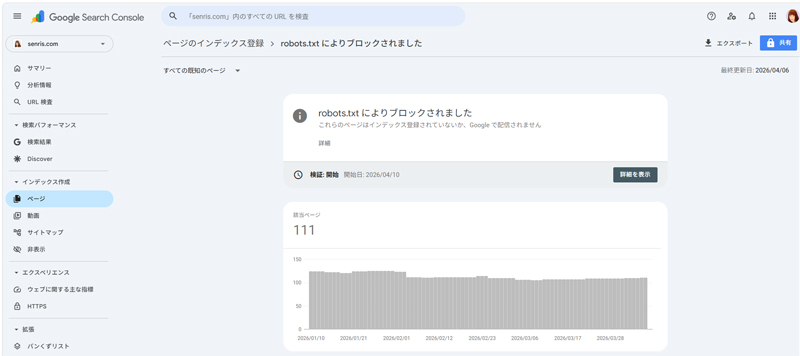
This site started as a multilingual site based on the WordPress plugin Transposh. Initially, we supported languages other than English (French, Italian, German, Korean, Russian, etc.), so there were 4,636 pages that were not registered in the Page Indexing section of Google Search Console, which put a strain on Google's crawlers and servers.
Therefore, under Gemini's supervision, robots.txt was rewritten as follows so that the crawler would only crawl Japanese and English pages. The marked line is the relevant location.
# --- AI・特定ツールの完全拒否 ---
User-agent: Bytespider
Disallow: /
User-agent: CCBot
Disallow: /
User-agent: PetalBot
Disallow: /
User-agent: PerplexityBot
Disallow: /
User-agent: DotBot
Disallow: /
User-agent: SemrushBot
Disallow: /
User-agent: MJ12bot
Disallow: /
User-agent: AhrefsBot
Disallow: /
User-agent: BLEXBot
Disallow: /
User-agent: Yandex
Disallow: /
User-agent: 360Spider
Disallow: /
User-agent: YoudaoBot
Disallow: /
User-agent: Mail.RU_Bot
Disallow: /
User-agent: ltx71
Disallow: /
User-agent: LSSRocketCrawler
Disallow: /
User-agent: LinqiaScrapeBot
Disallow: /
User-agent: Wotbox
Disallow: /
User-agent: Steeler
Disallow: /
User-agent: Shim-Crawler
Disallow: /

# --- WordPress・システム関連の最小限の除外 ---
User-agent: *
Disallow: /[wpのインストールディレクトリ]/wp-admin/
Allow: /[wpのインストールディレクトリ]/wp-admin/admin-ajax.php

# --- Facebook、Facebot ---
User-agent: facebookexternalhit
Allow: /

# --- Meta AI学習 ---
User-agent: meta-externalfetcher
Allow: /

User-agent: meta-externalagent
Allow: /

# --- クロール頻度調整 ---
User-agent: Baiduspider
Crawl-delay: 10
User-agent: Sogou web spider
Crawl-delay: 10

# 言語パラメータの制御
Disallow: /*lang=
Allow: /*lang=ja
Allow: /*lang=en

# ディレクトリ単位の除外
Disallow: /cgi-bin/
Allow: /cgi-bin/joyfulx/joyful.cgi
Disallow: /debug/
Disallow: /doc/
Disallow: /download/
Disallow: /javapics
…続く

# サイトマップ
Sitemap: https://senris.com/[サイトマップのXMLファイル]
2022.06.30 Update
Additional Note – What I Got Hooked on Building WordPress
While building the WordPress system, I will list the things I got hooked on below. If you proceed with development without fully understanding the WordPress specifications, you often end up suffering from inexplicable phenomena.
1. If you create the same post type as the slug(URl) for your custom post
If you create the same post type as the custom post slug(URl), only the custom post archive page will be displayed.
For example, if the slug of the gallery custom post page is “gallery” and the post type taxonomy is also registered as “gallery” with the register_post_type() function in functions.php as follows: It will end up.
// 投稿タイプ「ギャラリー」をブロックエディタに適用

function regist_posttype_gallery(){
	register_post_type(
		'gallery',
		array(
		'label'         => 'ギャラリー',
		'hierarchical'  => false,
		'public'        => true,
		'has_archive'   => true,
		'supports'      => array(
		'title',
		'editor',
		'thumbnail',
		'comments'
		),
		'menu_position' => 5,
      		'show_in_rest' => true, // ブロックエディタ対応
		'menu_icon'     => get_template_directory_uri() . '/post-types/menu_user.png'
		)
	);

	register_taxonomy(
		'gallerycat',
		'gallery',
		array(
		'label'        => 'ギャラリーのカテゴリー',
      		'show_in_rest' => true, // ブロックエディタ対応
		'hierarchical' => true,
		)
	);
}
add_action( 'init', 'regist_posttype_gallery' );
Now, to open the gallery's custom post page, if you specify "https://homepage/gallery" in the browser, the gallery's archive page will be displayed.
Apparently, this is a WordPress specification.
Therefore, to avoid this problem, I solved the problem by changing the slug of the custom post to “photos” or “gallery-top”.
2026.07.08 Added
In the latest functions.php, the settings for the gallery block editor are as follows. Removed old theme descriptions that were at risk of XSS and officially recommended by WordPress get_current_screen() I am using and modifying the script to the latest version.
// 投稿タイプ「ギャラリー」をブロックエディタに適用

function regist_posttype_gallery(){
    register_post_type(
        'gallery',
        array(
            'labels' => array(
                'menu_name'     => 'ギャラリー',     	// 左側の親メニュー名
                'name'          => 'ギャラリー', 	// パンくずリストや大タイトルに使用される名前
                'all_items'     => 'ギャラリー 一覧', 	// 子メニュー1行目
                'add_new_item'  => 'ギャラリーを追加', 	// 子メニュー2行目
                'singular_name' => 'ギャラリー',
            ),
            'hierarchical'  => false,
            'public'        => true,
            'has_archive'   => true,
            'supports'      => array(
                'title',
                'editor',
                'thumbnail',
                'comments',
                'excerpt' // 抜粋を有効
            ),
            'menu_position' => 5,
            'show_in_rest'  => true, // ブロックエディタ対応
            'menu_icon'     => 'dashicons-camera'
        )
    );

    register_taxonomy(
        'gallerycat',
        'gallery',
        array(
            'label'        => 'ギャラリーのカテゴリー',
            'show_in_rest' => true, // ブロックエディタ対応
            'hierarchical' => true,
        )
    );
}
add_action( 'init', 'regist_posttype_gallery' );


/* 管理画面一覧にギャラリーのカテゴリを表示 */
function manage_gallery_columns( $columns ) {
//	$columns['fcategory'] = 'ギャラリーのカテゴリー';
	$columns['gallery_category'] = 'ギャラリーのカテゴリー';
	return $columns;
}

function add_gallery_column( $column_name, $post_id ){
	if ( 'gallery_category' == $column_name ) {
		$fcategory = get_the_term_list( $post_id, 'gallerycat', '', '、' );
		if ( $fcategory ) {
			echo $fcategory;
		} else {
			echo __( 'None', '_hpb' );
		}
	}
}

add_filter( 'manage_edit-gallery_columns', 'manage_gallery_columns' );
add_action( 'manage_gallery_posts_custom_column', 'add_gallery_column', 10, 2 );

/* 管理画面のヘッダーにスマホ用のCSSのみを出力 */
add_action('admin_head', 'plugin_header_gallery');

function plugin_header_gallery() {
    $screen = get_current_screen();

    // ギャラリー 一覧画面のときだけ実行
    if ( isset($screen->post_type) && $screen->post_type === 'gallery' ) {
        ?>
        <style>
            /* スマホ表示(782px以下)で「ギャラリーのカテゴリー」列を非表示にする */
            @media (max-width: 782px) {
                .fixed .column-gallery_category {
                    display: none;
                }
            }
        </style>
        <?php
    }
}
2. How to change the template program for static pages
I didn't know how to change the template program that corresponds to static pages.
The program name of the template corresponding to the slug "notice", "photos" of the custom post page is "blog3.php" and "blog1.php" which is automatically assigned, and it was difficult to understand, so today I looked up how to change it and changed the program name.
For example, change “blog1.php” to “blog_gallery.php”.
From the theme directory, open “blog1.php” with an editor, rewrite the third line comment “Template Name: blog1.php” to “Template Name: blog_gallery” as follows, and edit the file “blog_gallery.php” Save as.
<?php
/*
Template Name: blog_gallery
*/
get_header(); ?>
Next, in WordPress, open the edit page for the custom post "photos" (fixed page) below and select "blog_gallery.php" from the drop-down list of templates to refresh the static page.
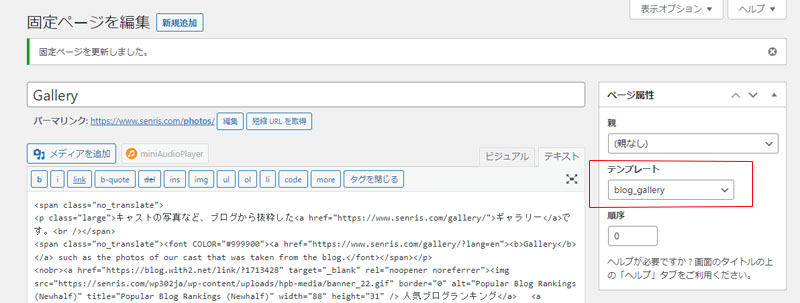
As you can see, just by rewriting the comment section of the template program, the specification reflected in this drop-down list was a blind spot.
Actually, there are many others, but it seems that there is no sharpness if I list them, so I will leave it at this time for this time. 😓


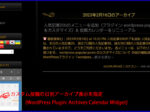
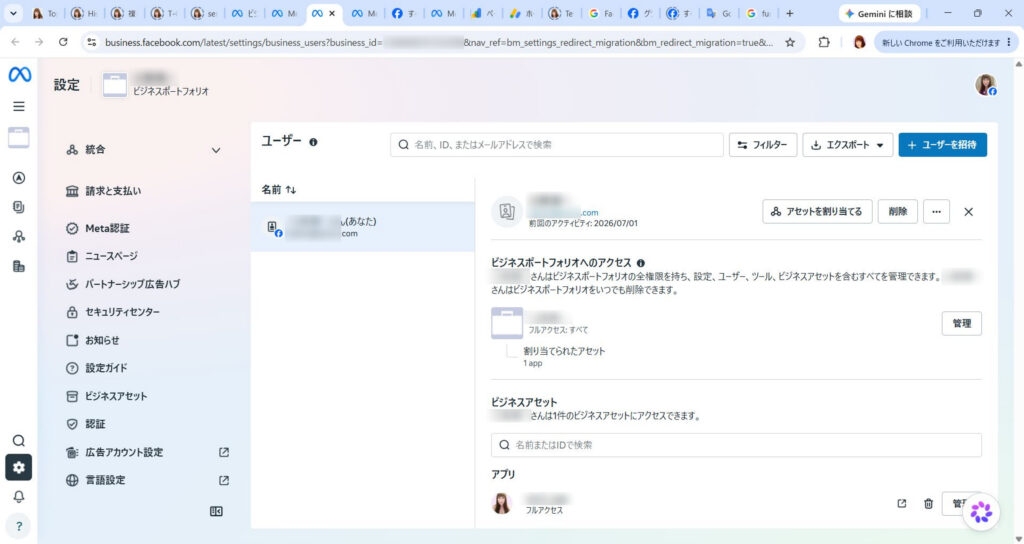
The English translation of this page has just been completed.
True record! Explains all recommended plug-ins for WordPress