Latest update date: August 21, 2026 at 11:46 PM
⚠️This article was originally published by senris.com. Please be careful of unauthorized reproduction and fake sites!
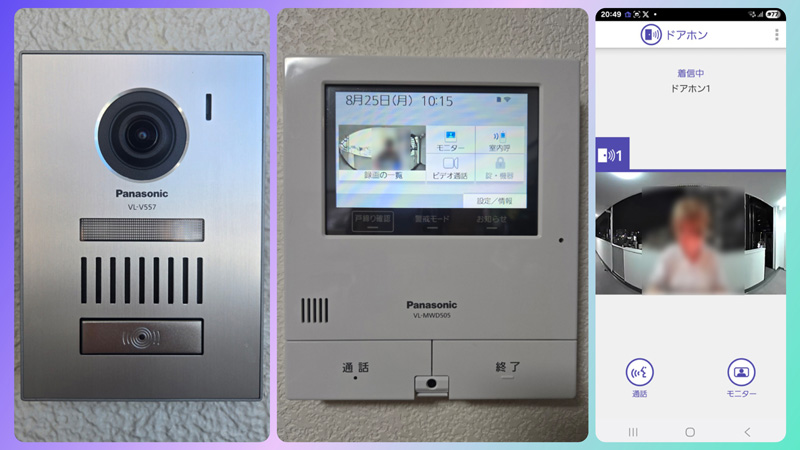
As the world is in a dangerous situation, we have installed Panasonic's "VL-SVD505KS Doorphone Outside" that has a recording function on an SD card and allows you to respond to guests from your smartphone outdoors.
This will be replaced from the previously installed EyePhone door phone (JC-DA+KD-1M) that does not have a recording function to the Panasonic door phone VL-SVD505KS (VL-V557+VL-MWD505).
The only set products I purchased this time are camera entrance handsets (door phones) and monitor master unit (door phones) and do not include wireless monitor master unit (substitute). Since this unit can also accommodate visitors from a smartphone, we decided that no child unit is required.
Doorphones outside VL-SVD505KS In addition to the door phone main unit and child unit, you can also respond to visitors from your smartphone, and you can also use the dedicated app (Panasonic Doorphone Connect) to your smartphone while you are out.
Regarding connecting devices, you can connect up to two entrance handsets and up to seven indoor monitors (one door phone base unit and six handsets).
The door phone main unit can be directly connected to an alarm such as a fire alarm or gas leak alarm, call equipment, emergency button (one type), a glowing chime, melody sign, and buzzer with an alarm lamp (one type).
Additionally, up to two devices can be connected via LAN cables, such as sensor cameras (up to two devices such as outdoor VL-CD265/indoor VL-CD215) and a variety of devices can be connected via Wi-Fi, including wireless cameras (up to four devices such as VL-WD813K/VL-WD712K), window/door sensors (up to 50 devices such as window opening/closing door sensor KX-HJS100/door sensor ECID30A), and Mimamori remote controls (up to 6 devices, up to 6 devices).
Below, we will explain in detail the features, functions, various settings, operation overview, and more of Panasonic's "VL-SVD505KS Doorphone Outside".
Features of the VL-SVD505KS door phone, even outside
Below is a summary of the features of the VL-SVD505KS door phone, even outside. (Edit from Microsoft Copilot)
Panasonic's "VL-SVD505KS Door Phone Outside" is a high-performance TV door phone that can be linked to smartphones. The main features are summarized below:
🔧 Main Specifications and Features
- Monitor size: 5-inch wide LCD
- Recording function: Automatically record and record footage of visitors. Recorded in the memory of the monitor main unit. Using an SD card (sold separately) can record up to 3,000 video and audio per item for approximately 30 seconds.
- Call function: Responds to visitors (with voice change function), and video message calls between the parent unit and the child unit (including smartphones).
- Camera function: The monitor main unit also has a camera. The camera entrance handset is equipped with a wide-angle lens, allowing you to check the area around the entrance. High-quality multi-tone technology allows for beautiful and bright images even when the light is dazzling, such as when it is retrograde or dazzling than conventional models. The camera section is lens coverless, reducing reflections and creating clear images.
- Smartphone compatible: You can respond from outside with the dedicated app "Doorphone Connect."
- Release Date: October 18, 2018
- Price range: Approx. ¥41,000 - ¥65,000 (varies depending on the retailer)
📲 The appeal of smartphone integration
- You can check and respond to visitors using your smartphone even when you're out. You can also make video calls with your smartphone while you're out.
- Even if your child is away from home, you can use your smartphone instead. It is also convenient for redelivery by courier.
- The door phone detects when your family comes home or goes out using the Mimamori remote control (sold separately) and notifies your smartphone. You can watch over your family even when you're out.
- Real-time viewing of monitors
- You can check recorded footage on your smartphone
- Know your visits in real time with notifications
🛠️ Installation and connection information
- Can be installed using existing wiring
- It can also be linked with electric locks and wireless cameras
- Also compatible with additional monitors and remote controls
📚 Detailed information and manual
The official product details page also allows you to view instruction manuals, construction manuals, CAD drawings, and more:Panasonic official catalog page
Selecting the door phone model
The following requirements have been set when selecting a door phone model.
・HD (720p) or higher image quality
・Recording to SD card is possible
・You can respond via smartphone via internet connection
- Models with monitor size of 4.3 inches or more, stable operation and no defect report
Therefore, the low-priced Iris Ohyama door phone (TD-SM7070C-BB) was listed as a candidate, but after investigating reviews, I gave up on purchasing for the following reasons:
-Iris Ohyama (TD-SM7070C-BB) has low image quality at 480p (SD quality, 300,000 pixels).
- The intercom response is slow and there is a time lag of approximately 1.5 seconds.
- Your face won't be visible unless you leave the intercom.
- The angle of the outdoor handset camera cannot be adjusted.
- When an SD card is inserted, if a visitor presses the call button, the video will only be recorded for 5 seconds.
- The smartphone link function is not a dedicated app, but rather a method of registering it with LinkJapan's HomeLink app and recognizing it as a device, but Wi-Fi is cut off halfway through, making the internet connection unstable, and the operability is unstable.
- You cannot watch the video by checking the history from your smartphone.
The Panasonic door phone VL-SVD505KS does not have Full HD quality, but it is 720p (HD quality, approximately 1 million pixels), so it has better image quality than the Iris Ohyama door phone.
Initially, I was considering the Panasonic door phone "VL-SVD505KF" (actual price: 32,400 yen), which has the same functions as the VL-SVD505KS and is a little cheaper, but I removed it from the list for the following reasons.
・The size of the VL-SVD505KF camera entrance unit (VL-V574L-N) is compact and small (99x131x26.5 mm), so if replaced and installed, the unpainted part of the exterior wall will be exposed. ⇒ The VL-SVD505KS handset (VL-V557L-S) is larger, so it can hide the unpainted part (119x170x25.4 mm)
- The exterior of the camera entrance unit (VL-V574L-N) is made of plastic and is cheap. ⇒ The exterior of the camera entrance unit (VL-V557L-S) of the VL-SVD505KS is made of aluminum alloy and has a luxurious feel (also suitable for installation and installation of exterior walls).
- Regarding dust and waterproofing, VL-V574L-N is "IPX3" and VL-V557L-S is "IP54"
Specifications of the VL-SVD505KS door phone, even outside
Below is a summary of the product overview and specifications for the VL-SVD505KS.
| Door phones outside | |
| Model number | VL-SVD505KS |
| specification | [Basic Functions] Type: TV door phone Monitor size: 5-inch wide color LCD display Smartphone compatible: ○ Call method: Automatic voice switching method Maximum number of connected units: Entrance handset VL-V557L-S: 2 units, 7 indoor monitors (Parent unit VL-MWD505: 1 unit, VL-WD618: 6 units) Power supply method: Power cord type (compatible with two methods: AC power outlet/wall power cable directly connected) Power consumption: Door phone base unit (when standby) approx. 4W/(when operating) approx. 10W Wireless communication method: 1.9GHz TDMA-WB Wireless LAN: (Standard) IEEE802.11b/g/n compliant (Frequency range) 2.4GHz to 2.5GHz [Detailed Features] Hands-free: ○ Response method: Voice response/Touch response/Prestoke response SD card recording: ○ Recording function: 1 video 30 seconds (main unit memory) 100 (SD card memory) Maximum of 3,000 Wide-angle lens: ○ (Maximum angle of view: approx. 170° horizontal, 110° vertical) LED light: ○ (Lighting lamp) Imaging device: Approximately 1 million pixels Maximum subject illumination: 1 lux (within 50cm of camera) Touch panel LCD: ○ [Other features] Fire alarm link function: ○ Electric lock link: ○ [Size and weight] Width x Height x Depth (Monitor Unit): 165x192x27 mm Weight (monitor master unit): 635 g <VL-557L-S> Weight (entrance handset): Approx. 370 g [when exposed] / Approx. 330 g [when embedded] Width x Height x Depth (Entrance Handset): 119x170x25.4 mm [When exposed] / 119x170x22.1 mm [When embedded] Dust-proof and waterproof: IP54 <VL-574L-N: VL-SVD505KF> Width x Height x Depth (Entrance Handset): 99 x 131 x 26.5 mm Dust-proof and waterproof: IPX3 [Appearance material] Metal part: Aluminum alloy / Resin part: Flame retardant resin Flame-retardant resin |
Replacement and installation of the door phone VL-SVD505KS even outside
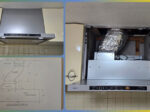
For replacement and installation work from an EyePhone door phone (JC-DA+KD-1M) to Panasonic's door phone VL-SVD505KS (VL-V557+VL-MWD505), please visit the following link:Lifestyle Market', and we asked a local specialist to do so. Incidentally, the construction cost is 9,900 yen.
I had the power to the VL-MWD505 be connected via a power cable inside the wall, so the AC power cord was gone, and the area around the door phone base unit was neater.
The gallery below is before and after the camera entrance and door phone main unit.


Attaching an SD card


By attaching an SD memory card to the main unit of Panasonic VL-SVD505KS door phone (VL-MWD505), the recording capacity (up to 100 memory items) is expanded, allowing visitors to record footage on the SD memory card.
If an SD memory card is not installed, camera footage from externally connected devices cannot be recorded.
As shown in the gallery indicated in the title, I purchased a SanDisk 32GB SDHC standard SD memory card (FAT32 format) from Amazon for 899 yen and installed it.
With a capacity of 32GB, if you record only the video and audio from a door phone, and if the recording time per item is 30 seconds, you can record a maximum recording time of 25 hours and a maximum number of recordings: 3,000.
Incidentally, since this limit is set from memory capacity of 16GB or more, a 16GB SD memory card seems to have been sufficient.
This unit supports 2GB SD memory cards (FAT16 format) to 128GB SDXC memory cards (exFAT format). The SD memory cards listed below can also be used. (Special adapter required)
- miniSD memory card/microSD memory card
- miniSDHC memory card/microSDHC memory card
- microSDXC memory card
Setting up the door phone VL-SVD505KS even outside
We will explain how to set up the main door phone unit (VL-MWD505) and the dedicated app (Panasonic Door Phone Connect) for the door phone VL-SVD505KS even outside.
Doorphone parent unit (VL-MWD505)... Recording and playback settings
The default settings at the time of shipment are not recording audio, so if you want to include audio information, change the mode for recording door phone incoming call to "Update (record + recording)" from "Settings/Information" in the touch menu of the door phone master unit.


Doorphone parent unit (VL-MWD505)... Network settings
To operate the door phone on the go, you must first connect the VL-MWD505 to Wi-Fi.
Connect to the network using the following procedure (for manual settings) from "Settings/Information" in the touch menu of the door phone master unit.
If you successfully connect to the network, a Wi-Fi icon will appear in the top right corner of the door phone master unit.


Panasonic Doorphone Connect Settings
Dedicated app Panasonic Door Connect Follow the steps below to install and configure. Below is for Android.


Here, register the connected device using the following procedure from the touch menu of the door phone master unit.


Once again, enter your "Login Password" and "Set Name" from your smartphone using the following steps:


Examples of operation of the door phone VL-SVD505KS even outside
We will upload an example of the operation of the door phone main unit (VL-MWD505) and the dedicated app (Panasonic Door Phone Connect) outside to the gallery below.
The camera entrance handset (VL-V557) is equipped with a wide-angle lens, so the wide display mode like the following allows you to view the entire shared corridor of the apartment building, further increasing the security effect.
This unit is in a very high-performance class and is equipped with a luxurious number of functions. If you would like to know more, please refer to the instruction manual posted at the end of this article.
My apartment has security cameras, fire alarms, gas alarms, sprinklers, etc. installed, and since these are centrally managed at the disaster prevention center within the apartment building, I don't think there is a need to add new sensor devices to this unit.
However, if you live in a detached house and introduce this model, we believe that security will be further enhanced if you connect security cameras, fire alarms, door sensors, etc. to operate it, so why not consider this?
Example of operation of the door phone master unit (VL-MWD505)
To respond to guests from the door phone master unit, press the "Calendar" button and then use the "Exit" button to end the response. All other operations can be performed by touching the touch from the touch screen menu.


Examples of Panasonic Door Phone Connect operation
Once the network settings for the dedicated app "Panasonic Doorphone Connect" are complete, you will be able to remotely control the doorphone master unit as follows.


VL-SVD505KS instruction manual
VL-SVD505KS Connection Settings Guide
2025.09.13 Added
Panasonic TV Door Phone List
Child device (Vl-wd618)Added


Also, I purchased the Panasonic Wireless Monitor Skipper (VL-WD618) from Yahoo! Auctions for 12,410 yen (tax included) and installed it in my bedroom.
The purchased product did not come with the instruction manual and original box, but it was only used once, and the LCD of the handset still had a protective sticker on it, making it almost new.
A new handset is priced at around 20,000 yen (manufacturer suggested retail price: 31,900 yen Release date: October 18, 2018), so it's cheaper to buy the handset from Yahoo! Auctions, Mercari, etc. and add it later.
This set also came with the "VL-JY1" adapter that connects to an electric lock control device for JEM-A compatible equipment, but since it is not necessary at home, I plan to sell this adapter on Mercari.
When adding a used child unit to the parent unit, first reset the child unit and then register the child unit from the "Settings/Information" menu: instruction manual ⇒ "Increase the number of child units (additional installation)"
2025.09.14 Added
The Panasonic JEM-A adapter "VL-JY1" was sold on Mercari for a selling price of 2,800 yen, and it sold on the same day!